
Table of Contents
The Advanced IP Blocker vulnerability raises serious concerns about WordPress login security. Learn how attackers may reach the six-digit authentication stage without completing password verification, why TOTP protection needs rate limiting, which accounts require attention, and how administrators can update, investigate suspicious activity, and secure their websites.
Editorial focus: Advanced IP Blocker vulnerability
Understanding the Advanced IP Blocker 2FA Security Risk
Two-factor authentication has become one of the most important security features for WordPress websites. It adds another verification step after a user enters their password, making unauthorized access considerably harder. Website administrators often trust this additional protection to defend their accounts against stolen credentials, phishing attempts, and automated login attacks. However, two-factor authentication only works as intended when the application correctly enforces every step of the authentication process. If a plugin allows someone to reach the verification stage without first proving they know the account password, that extra security layer can become a new point of attack.
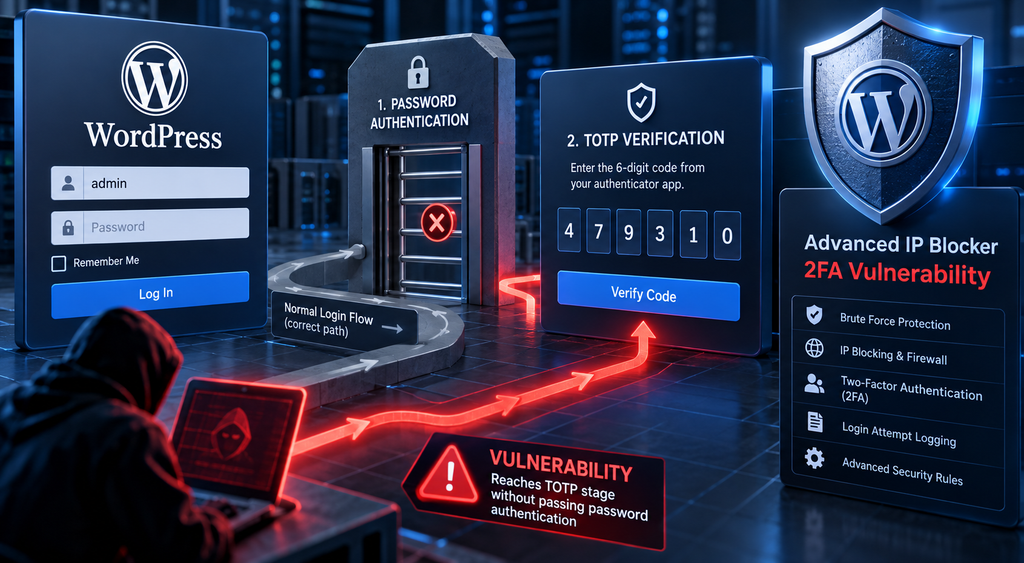
The reported Advanced IP Blocker vulnerability, identified as CVE-2026-104732, concerns precisely this distinction. The security issue is described as an authentication-flow weakness involving the plugin’s time-based one-time password, or TOTP, verification mechanism. Instead of cracking a WordPress password, an attacker may be able to target the second authentication stage directly. This changes the security assumptions behind the login process. A strong password cannot protect an account against a vulnerable route that fails to enforce password verification before processing a second-factor code.
For administrators, the practical response involves more than installing an update. It also means understanding whether the vulnerable functionality was enabled, reviewing unusual authentication attempts, inspecting administrator sessions, and checking whether suspicious account changes occurred. This guide explains the reported issue, the difference between password cracking and authentication bypass, and a structured approach to reducing exposure while preserving access for legitimate users.
What Is CVE-2026-104732
CVE-2026-104732 is the vulnerability identifier associated with the reported Advanced IP Blocker two-factor authentication issue. Advanced IP Blocker is a WordPress security plugin, and the concern described in this advisory involves the handling of authentication requests. The important technical question is whether the TOTP verification function properly confirms that the user has already completed the password stage. If that requirement is missing or incorrectly enforced, the system may treat an attacker-controlled request as though it belongs to a legitimate, partially authenticated login session.
The reported remediation target is Advanced IP Blocker version 8.13.15. Administrators should confirm the affected-version range and patched release through the plugin maintainer’s changelog and a recognized vulnerability database before relying on a specific version boundary. The CVE identifier and version number alone do not establish the precise implementation details, exploitation prerequisites, or evidence of attacks in the wild. Those details require a published technical advisory or vendor confirmation.
Understanding the vulnerability at a glance
| Security detail | Reported information |
|---|---|
| Plugin | Advanced IP Blocker |
| Vulnerability identifier | CVE-2026-104732 |
| Primary concern | Two-factor authentication flow bypass |
| Authentication mechanism | TOTP, typically a six-digit code |
| Reported remediation version | 8.13.15 |
| Potential consequence | Unauthorized account access if additional verification weaknesses are exploitable |
| Recommended priority | High for websites using the affected 2FA functionality |
Why this issue deserves attention
WordPress administrators sometimes assume that an authentication vulnerability requires an attacker to discover a valid password. That assumption is dangerous when the underlying weakness concerns application logic rather than password strength. A login process contains multiple security decisions, and each one must enforce its own prerequisites. If a website treats a TOTP verification request as sufficient evidence of an authorized login attempt, the application may accidentally weaken the protection offered by the first authentication factor.
The actual severity depends on several conditions, including how the plugin associates TOTP challenges with users, whether requests require a valid server-side authentication state, and how frequently verification attempts are permitted. A reachable TOTP endpoint does not automatically mean that an account can be taken over. Nevertheless, administrators should investigate a confirmed authentication-flow bypass promptly because the consequences could involve privileged WordPress accounts, sensitive content, and website configuration.
How the Vulnerable 2FA Login Flow Works
A properly implemented two-factor authentication system follows a strict sequence. First, the visitor supplies a username and password. WordPress verifies those credentials and establishes a temporary authentication state indicating that the first factor has succeeded. The user then enters a code generated by an authenticator application. Only after the server validates that code and its relationship to the pending login should the application create a fully authenticated session. Every stage must depend on successful completion of the previous stage.
The reported Advanced IP Blocker vulnerability concerns a possible break in that sequence. The key difference is that an attacker may attempt to interact with the TOTP verification stage without first passing the password check. This is not equivalent to guessing the password or breaking its cryptographic protection. Instead, it is a failure to enforce the correct order of authentication operations. In security terminology, the weakness involves the authorization or state validation surrounding the authentication workflow.
How a secure WordPress login should behave
Expected two-factor authentication sequence
- Username and password submitted
- Server verifies the first factor
- Temporary login state created
- Bound to the correct user and session
- Six-digit TOTP verified
- Code, timing and attempt limits checked
- Authenticated WordPress session
- Access granted only after both factors pass
What changes when the password stage can be skipped
Imagine an organization running a private WordPress portal. Its administrator has a long, unique password and uses an authenticator application for additional protection. Under normal conditions, an outsider who knows the administrator’s username still cannot reach a valid TOTP challenge without supplying the correct password. If the plugin does not properly verify the temporary authentication state, however, an outsider might reach the code-checking logic directly. The password remains secret, but the login process no longer consistently requires it.
This distinction is central to understanding the Advanced IP Blocker vulnerability. The reported weakness does not imply that WordPress password hashes can be decrypted or that the authenticator application has been compromised. Instead, it raises the possibility that the application may process second-factor verification outside its intended security context. A secure implementation must reject requests that lack proof of a completed first-factor check, even when a supplied TOTP code happens to be correct.
Why server-side authentication state matters
A server should never rely exclusively on browser-provided information to determine whether the password step succeeded. Attackers can construct their own HTTP requests and modify parameters sent by a browser. The application must therefore maintain a trusted, short-lived authentication state on the server and associate it with the correct user, session, and verification challenge. That state should expire quickly and become invalid after successful authentication, cancellation, or too many failed attempts.
For example, a legitimate user who enters the correct password might receive a temporary challenge identifier. The server should verify that identifier against its own stored record before accepting a TOTP code. Simply supplying a username or user ID must not establish the right to complete a login. This design principle applies to WordPress plugins, enterprise identity systems, custom login pages, and nearly every application that uses multiple authentication factors.
Why a Six-Digit TOTP Can Be Brute-Forced
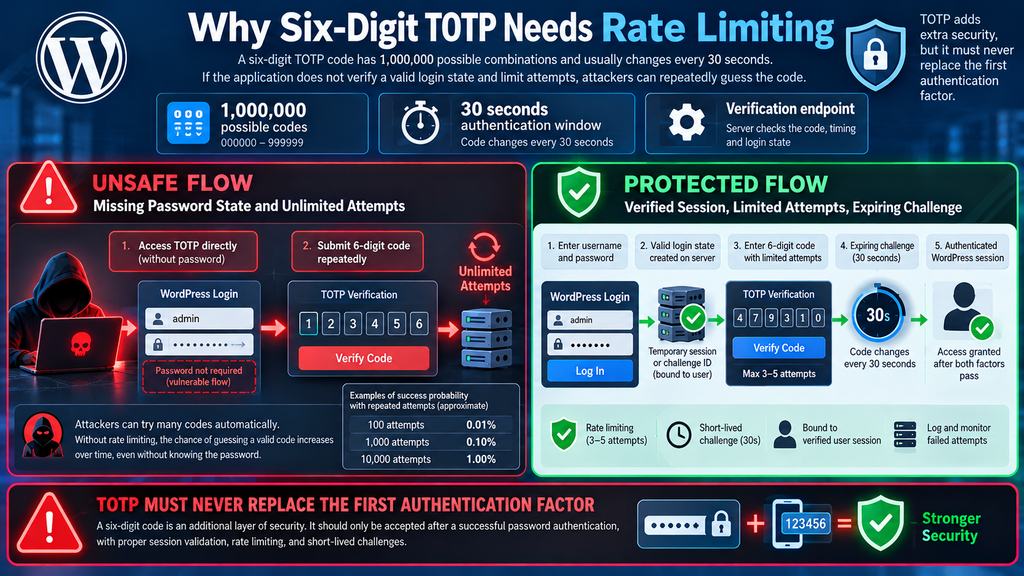
A typical six-digit TOTP code contains one million possible combinations, ranging from 000000 to 999999. Authenticator applications generate these codes using a shared secret and the current time. Most implementations use a 30-second time interval, although server configurations and validation windows can differ. The codes are intended to expire quickly, reducing their usefulness if someone observes or intercepts one. However, expiration alone does not make unlimited guessing safe.
The real protection comes from combining the temporary code with a verified first authentication factor and strict limits on failed attempts. If an attacker can submit many TOTP guesses without completing password verification, the six-digit code becomes a much smaller authentication barrier than the intended two-factor system. Rate limiting, account-level lockouts, temporary challenge expiration, and security monitoring are therefore essential. Without them, repeated guesses may eventually produce a valid code.
Understanding the mathematics behind TOTP guessing
For a single valid six-digit code and one independent random guess, the chance of success is approximately one in one million. That probability is small, but it changes when a system permits repeated attempts. The following table illustrates the approximate probability of at least one successful guess against a single accepted code value, assuming independent random attempts and no effective rate limiting.
| Number of guesses | Approximate success probability |
|---|---|
| 1 | 0.0001% |
| 10 | 0.001% |
| 100 | 0.01% |
| 1,000 | 0.10% |
| 10,000 | 1.00% |
These figures are illustrative rather than a prediction of real-world exploitation. Some TOTP implementations accept codes from adjacent time intervals to accommodate clock differences, while others enforce strict challenge limits. Server capacity, request filtering, session validation, and account lockouts also influence practical exposure. Importantly, this mathematical example does not establish that Advanced IP Blocker permits any particular number of attempts.
Why rate limiting must be applied to the account
An effective defense should limit verification attempts against the account or authentication challenge, not merely against the visitor’s IP address. Attackers may use different network connections, and legitimate users sometimes share public IP addresses. An IP-only restriction can therefore be bypassed or can unintentionally block innocent visitors. Account-level limits, temporary challenge expiration, and carefully designed network protections work better together than any single control.
For example, a website could allow only a small number of failed TOTP submissions for a pending login and then require the user to restart authentication. Administrators should also record failed challenges without exposing the actual codes or shared secrets in logs. This approach helps security teams distinguish ordinary typing mistakes from unusual authentication activity while protecting sensitive authentication material.
Which WordPress Accounts Are Exposed

The accounts requiring the most attention are those protected by the affected Advanced IP Blocker TOTP functionality, assuming the reported bypass is confirmed and the necessary conditions exist. An administrator account is particularly sensitive because it can control plugins, themes, user roles, and important website settings. However, an authentication vulnerability does not necessarily stop at administrator accounts. Editors, authors, shop managers, and other registered users may also require investigation, depending on the plugin’s configuration and the vulnerable login flow.
Exposure should not be confused with confirmed compromise. Installing an affected plugin does not automatically mean that attackers have accessed the website. Administrators need to determine whether the relevant 2FA feature was enabled, which accounts used it, whether suspicious verification activity occurred, and whether any unexpected sessions were established. These checks help prioritize the response without creating unnecessary alarm or assuming that every account has been taken over.
Administrator and Super Administrator accounts
Administrators deserve immediate attention because their privileges can affect the entire WordPress installation. A compromised administrator may be able to install plugins, modify site settings, create additional accounts, or change the website’s content. On WordPress Multisite networks, Super Administrators have even broader capabilities, including network-level management. For these reasons, a possible authentication bypass involving privileged accounts should trigger a review of recent logins, active sessions, role changes, and installed software.
For example, suppose a website has three administrators, but only one normally signs in during weekends. If audit records show a new administrator session outside that person’s normal activity, the security team should investigate. The session may have a legitimate explanation, such as emergency maintenance or travel. Nevertheless, it should be compared with authentication records, account activity, and the administrator’s confirmation before being treated as harmless.
Editors, authors, and content managers
Editors and authors usually have fewer privileges than administrators, but unauthorized access to their accounts can still cause serious problems. Depending on the assigned role and installed plugins, an attacker might publish misleading articles, change existing content, insert unwanted links, or interfere with editorial workflows. These changes may affect visitor trust and search visibility even when the attacker cannot modify WordPress core files.
Consider a publishing website with several authors using TOTP authentication. If an attacker gains access to an editor account, they may be able to modify published articles without requiring administrator privileges. The site owner should therefore examine recent content revisions, scheduled posts, account email changes, and unfamiliar user sessions. This broader review is especially important when the exact scope of an authentication vulnerability has not been independently established.
WooCommerce and membership websites
Online stores and membership websites often contain accounts with access to personal information, orders, subscriptions, or customer records. WooCommerce shop managers, for example, can have substantial operational permissions. A security investigation should therefore consider business-critical roles in addition to traditional WordPress administrators. The potential impact depends on the account’s capabilities, additional plugins, and the type of information stored by the website.
If a shop manager account shows unexpected activity, the response may include reviewing order modifications, payment configuration changes, exports, and customer information access. Administrators should avoid assuming that every unusual event proves a breach. Instead, correlate evidence from multiple sources and preserve relevant records before making major changes. This approach supports a more accurate investigation and helps reduce unnecessary disruption.
How to identify accounts requiring review
Open the WordPress dashboard and navigate to Users → All Users. Filter accounts by role, starting with Administrators and other privileged users. Open each relevant user profile and inspect its available two-factor authentication settings. The plugin documents a 2FA management interface for administrators, although exact labels may differ between versions. Record which users have TOTP enabled, whether their role requires it, and whether the account is still actively used.
For example, a former employee’s administrator account should not remain active merely because its password is strong or its TOTP configuration exists. Confirm whether the account still has a legitimate owner. If it is unnecessary, follow the organization’s account-removal procedure while preserving content ownership and audit evidence. For active accounts, verify that the email address, role, and recent activity match expectations.
Updating to Advanced IP Blocker 8.13.15
Updating Advanced IP Blocker is the central remediation step once the vendor confirms the corrected release. Version 8.13.15 is the reported target for this issue, but the publicly accessible plugin information checked for this article did not independently establish that release as the confirmed security fix. The official WordPress.org listing describes the plugin’s TOTP authentication, rate limiting, security logs, session management, and other defensive features. Administrators should use its current changelog to confirm the fix and install the latest verified, compatible release.
Before updating, remember that security plugins can affect login restrictions, firewall rules, network access, and administrator authentication. A rushed change without a working backup or recovery method can create an avoidable lockout. The safest approach is to record the current configuration, preserve relevant logs, verify the update source, and test the login process afterward. High-risk websites should perform these checks through a controlled maintenance procedure.
Step 1: Check the installed plugin version
Sign in to WordPress using an authorized administrator account. Open Plugins → Installed Plugins, then locate Advanced IP Blocker. The plugin entry should display its installed version and indicate whether an update is available. Compare this information with the official WordPress.org listing and the vendor’s security announcement. If your installation uses an older version associated with the advisory, prioritize the update and review whether the vulnerable 2FA feature was enabled.
Administrators managing several websites should repeat this check for every installation. Do not assume that updating one WordPress website also updates another, even when they share the same hosting account. For WordPress Multisite, review whether the plugin is network-activated and how updates are managed. Keep a short inventory containing the website address, installed version, 2FA status, and update result.
Step 2: Create a verified backup
Before making changes, create a backup that includes the WordPress database, plugins, themes, uploads, and relevant configuration files. Use your hosting provider’s backup system, a trusted WordPress backup solution, or an established server-level backup process. A database-only backup may not be enough to recover the website if a plugin update causes a compatibility issue.
For example, a website running on cPanel can use its hosting backup tools or an approved external backup destination. Confirm that the backup finished successfully and that the files can be accessed. Ideally, test restoration on a staging environment. A backup that has never been checked may create a false sense of security, especially when the website supports customers or business operations.
Step 3: Update through the WordPress dashboard
Navigate to Dashboard → Updates or Plugins → Installed Plugins. If an official Advanced IP Blocker update is available, select the update action and allow WordPress to finish. Avoid closing the browser or interrupting the update while files are being replaced. Once the process completes, return to the plugin list and confirm the installed version.
If version 8.13.15 or a newer vendor-confirmed fixed release is not yet available, do not install a ZIP file from an unfamiliar website claiming to contain the patch. Use the official plugin distribution channel or a verified developer release. If no confirmed fix exists, consider temporarily disabling the affected 2FA feature through an authorized recovery procedure and replacing its protection with a maintained alternative until remediation is available.
Step 4: Verify the version using WP-CLI
Administrators with SSH access can check the installed plugin version without opening the dashboard. WP-CLI is particularly useful for server maintenance, remote audits, and installations where the administration interface is unavailable.
Run the following command from the WordPress installation directory:
wp plugin get advanced-ip-blocker --fields=name,status,version,update,update_versionThe command requests the plugin’s current status, installed version, and available update information. If the plugin is installed under its documented WordPress.org slug, the result should identify the package and its version. The official plugin listing identifies the installation directory as advanced-ip-blocker.
For an installation managed through cPanel, you may need to execute WP-CLI as the website’s owning system user and supply the correct WordPress path. For example:
wp --path=/home/USERNAME/public_html plugin get advanced-ip-blocker --field=versionReplace USERNAME with the hosting account’s actual username. Avoid executing routine WordPress maintenance as the root user when the hosting configuration provides a safer account-specific method.
Step 5: Test both successful and unsuccessful logins
After updating, open a private browser window and sign in using a dedicated test account. First, enter an incorrect password and verify that the application refuses authentication. The system should not create a valid pending second-factor challenge for that unsuccessful login. Next, enter the correct password and confirm that the expected TOTP verification screen appears.
Complete the login using a valid code from the test account’s authenticator application. Confirm that WordPress grants the correct permissions and redirects to the expected destination. Finally, sign out and verify that protected dashboard pages are no longer accessible. These tests confirm normal user-facing behavior, but they do not replace a security audit of the patched authentication endpoint.
Step 6: Check compatibility and prevent administrator lockouts
Security updates can interact with caching systems, custom login pages, reverse proxies, and other authentication plugins. After installing the update, test the website from a normal browser and, where appropriate, a separate network. Confirm that legitimate users can complete authentication without encountering repeated challenges or unexpected firewall blocks.
Advanced IP Blocker’s official documentation specifically recommends checking the website and server IP allowlist in Security → Dashboard → System Status. This is particularly relevant when firewall settings could interrupt administrator access. Do not broadly whitelist untrusted networks simply to resolve a login problem. Instead, review the exact rule causing the block and apply the narrowest safe correction.
Auditing 2FA Attempts and Administrator Sessions
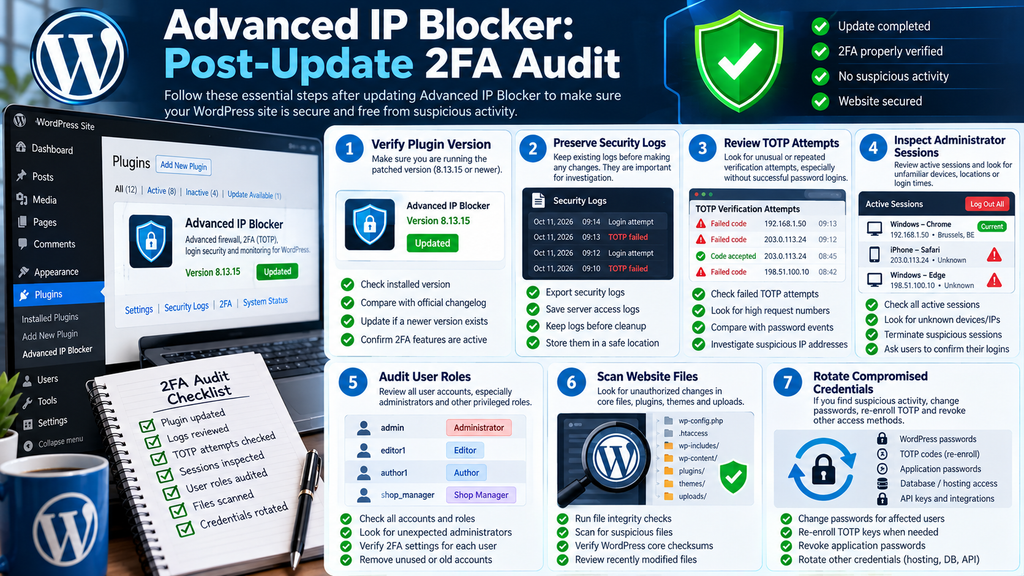
A successful plugin update addresses the vulnerable software, but it does not automatically terminate every existing session or reverse changes made before remediation. This is why a post-update security audit matters. Administrators should look for evidence of abnormal authentication activity, unfamiliar sessions, unexpected account changes, and modifications to sensitive website settings. The objective is not to assume compromise, but to establish whether suspicious behavior occurred during the period of potential exposure.
Advanced IP Blocker advertises security logs, an activity audit log, active user session management, and file integrity monitoring. These features may help administrators reconstruct important events, provided they were enabled and retained the relevant records. Hosting access logs, CDN logs, and independent WordPress audit systems can provide additional evidence. No single log source should be treated as a complete record of every authentication event.
Step 1: Preserve the evidence before changing settings
Start by recording the installed plugin version, relevant configuration settings, and the time of the update. Export available security logs before changing retention periods or clearing temporary data. If the website is under active investigation, preserve the original files and database in a secure location with restricted access. This helps establish a reliable timeline and reduces the risk of losing evidence during cleanup.
For example, a website administrator might identify a suspicious login at 02:15. Before terminating the session, they can preserve the relevant audit records and compare them with hosting logs from the same period. If the account owner confirms they were not online, the administrator has a stronger basis for treating the event as potentially unauthorized. Log preservation is especially important when a business may need professional incident-response assistance.
Step 2: Review failed TOTP verification attempts
Open the plugin’s security logging interface and look for authentication-related events, if the installed version records them. Pay attention to repeated failed verification attempts, unusual request volumes, and unexpected activity involving privileged accounts. Where available, compare the number of TOTP attempts with preceding successful password checks.
A suspicious pattern might involve numerous second-factor verification failures without corresponding successful first-factor authentication events. However, this observation is only meaningful if both types of events are actually logged. Missing password events could reflect incomplete logging rather than an authentication bypass. Correlate the findings with web server records and the plugin’s documented behavior before reaching a conclusion.
Step 3: Inspect Apache or Nginx access logs
Web server access logs can reveal request timing, client addresses, request paths, response codes, and user-agent information. They generally do not prove that a TOTP verification succeeded, and they should not be expected to contain authentication secrets. Their main value is showing unusual request patterns that can be correlated with application-level records.
On a server where the logs are accessible, an administrator can begin with a broad search for requests to the WordPress login page:
grep 'wp-login.php' /path/to/access.log | tail -n 100Replace /path/to/access.log with the actual access-log location. On cPanel systems, logs may be available through domain-specific hosting directories or WHM interfaces. The command displays the most recent 100 matching lines from the selected file, not necessarily the last 100 requests chronologically across rotated logs. It is a starting point for investigation rather than a complete authentication audit.
Step 4: Review active administrator sessions
Navigate to the plugin’s session management interface if it is available in your installed version. Inspect sessions belonging to administrators and other privileged users. Look for unfamiliar devices, unexpected locations, unusual login times, or sessions that account owners cannot recognize. IP geolocation can be inaccurate, particularly when people use mobile networks, VPNs, or corporate gateways, so avoid relying on location alone.
If an administrator confirms that a session is unauthorized, preserve the available evidence and terminate it through the session management interface. WordPress also provides a Log Out Everywhere Else control in user profiles. For a broader incident, administrators may need to invalidate all affected sessions and require fresh authentication. Session termination should be followed by an investigation of what the account did while access was active.
Step 5: Inspect account and privilege changes
Open Users → All Users and review accounts created or modified during the suspected exposure period. Look for unexpected administrators, changed email addresses, altered roles, and users that no longer belong to the organization. If the website uses a dedicated audit log, compare those changes with authentication events and administrator activity.
For example, a new administrator account created shortly after an unfamiliar login deserves immediate investigation. Verify whether the account was added by an authorized site owner or an approved automation process. If it cannot be explained, preserve the record, restrict access, and review the surrounding activity. Simply deleting the suspicious account without investigating related changes may leave other unauthorized access methods in place.
Step 6: Check plugins, themes, and website files
A compromised administrator may have the ability to install or modify software, depending on the WordPress configuration. Review recently installed plugins, unexpected theme changes, newly created administrator tools, and modifications to sensitive files. Advanced IP Blocker’s file integrity functionality may help identify changes, while WP-CLI can verify official WordPress core checksums.
Run:
wp core verify-checksumsThis checks WordPress core files against published checksums. A successful result is useful, but it does not prove that plugins, themes, uploads, or database content are clean. Custom files and malicious changes outside WordPress core require separate investigation. Administrators should avoid automatically deleting suspicious files before determining their purpose and preserving evidence.
Step 7: Rotate credentials and authentication secrets when warranted
If investigation reveals credible evidence of unauthorized account access, reset passwords for affected users and revoke their active sessions. Re-enroll TOTP credentials when there is reason to believe that second-factor secrets or backup codes may have been exposed. A password reset alone may not invalidate every form of access, such as application passwords, API credentials, or external integration tokens.
For a confirmed administrator compromise, also review WordPress application passwords, hosting credentials, database access, and relevant service tokens. Rotate only through a planned process that accounts for dependent services. WordPress authentication salts can be refreshed to invalidate authentication cookies, but changing them affects all users and should be coordinated during incident response. Avoid unnecessary mass credential rotation when there is no evidence that those credentials were exposed.
advanced-ip-blocker-wordpress-2fa-audit
WordPress security checklist for updating Advanced IP Blocker and investigating TOTP attempts, administrator sessions, and account changes.
Strengthening WordPress Authentication After the Update
The Advanced IP Blocker vulnerability illustrates a broader security principle: adding more authentication steps does not automatically make a system secure. Each step must enforce the correct conditions, and the application must maintain trustworthy information about the user’s authentication state. A strong password, a valid TOTP code, and an effective firewall all contribute to security, but they protect different parts of the login process.
Administrators should use the remediation process as an opportunity to review their entire authentication configuration. This includes identifying privileged accounts, enforcing appropriate 2FA requirements, restricting unnecessary access, and monitoring suspicious activity. The aim is to build several independent safeguards rather than depending on a single plugin or security feature.
Enforce two-factor authentication for privileged users
Require two-factor authentication for administrators and other accounts with sensitive permissions. The official Advanced IP Blocker description includes TOTP authentication, backup codes, role enforcement, and centralized 2FA management. Once a verified fix is installed, these capabilities can form part of a layered authentication strategy.
During rollout, provide clear enrollment instructions and a secure recovery process. For example, an administrator should be able to register an authenticator application, verify the initial code, and store recovery codes in an approved password manager. Recovery codes should never be placed in public documents or sent through unprotected communication channels. The recovery process itself must also prevent unauthorized users from bypassing authentication.
Apply rate limits to authentication endpoints
Rate limiting reduces the number of authentication attempts an attacker can make during a given period. For WordPress, administrators should consider controls at the application, firewall, and reverse-proxy layers. Login attempts, TOTP challenges, password resets, and other sensitive authentication operations may need separate policies because they present different risks.
A practical configuration might permit a small number of failed second-factor attempts before invalidating the pending challenge. The exact threshold should reflect the site’s security requirements and user experience. Administrators must also account for legitimate users who mistype codes or experience clock synchronization problems. The goal is to make automated guessing impractical without unnecessarily preventing real users from signing in.
Protect the login page without breaking integrations
Advanced IP Blocker includes firewall and login-protection features, but these controls should be configured carefully. Restricting access by country or IP address may be appropriate for a private administrative portal with a predictable user base. It may be unsuitable for a public membership website serving visitors internationally. The plugin’s documentation specifically cautions against using broad login whitelisting on customer-facing commerce or membership sites.
For example, a small company whose administrators always connect through a managed VPN may restrict administrative access to approved network addresses. A public WooCommerce store should instead focus on account-specific controls, adaptive challenges, monitoring, and carefully scoped firewall rules. Always test security restrictions with representative legitimate users before deploying them across a production website.
Keep WordPress and related software updated
Authentication security depends on more than one plugin. WordPress core, the PHP runtime, themes, and other plugins can all affect the security of the website. A vulnerable login extension may interact with a custom authentication page, membership plugin, or caching system in unexpected ways. Administrators should maintain an accurate inventory of installed software and remove components that are no longer necessary.
Schedule regular update reviews and prioritize confirmed security fixes. On high-traffic websites, use staging environments to identify compatibility problems before deployment. Keep reliable backups and establish a rollback procedure. Automatic updates can reduce exposure time, but they still require monitoring to detect failed installations or unexpected changes in website behavior.
Monitor administrator activity continuously
An audit performed immediately after a security update is valuable, but ongoing monitoring provides better protection against future incidents. Administrators should review privileged logins, account creation, role changes, plugin installations, and unusual authentication failures. Configure alerts for important events where the available security tools support them.
For example, a notification about a newly created administrator account can prompt a quick review before an unauthorized user makes additional changes. Similarly, a sudden increase in failed authentication challenges may indicate automated activity. These alerts are most useful when they provide enough context for investigation and avoid overwhelming administrators with routine background traffic.
Frequently Asked Questions
1. What is the Advanced IP Blocker vulnerability?
The Advanced IP Blocker vulnerability, reported under CVE-2026-104732, concerns a possible weakness in the plugin’s two-factor authentication workflow. The reported issue involves reaching the TOTP verification stage without properly completing password authentication. If confirmed and exploitable, this type of weakness could undermine the protection normally provided by two-factor authentication. The exact affected versions, prerequisites, and technical behavior should be confirmed against an authoritative advisory.
2. Does this vulnerability mean WordPress passwords have been cracked?
No. An authentication-flow bypass is different from password cracking. Password cracking involves recovering or guessing a password, while an authentication bypass involves reaching a protected operation without satisfying its normal security requirements. In the reported scenario, the concern is whether the second-factor verification process correctly checks that password authentication already succeeded. A password can remain secret even when a flawed login workflow permits unauthorized access.
3. Why is a six-digit TOTP code potentially vulnerable to brute-force attacks?
A six-digit code has one million possible values. That provides meaningful protection when the application requires a valid password, limits verification attempts, and expires authentication challenges. However, if an attacker can repeatedly submit guesses without those safeguards, the probability of eventually matching a valid code increases. Effective rate limiting and secure session validation are therefore essential parts of TOTP authentication.
4. Which Advanced IP Blocker versions are affected?
The reported remediation target is version 8.13.15, but the complete affected-version range was not independently confirmed from the public sources reviewed for this article. Administrators should consult the vendor’s current security changelog and the relevant CVE advisory. Do not assume that every older installation is exploitable under identical conditions, or that a particular release is fixed without verifying the vendor’s announcement.
5. Is Advanced IP Blocker 8.13.15 the safe version?
Version 8.13.15 has been identified as the reported remediation target. However, the official public changelog reviewed during preparation did not independently confirm the corresponding CVE fix. Administrators should verify that the installed release includes the documented correction and prefer the latest officially supported, compatible version. A version number by itself is not proof that every authentication weakness has been resolved.
6. Can attackers access WordPress administrator accounts without knowing the password?
An authentication-flow vulnerability can potentially allow unauthorized access without recovering the account password. However, whether administrator takeover is possible depends on the precise weakness, the affected endpoint, the verification requirements, and other protections. The existence of a reachable TOTP challenge does not automatically prove that an attacker can create an authenticated administrator session.
7. Should I disable two-factor authentication until the issue is fixed?
Not automatically. Properly implemented two-factor authentication remains an important security measure. If a confirmed vulnerability affects your installed version and no verified patch is available, follow the vendor’s mitigation guidance. This may involve temporarily disabling the affected 2FA component and deploying a maintained alternative. Do not leave privileged accounts protected only by weak passwords or remove security controls without a replacement plan.
8. How can I tell whether someone exploited the vulnerability?
Review authentication logs, failed TOTP attempts, active administrator sessions, user-role changes, and suspicious account activity. Compare application records with hosting and firewall logs. Look for unusual login patterns and actions that account owners cannot explain. These indicators may support an investigation, but none independently proves exploitation. If evidence suggests unauthorized administrator access, preserve records and consider professional incident-response assistance.
9. Does changing my WordPress password fix the vulnerability?
Changing a password does not correct a software flaw that allows authentication steps to be skipped. The vulnerable code must be patched or otherwise safely mitigated. Password changes become important when credentials may have been exposed or an account may have been compromised. Administrators should also revoke suspicious sessions, examine authentication methods, and review any changes made during unauthorized access.
10. Can a firewall completely prevent this type of 2FA bypass?
A firewall can reduce exposure by blocking suspicious requests, limiting traffic, and enforcing access restrictions. However, it cannot be assumed to repair a logic flaw inside an authentication plugin. Attackers may also distribute requests across multiple addresses, making simple IP-based blocking less reliable. The strongest approach combines a verified software fix with secure session handling, account-level rate limiting, and ongoing security monitoring.
A Stronger Login Begins With the Right Security Checks
The most important lesson from the reported Advanced IP Blocker vulnerability is that two-factor authentication must operate as a complete, connected security process. A strong password protects the first authentication stage, while a TOTP code provides additional verification. Neither mechanism should be allowed to function independently when the application requires both. If the server fails to enforce that relationship, the intended security model can break down.
For WordPress administrators, the appropriate response is practical and evidence-based. Verify the official advisory, check the installed plugin version, apply a confirmed security update, review relevant authentication records, and investigate suspicious administrator sessions. Strengthen rate limiting and maintain reliable recovery procedures. Most importantly, remember that installing a security plugin is not the end of website protection. Regular maintenance, careful configuration, and meaningful monitoring are what turn individual security features into a dependable defense.
Also read: Critical WordPress Admin Risk
⚠️ Disclaimer and Source Hygiene
This article is provided for educational, defensive security, and WordPress administration purposes. It does not contain instructions for exploiting authentication weaknesses against third-party websites. Security information may change as developers release patches, researchers publish additional technical findings, and vulnerability databases update their records.
Verification notice: At the time of research, the public WordPress.org documentation confirmed that Advanced IP Blocker includes TOTP-based two-factor authentication and other login security features. However, the precise technical details of CVE-2026-104732 and its reported fix in version 8.13.15 could not be independently verified from the sources retrieved. The vulnerability-specific analysis is therefore presented as a reported scenario, not as a confirmed reproduction or evidence of active exploitation.
Before making production changes, consult the plugin developer’s latest release notes, a recognized vulnerability database, and a qualified WordPress security professional when necessary. Always preserve backups and relevant logs before beginning remediation.
📚 Sources and References
Official WordPress and Plugin Documentation
1. Advanced IP Blocker – WordPress.org Plugin Directory
Official plugin information covering TOTP authentication, backup codes, login security, firewall configuration, audit logging, active session management, and plugin releases.
2. Advanced IP Blocker – Development and Changelog
The official changelog is the appropriate starting point for verifying release-specific fixes and checking whether a reported security correction is included in an available update.
WordPress command-line documentation for listing, inspecting, updating, and managing installed plugins.
4. WP-CLI – Core Checksum Verification
Documentation for checking WordPress core files against official published checksums during maintenance and security investigations.
Authentication Security Standards
5. RFC 6238 – Time-Based One-Time Password Algorithm
The technical standard defining TOTP generation and verification.
6. NIST SP 800-63B – Authentication and Authenticator Management
Authoritative guidance on authentication requirements, authenticators, and controls for reducing authentication-related risks.
7. OWASP Authentication Cheat Sheet
Security guidance covering authentication design, login protection, and defensive controls against automated attacks.
8. OWASP Multifactor Authentication Cheat Sheet
Practical recommendations for implementing and protecting multifactor authentication systems.
CVE and Vulnerability Verification
9. CVE Program – Official Website
The official CVE program for vulnerability identifiers and published records.
10. National Vulnerability Database – NIST
A public resource for reviewing vulnerability descriptions, affected products, and available severity information.
🕊️ Secondary Sources and Testimonials
The official WordPress.org plugin page contains user reviews discussing Advanced IP Blocker’s security features, firewall controls, and administrative tools. These reviews can provide useful operational context, but they are not independent security audits and should not be used as proof that a specific vulnerability is fixed.
For technical conclusions, prioritize official developer advisories, verified vulnerability disclosures, authentication standards, and documented security testing. Distinguish confirmed facts from hypothetical exploitation scenarios, and update published guidance when authoritative new evidence becomes available.
Sign in with a Subscriber account to vote.