
Table of Contents
CVE-2026-92820 affects specific Ninja Forms File Uploads configurations using the external Amazon S3 upload flow. Vulnerable versions through 3.3.34 may allow unauthenticated arbitrary file read, write, or deletion. Learn which configurations are exposed, why the flaw matters, and how administrators can respond safely.
Ninja Forms File Uploads Vulnerability Requires Immediate Attention
A newly disclosed security issue in the Ninja Forms File Uploads extension deserves the attention of WordPress administrators, particularly those who send uploaded files to Amazon S3. Tracked as CVE-2026-92820, the vulnerability affects Ninja Forms – File Uploads versions up to and including 3.3.34. Under the required configuration, an unauthenticated attacker may be able to influence server-side file operations. The potential consequences include reading files, writing files, or deleting files from the WordPress server. In certain circumstances, arbitrary file writing could also lead to remote code execution. The published CVSS v3.1 score is 8.1, placing the vulnerability in the High severity category.
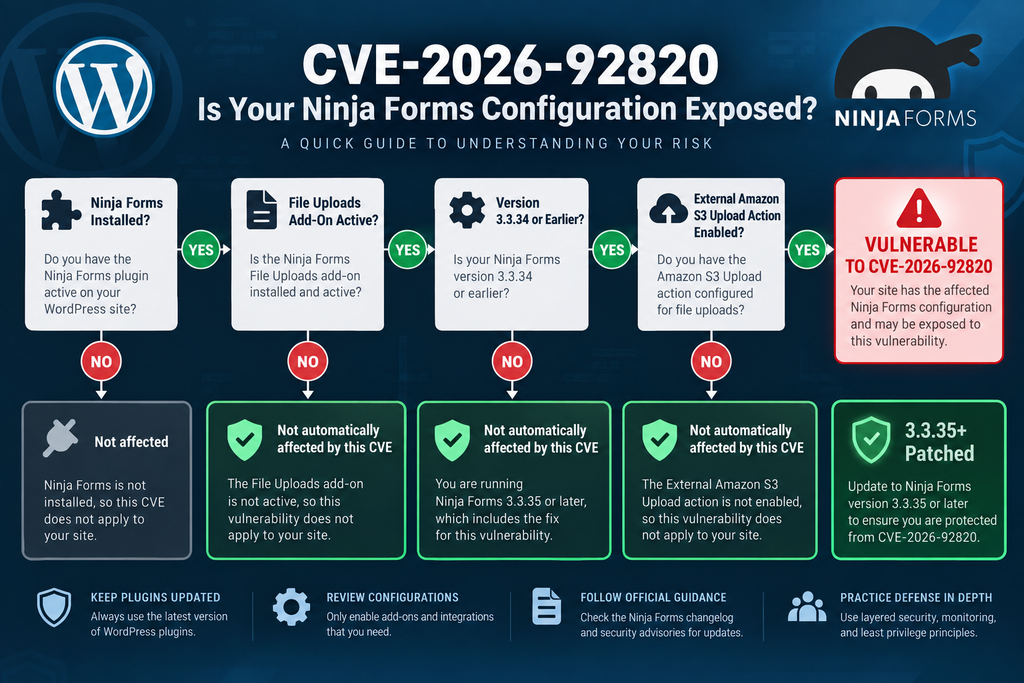
However, the scope needs to be explained carefully. This disclosure does not mean that every website running Ninja Forms is vulnerable. It does not even mean that every installation using the separate File Uploads extension is automatically exploitable through this particular flaw. The vulnerable workflow involves the File Uploads add-on’s external Amazon S3 upload functionality. The arbitrary file-read scenario has an additional condition: a form email action must be configured to attach uploaded files. These requirements are important because security alerts become less useful when broad headlines obscure the actual configuration needed for exploitation.
For administrators who do use this workflow, the recommended response is straightforward: identify the installed File Uploads version, review the affected forms and their storage actions, create an appropriate backup, and update to version 3.3.35 or newer. Both WPScan and Patchstack identify 3.3.35 as the fixed version for this vulnerability. Administrators who cannot update immediately should consider disabling the affected external upload functionality until remediation is possible.
Security Alert at a Glance
The affected component is Ninja Forms – File Uploads, rather than the basic concept of Ninja Forms as a whole. The reported vulnerable range is version 3.3.34 and earlier. The fixed release is 3.3.35. CVE-2026-92820 was published on October 2, 2026, and its CVSS 3.1 vector indicates network accessibility, no privileges required, no user interaction, high attack complexity, and potentially high confidentiality, integrity, and availability impact.
That combination deserves attention even though exploitation depends on specific conditions. No administrator should interpret “high attack complexity” as permission to postpone patching indefinitely. At the same time, there is no reason to assume compromise merely because Ninja Forms appears in the WordPress Plugins screen. The correct response starts with identifying whether the affected File Uploads extension and S3 workflow actually exist on the site.
What Is CVE-2026-92820
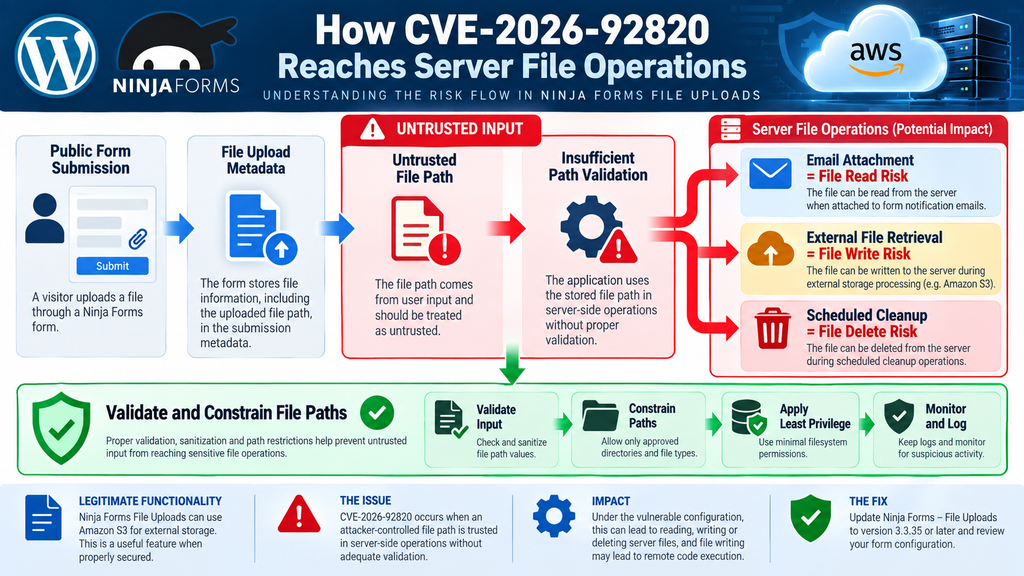
CVE-2026-92820 is a vulnerability involving arbitrary server-side file operations in the Ninja Forms File Uploads extension for WordPress. According to the published CVE information, versions through 3.3.34 are affected through the external Amazon S3 upload flow. The underlying problem involves trusting a file path supplied through a form submission and later using that value in sensitive file-handling operations without sufficient validation. Depending on the subsequent workflow, that path can become relevant to reading, writing, or deleting a server file.
The vulnerability has been assigned a CVSS v3.1 base score of 8.1 High with the vector CVSS:3.1/AV:N/AC:H/PR:N/UI:N/S:U/C:H/I:H/A:H. In practical terms, the issue is remotely reachable and does not require an authenticated WordPress account. No victim interaction is required either. However, the attack complexity is rated High because exploitation depends on environmental and configuration conditions rather than being universally available on every installation.
This distinction makes CVE-2026-92820 different from a simple statement such as “installing Ninja Forms exposes your server.” That would be inaccurate. Administrators should instead think of the issue as a dangerous interaction between an affected File Uploads version, an externally stored upload workflow, attacker-controlled path information, and later server-side operations that trust that information.
Read, Write and Delete Are Three Different Risks
Arbitrary file read means that an application can potentially be manipulated into accessing a server file that should not have been available through the intended form workflow. Depending on what files are readable by the web server process, the confidentiality impact can be significant. Configuration files and application data may contain information that should never leave the server.
Arbitrary file write is potentially even more serious because it changes server data rather than merely reading it. If attacker-controlled content can reach a security-sensitive or executable location, the effect may extend beyond a corrupted file. The published CVE description specifically notes that the write condition can lead to remote code execution when the external store is configured. That possibility explains the High integrity impact assigned to the vulnerability.
Arbitrary file deletion threatens availability. A website depends on many files beyond visible media and theme assets. Removing the wrong application, configuration, cache, or supporting file may break part of the site or potentially make the application unavailable. The exact result depends heavily on hosting permissions and the target accessible to the PHP process.
Why the 8.1 Score Still Matters
Security ratings should provide context rather than create panic. An 8.1 score represents a serious vulnerability, but CVSS is not a prediction that every affected site will be attacked. It describes technical characteristics and potential impact. In this case, the network attack vector, lack of authentication, and high confidentiality, integrity, and availability impacts raise the score. High attack complexity lowers it compared with vulnerabilities that work reliably under almost any installation state.
Site owners should therefore combine the CVSS rating with their actual configuration. A site using File Uploads 3.3.34 with the relevant Amazon S3 workflow deserves rapid remediation. A website running Ninja Forms without the affected File Uploads workflow should not be described as exposed to this exact attack path simply because the Ninja Forms name appears in the advisory.
Which Ninja Forms Configurations Are Exposed
The most important part of this advisory is understanding the configuration requirements. CVE-2026-92820 concerns the Ninja Forms – File Uploads extension, with affected versions through 3.3.34. Exploitation of the disclosed arbitrary file operations requires use of the plugin’s External File Upload (Amazon S3) action. The arbitrary file-read variant carries another requirement: the affected form must have an email action configured to attach the uploaded file.
Ninja Forms officially documents Amazon S3 as one of the external services supported by its File Uploads functionality. Administrators can configure external storage settings and use Amazon S3 as a destination for uploaded files. That is legitimate functionality and should not itself be treated as unsafe. The security problem arises from the way an affected plugin version handles attacker-influenced path data in the vulnerable workflow.
Consequently, administrators should avoid making decisions based only on the presence of the main Ninja Forms plugin. A meaningful assessment needs to determine whether the File Uploads extension is installed, which version is active, whether affected forms use external S3 uploads, and whether uploaded files are attached to notification emails.
A Practical Exposure Checklist
Start in the WordPress administration area and inspect the installed plugins. Look specifically for Ninja Forms – File Uploads rather than assuming the core Ninja Forms plugin provides the vulnerable code. Record its version before making changes. If the extension is version 3.3.34 or older, continue the assessment and prioritize the update.
Next, inspect forms that contain file upload functionality. Review their actions and external-storage configuration. The official Ninja Forms documentation shows that File Uploads can be connected to external services, including Amazon S3, through dedicated external settings. If S3 is not configured or used by the affected form, the disclosed CVE conditions differ materially from the vulnerable workflow described in the advisory.
Finally, check the form’s email actions. Ninja Forms provides an option to attach file uploads to email messages. This matters specifically to the arbitrary file-read branch of CVE-2026-92820. The CVE description says this variant additionally requires a form email action configured to attach the uploaded file.
Do Not Confuse This CVE With Earlier Ninja Forms Issues
Administrators searching for CVE-2026-92820 may encounter older Ninja Forms File Uploads advisories. One particularly important example is CVE-2026-0740, an earlier unauthenticated arbitrary file upload vulnerability affecting versions through 3.3.26. Wordfence reported active exploitation of that earlier issue in April 2026. CVE-2026-0740 was fully addressed in version 3.3.27.
CVE-2026-92820 is a separate vulnerability with a different affected range and configuration. Administrators should not conclude that installing 3.3.27, which fixed the earlier CVE, also resolves the newer issue. For CVE-2026-92820, the affected range extends through 3.3.34 and the identified fixed version is 3.3.35.
This is an important patch-management lesson. A plugin can receive a security fix and later require another update for a newly discovered vulnerability. Checking only whether a website was “patched earlier this year” does not establish that its current version is safe from later disclosures.
How an Attacker Controls the Stored File Path
Understanding the flaw does not require reproducing an exploit. At a defensive level, the important concept is the trust boundary. A web application receives information from a browser, processes it, and then decides what operations that information may influence. Values originating from an unauthenticated form submission should always be treated as untrusted until they have been validated and constrained for their intended purpose.
According to the CVE description, the affected external Amazon S3 upload workflow trusts an attacker-supplied file path from the form submission and stores it as the upload’s file_path. That stored value can later reach operations involving email attachments, fetched content, and scheduled deletion. The security problem appears when the application treats that path as trustworthy enough to perform filesystem operations without adequate validation.
A safe upload system normally separates user-controlled metadata from authoritative server-side paths. The application should decide where files belong and should ensure that a supplied value cannot escape the intended storage boundaries. The same principle applies whether an application handles WordPress media, temporary uploads, generated documents, backups, or files synchronized with an external storage service.
Why File Paths Are Security-Sensitive Input
A filename may look harmless to an ordinary user, but filesystem paths carry meaning to the operating system and application. A path determines where the program looks for a resource. If untrusted input gains too much influence over that path, an application may interact with something outside the intended upload directory.
That is why path handling deserves the same security attention as SQL queries, HTML output, authentication tokens, and API credentials. Developers should normalize and validate paths, enforce approved directories, apply least-privilege filesystem permissions, and avoid trusting client-provided storage metadata as an authoritative local destination.
For site administrators, the lesson is simpler. You do not need to reproduce the vulnerable request to determine whether remediation is necessary. If your environment matches the affected configuration and runs a vulnerable version, update it. Testing an exploit against a production site creates unnecessary risk and may alter evidence that would otherwise help an investigation.
Why External Storage Does Not Automatically Mean the Server Is Isolated
Moving uploaded files to S3 can provide useful operational advantages. It may reduce local storage pressure, centralize objects, or support a broader media architecture. However, external storage does not automatically remove the WordPress server from every stage of the file lifecycle.
The application may still process metadata, retrieve files, create temporary copies, attach files to email messages, or delete local resources after a scheduled event. Those transitional operations matter because they reconnect external object storage with the local filesystem.
CVE-2026-92820 demonstrates why administrators should examine the complete lifecycle of uploaded content. The question is not simply “Where is the final file stored?” It is also “What does WordPress do with the filename and path before, during, and after storage?”
When Arbitrary File Write Becomes Remote Code Execution

Arbitrary file write and remote code execution are related concepts, but they should not be treated as identical. File write means an attacker can cause data to be written somewhere that the application should not permit. Remote code execution means attacker-controlled instructions can actually be executed by the server. The second outcome depends on additional environmental conditions.
The published CVE description explicitly states that the arbitrary file-write condition can lead to remote code execution when the external store is configured. That makes the write capability especially serious. However, a responsible security explanation should stop short of providing a recipe for converting file writing into executable server content. Administrators do not need an exploit demonstration to understand that writing attacker-controlled content into security-sensitive locations can threaten the entire application.
Server configuration can also affect the ultimate impact. Filesystem permissions, PHP execution rules, web-server configuration, containerization, account isolation, and ownership boundaries all influence what the WordPress process can modify and what happens afterward. Strong hosting controls can reduce consequences, but they should be treated as additional layers rather than substitutes for patching the vulnerable extension.
Remote Code Execution Can Change the Security Boundary
When a web vulnerability reaches code execution, the concern extends beyond a single WordPress form. Code executing with the permissions of the web-server or PHP process may potentially interact with resources available to that account. The accessible scope varies considerably among hosting environments.
This is one reason administrators should use isolated hosting accounts where possible. Multiple unrelated websites should not casually share broad writable directories or credentials. Database accounts should have only the permissions they need, and application secrets should not be exposed more widely than necessary.
Those practices cannot fix CVE-2026-92820. They can, however, reduce the blast radius of many web application vulnerabilities. Security works best when patching, permissions, backups, monitoring, authentication, and infrastructure isolation reinforce one another.
File Read Can Expose More Than Website Content
The confidentiality side of the vulnerability deserves equal attention. A WordPress installation contains more than public posts and uploaded images. Depending on server configuration and process permissions, locally readable files can include application configuration, logs, temporary data, or other operational information.
For CVE-2026-92820, the arbitrary file-read variant additionally depends on the affected form having an email action that attaches uploaded files. That condition should be part of every administrator’s exposure assessment. It is not enough to ask whether email notifications exist; the relevant question is whether the form is configured to attach the uploaded files.
If that combination existed while a vulnerable version was active, administrators should review relevant mail activity and form submissions rather than assuming that installing the patch retrospectively proves nothing happened before the update.
File Deletion Can Become an Availability Problem
Deletion may receive less attention than code execution, but it can still produce substantial operational damage. A web application depends on files for configuration, plugins, themes, generated assets, caching, and other functions. Removing a file unexpectedly may produce errors immediately or create subtle failures that appear later.
Backups are therefore essential. A good backup strategy should contain recoverable copies of both the WordPress database and required files. Copies should not all reside within the same writable environment as the production site.
For a site undergoing a possible security investigation, preservation matters as well. Do not immediately erase every unusual artifact before collecting relevant logs and timestamps. Evidence may help determine whether an observed file change was an attack, an administrator action, a plugin update, or an unrelated application event.
Updating or Disabling the File Uploads Add-On
The primary remediation for administrators running an affected configuration is to update Ninja Forms – File Uploads to version 3.3.35 or later. WPScan lists versions before 3.3.35 as affected by this issue, while Patchstack identifies versions through 3.3.34 as vulnerable and 3.3.35 as patched.
Before updating a production website, create a reliable backup according to your normal maintenance procedure. Confirm that the backup can actually be restored and that it is stored safely. Then install the official update through the normal licensed distribution channel available for your Ninja Forms extension. After installation, verify the active version instead of assuming the update completed because WordPress displayed a success message.
Next, test the affected forms using benign sample files. Confirm that legitimate uploads still work, that S3 storage behaves as expected, that notification emails arrive correctly, and that normal cleanup functions continue to operate. Functional testing after a security update is important because administrators need both security and reliable business workflows.
What to Do if You Cannot Update Immediately
If operational constraints prevent an immediate update, reducing exposure is preferable to leaving a known vulnerable workflow publicly available. Administrators should consider disabling the affected File Uploads functionality or the relevant external Amazon S3 upload action until the patched release can be installed.
This should be treated as temporary risk reduction, not a permanent substitute for patching. Removing the exposed workflow may reduce the opportunity to reach the vulnerable path, but the outdated code remains installed. Future configuration changes can accidentally reintroduce exposure.
Administrators should also inspect forms individually. Large WordPress installations often contain old forms that remain published long after a campaign, recruitment process, support workflow, or upload request has ended. An abandoned form can still present an attack surface if it remains publicly accessible.
Verify the Version After Updating
A security update is not complete until the running version has been confirmed. Caching, failed filesystem writes, permission problems, interrupted deployments, staging-to-production mistakes, and license issues can occasionally leave a site on an older version.
Open the WordPress Plugins area and confirm that Ninja Forms – File Uploads reports 3.3.35 or a later release. If the site uses deployment automation, also verify the version in the production environment rather than relying only on a development or staging record.
Managed WordPress users may also want to check their hosting dashboard. Some providers independently track vulnerable plugin versions or delay updates for compatibility testing. Compare what the host reports with what WordPress itself shows.
Do Not Test the Vulnerability on Production
After learning about a vulnerability, administrators sometimes want to prove that their site is exploitable before installing the patch. That is rarely necessary and can create new problems.
A proof-of-concept test involving filesystem operations may overwrite, expose, or remove data. It can also trigger security monitoring, contaminate logs, or make a later forensic review more difficult. A safer approach is to determine whether the installed version and configuration match the published affected conditions.
If controlled security testing is genuinely required, use an isolated environment that contains no production secrets, personal information, live credentials, or shared infrastructure. Professional penetration testing should operate under clear authorization and a defined scope.
Auditing Local Files, Form Submissions and S3 Logs
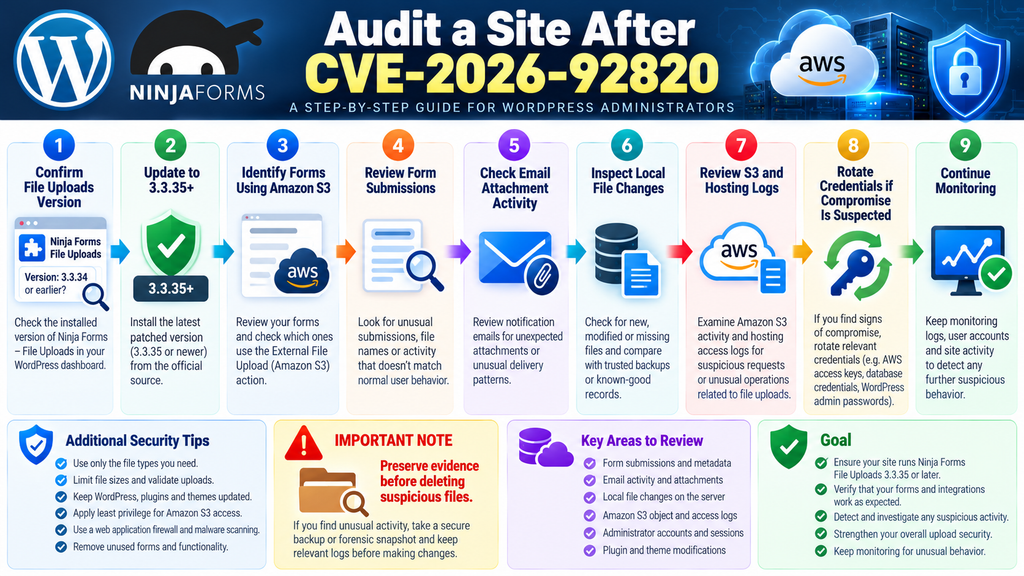
Updating closes the known vulnerable code path, but administrators whose sites previously matched the affected configuration should consider a retrospective review. The depth of that review should reflect the site’s importance, the sensitivity of processed information, and how long a vulnerable version remained exposed.
Begin with WordPress and hosting logs. Look for unexpected requests involving the affected forms, unusual traffic patterns, unexplained errors, and activity at times when administrators were not performing maintenance. Avoid relying on one indicator alone. A strange request does not automatically prove successful exploitation, while an apparently normal access log does not prove that every server-side action was harmless.
Compare filesystem state against trusted backups or known-good deployment records. Pay attention to unexplained new files, unexpected modifications, missing files, and timestamp changes that cannot be linked to updates or normal site operations. WordPress core checksums can help identify modifications to core files, while plugin and theme comparisons may require clean copies from their legitimate sources.
Review Form Submissions
Because the vulnerability originates in a form workflow, historical submissions can provide useful context. Review records associated with forms using File Uploads and Amazon S3. Look for unusual submission frequency, unexpected filenames, abnormal metadata, or entries that do not resemble legitimate user behavior.
Do not publish suspicious filenames, paths, private submission information, or customer data merely to document the investigation. Preserve evidence securely and restrict access to people who need it.
Also remember that a suspicious submission does not prove that the server performed a successful arbitrary file operation. Logs from several layers should be correlated before drawing conclusions.
Review Email Activity
For sites where the form email action attached uploaded files, email records become particularly relevant because that is the additional condition associated with the disclosed arbitrary file-read scenario. Review notification activity around suspicious form submissions and identify unexpected attachments or abnormal delivery patterns.
If transactional email is handled through an external provider, its logs may provide timestamps, recipient information, delivery events, and other useful metadata. Preserve those records before retention periods expire.
Do not forward potentially sensitive attachments casually during an investigation. If a message may contain material obtained through unauthorized file access, handle it as potentially sensitive evidence.
Review Amazon S3 Activity
Sites using the affected external upload workflow should also examine available Amazon S3 and associated AWS logging. Depending on the site’s logging configuration, administrators may be able to identify unusual object operations, unexpected request patterns, or activity that does not align with legitimate form submissions.
The quality of this evidence depends on which logging and monitoring features were enabled before the event. Logging cannot retroactively capture activity that was never recorded. Nevertheless, available object-level, access, identity, and application records can help establish a timeline.
Also review the credentials and permissions used by the integration. Apply least privilege so that the WordPress integration has only the S3 capabilities and resources genuinely required for its intended workflow. Broad cloud permissions unnecessarily increase the impact of compromised application credentials.
Check Administrator Accounts and Sessions
CVE-2026-92820 is described as an unauthenticated vulnerability, meaning an attacker does not need a normal WordPress account to reach the vulnerable workflow. However, if an attacker ultimately achieved broader application compromise, administrators should check whether additional accounts, sessions, or persistence mechanisms appeared afterward.
Review administrator users for unexpected additions or changes. Inspect active sessions where appropriate and investigate unexplained modifications to security plugins, themes, MU plugins, scheduled tasks, or configuration files.
If evidence suggests that application secrets may have been exposed, credential rotation should be planned carefully. Relevant database credentials, WordPress salts, S3 access credentials, hosting passwords, API keys, and administrator passwords may need attention depending on what was actually accessible.
Preserve Evidence Before Cleaning
Immediate cleanup feels natural when something suspicious appears. Yet deleting artifacts before recording them can make it harder to determine what occurred.
Take a secure backup or forensic snapshot where appropriate. Record relevant timestamps, filenames, logs, plugin versions, configuration state, and user-account changes. Then perform remediation from a known-good baseline.
For high-value sites, stores, membership systems, or websites processing sensitive personal information, professional incident-response assistance may be appropriate. Legal or regulatory reporting requirements can also vary by jurisdiction and by the type of information involved.
Defense in Depth After the Ninja Forms File Uploads Vulnerability
Updating the vulnerable extension is the immediate technical fix, but administrators can use this incident to improve their broader upload security. Public file-upload forms deserve special attention because they intentionally accept data from untrusted visitors. Even when a plugin correctly validates uploads, the surrounding environment should assume that hostile input will eventually arrive.
Limit accepted file types to what the business process actually requires. Restrict file sizes to reasonable values. Keep WordPress, plugins, themes, PHP, and server software updated. Remove unused extensions rather than leaving disabled or forgotten functionality indefinitely. Where possible, prevent executable content from running inside upload directories.
A web application firewall can provide another defensive layer, but it should not replace software updates. The same applies to malware scanning. Security tools can detect or block some suspicious activity, yet vulnerable application logic should still be corrected at its source.
Apply Least Privilege to S3
Cloud integrations deserve their own security review. A WordPress form generally does not need unlimited access to an AWS account. Its identity should receive only the permissions required for the intended bucket and workflow.
Restricting permissions helps contain mistakes and security incidents. If an application only needs to create objects within a defined location, granting unrelated administrative capabilities increases risk without improving functionality.
Credential management matters too. Avoid exposing access keys in public repositories, support tickets, screenshots, backups shared with third parties, or diagnostic output. If an investigation indicates that AWS credentials could have been exposed, rotate them and review the activity associated with the previous credentials.
Keep Useful Logs Long Enough
Security investigations often fail because the necessary logs disappeared before anyone knew they were needed. Hosting access logs may rotate quickly, application logs may be disabled, and cloud logs can have their own retention policies.
Choose retention periods appropriate for the importance of the website and applicable privacy requirements. Logs should provide enough history to investigate incidents without collecting unnecessary personal data indefinitely.
Time synchronization also matters. When WordPress, the web server, email provider, CDN, and AWS all use consistent timestamps, investigators can correlate events much more accurately.
Test Restores, Not Just Backups
A backup that cannot be restored provides false confidence. Regularly test recovery in an isolated environment. Verify the database, WordPress files, custom configuration, media, and any external dependencies needed to return the website to operation.
Keep at least one backup copy beyond the direct reach of the production WordPress account. If the same compromised application can modify both production files and every backup, recovery becomes much more difficult.
For websites that receive frequent submissions, determine how much data loss the organization can tolerate. That decision should guide backup frequency rather than choosing an arbitrary schedule.
Frequently Asked Questions
What is the Ninja Forms File Uploads vulnerability CVE-2026-92820?
CVE-2026-92820 is a High-severity vulnerability affecting Ninja Forms – File Uploads versions through 3.3.34. Under the required Amazon S3 external-upload configuration, attacker-controlled file-path information can reach server-side operations, potentially allowing arbitrary file read, write, or deletion. The published CVSS v3.1 score is 8.1.
Is every Ninja Forms website vulnerable?
No. The published conditions specifically involve the Ninja Forms – File Uploads extension and the external Amazon S3 upload flow. Simply having the core Ninja Forms plugin installed does not establish exposure to CVE-2026-92820. Administrators should check the add-on version and form configuration.
Which versions are affected?
Published security records identify Ninja Forms – File Uploads versions up to and including 3.3.34 as vulnerable. Version 3.3.35 is identified as the patched release. Administrators should install 3.3.35 or a newer legitimate release.
Does exploitation require a WordPress account?
The vulnerability is classified as unauthenticated. The CVSS vector lists privileges required as None, meaning a normal WordPress login is not a prerequisite when the required vulnerable configuration is reachable.
Is Amazon S3 required for this vulnerability?
The published CVE description states that exploitation requires use of the plugin’s External File Upload Amazon S3 action. Therefore, S3 configuration is a central condition when evaluating exposure to this specific CVE.
What additional condition applies to arbitrary file read?
The file-read variant additionally requires the affected form to have an email action configured to attach uploaded files. Ninja Forms documentation confirms that its email actions can be configured to attach file uploads.
Can CVE-2026-92820 lead to remote code execution?
The published vulnerability description states that the arbitrary file-write condition can lead to remote code execution when the external store is configured. Whether a particular server reaches that outcome can also depend on filesystem permissions and execution controls.
Should I disable Ninja Forms completely?
Not automatically. First determine whether the affected File Uploads extension, vulnerable version, and Amazon S3 workflow exist. If the affected extension cannot be updated immediately, disabling the vulnerable upload functionality or add-on can reduce exposure until remediation is completed.
Is CVE-2026-92820 the same as CVE-2026-0740?
No. CVE-2026-0740 was an earlier arbitrary file-upload vulnerability affecting Ninja Forms – File Uploads through 3.3.26 and was fixed in 3.3.27. CVE-2026-92820 is a separate 2026 disclosure affecting versions through 3.3.34 and is addressed in 3.3.35.
What should I audit after updating?
Review historical form submissions, local filesystem changes, email activity for forms that attached uploads, hosting logs, available S3 records, WordPress administrator accounts, and relevant credentials. If suspicious activity is discovered, preserve evidence before cleaning the site and consider professional incident-response assistance.
The Important Takeaway for WordPress Administrators
CVE-2026-92820 is serious because an unauthenticated visitor may reach sensitive filesystem operations when the required vulnerable workflow is present. Arbitrary file read threatens confidentiality, arbitrary file write threatens integrity and may escalate to remote code execution, while arbitrary deletion can damage site availability. The CVSS 8.1 rating reflects those potentially significant consequences.
At the same time, accurate reporting matters. This should not be presented as a universal Ninja Forms vulnerability affecting every website that uses the form builder. The disclosed attack path concerns Ninja Forms – File Uploads through version 3.3.34 and requires the external Amazon S3 upload workflow. Arbitrary file read has the additional email-attachment condition. Those facts should guide both remediation and communication.
For affected administrators, the practical path is clear: update File Uploads to 3.3.35 or later, verify the installed version, test legitimate form functionality, and audit historical activity when the vulnerable configuration was publicly reachable. If updating cannot happen immediately, disabling the affected external upload workflow is safer than knowingly leaving it exposed.
⚠️ Disclaimer and Source Hygiene
This article is provided for defensive cybersecurity awareness and WordPress administration purposes. It does not provide exploit payloads, malicious file paths, web shells, commands, or instructions for compromising websites. Technical conditions can differ according to plugin versions, hosting environments, WordPress configuration, server permissions, and future vendor updates.
Security information changes quickly. Administrators should verify their installed software against current vendor releases and authoritative vulnerability databases before making production decisions. If compromise is suspected, consider consulting a qualified WordPress security professional, hosting provider, incident-response specialist, or other appropriate professional.
The article distinguishes CVE-2026-92820 from earlier Ninja Forms File Uploads vulnerabilities and avoids assuming that every Ninja Forms installation is exposed. Information was cross-checked against the published CVE data, WPScan, Patchstack, Ninja Forms documentation, Wordfence-related vulnerability information, and additional vulnerability records available at the time of publication.
🔔 For more tutorials like this, consider subscribing to our blog.
📩 Do you have questions or suggestions? Leave a comment or contact us!
🏷️ Tags: Ninja Forms File Uploads vulnerability, CVE-2026-92820, Ninja Forms security, WordPress vulnerability, WordPress security, Ninja Forms File Uploads, Amazon S3 WordPress, WordPress file upload security, WordPress plugin vulnerability, WordPress security update
📢 Hashtags: #WordPressSecurity, #NinjaForms, #CVE202692820, #WordPress, #CyberSecurity, #PluginSecurity, #WebsiteSecurity, #AmazonS3, #WordPressTips, #SecurityUpdate
Sources and References
CVE and Vulnerability Information
CVE-2026-92820: Published vulnerability information identifies Ninja Forms – File Uploads through 3.3.34 as affected by arbitrary file operations through the external Amazon S3 upload flow. The CVSS v3.1 score is 8.1 High.
WPScan: The WPScan vulnerability database lists “Ninja Forms – File Uploads < 3.3.35” for this unauthenticated arbitrary file upload issue and identifies version 3.3.35 as fixed.
Patchstack: Patchstack identifies versions through 3.3.34 as vulnerable and version 3.3.35 as patched for CVE-2026-92820.
Ninja Forms Documentation: Official File Uploads documentation explains the extension’s external storage functionality, including Amazon S3, and documents the option for email actions to attach uploaded files.
Earlier CVE context: Wordfence documented CVE-2026-0740, a separate arbitrary file-upload vulnerability affecting File Uploads through 3.3.26, with the complete fix released in version 3.3.27. That earlier vulnerability should not be confused with CVE-2026-92820.
Secondary Sources and Testimonials
Secondary vulnerability aggregators and security publications can be useful for cross-checking timelines and technical summaries. However, administrators should prioritize the CVE record, security researchers, the software vendor’s documentation, and established vulnerability databases when deciding whether a production site requires remediation.
At the time of this article, the available CVE data identifies CVE-2026-92820 as published on October 2, 2026. The record reports no authentication requirement, High attack complexity, and potentially High impact across confidentiality, integrity, and availability.
No individual testimonial or anecdotal report should be treated as proof that a particular WordPress website has been compromised. Administrators should base incident conclusions on their own logs, filesystem evidence, form records, cloud activity, and other verifiable indicators.