
Table of Contents
A high-severity Schema & Structured Data vulnerability affects WordPress plugin versions 1.66 and earlier. Learn what CVE-2026-97291 means, why Contributor access matters, how PHP Object Injection differs from automatic code execution, and why administrators should update to version 1.67 or later.
The WordPress ecosystem depends heavily on plugins, and structured-data tools have become especially important for publishers who want search engines to understand their content. However, any plugin that processes information supplied by users can also become part of a site’s security boundary.
A recently disclosed Schema & Structured Data vulnerability, tracked as CVE-2026-97291, demonstrates why administrators should pay attention not only to unauthenticated attacks but also to accounts with limited WordPress privileges. The issue affects the popular Schema & Structured Data for WP & AMP plugin and has been classified as PHP Object Injection. Public vulnerability records identify versions through 1.66 as affected and version 1.67 as patched.
The vulnerability carries a CVSS 3.1 score of 8.8 (High). Its published vector indicates a network-accessible attack with low attack complexity, low privileges required, and no user interaction. Importantly, the published advisory identifies the required WordPress privilege as Contributor. This means the issue should not be described as an ordinary unauthenticated takeover vulnerability.
That distinction matters. A Contributor is already an authenticated WordPress user. On a small personal website, there may be no Contributor accounts at all. On a magazine, community publication, news website, guest-blogging platform, or large editorial operation, dozens of people may hold limited publishing accounts.
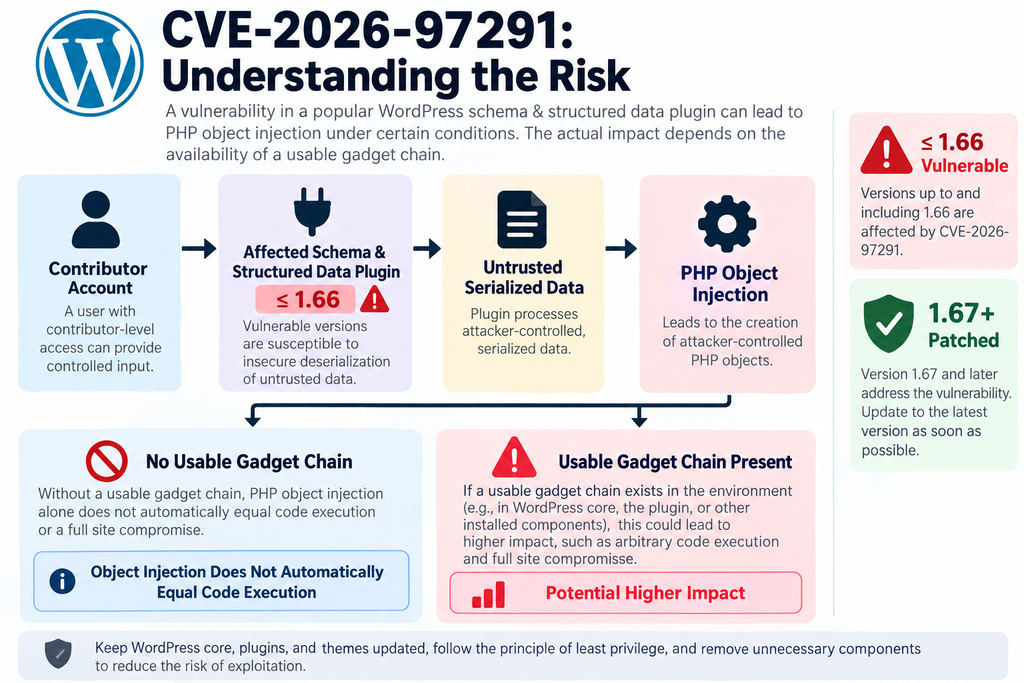
There is another distinction that deserves equal attention. PHP Object Injection does not automatically mean that arbitrary PHP or operating-system commands execute immediately. Object injection can become extremely serious when an application contains a suitable object or “gadget” chain. However, the public CVE information available for CVE-2026-97291 does not document such a chain. Administrators should therefore take the vulnerability seriously without turning a conditional technical risk into an unsupported claim of automatic remote code execution.
This guide explains what CVE-2026-97291 means, which versions require attention, why Contributor access changes the practical threat model, and how administrators can respond safely.
What Is CVE-2026-97291
CVE-2026-97291 is a security vulnerability affecting the WordPress plugin Schema & Structured Data for WP & AMP, developed by Magazine3. The vulnerability was publicly disclosed on September 30, 2026, and is categorized as PHP Object Injection. The official CVE data associates the issue with CWE-502: Deserialization of Untrusted Data.
In simple terms, PHP applications can serialize data into a format that preserves information about values and objects. That serialized representation can later be reconstructed through deserialization. This mechanism can be useful internally, but it becomes dangerous when untrusted or insufficiently validated input reaches a deserialization operation capable of constructing PHP objects.
PHP Object Injection describes a situation where attacker-controlled data can influence that object reconstruction process. The security impact then depends on the surrounding application, the classes available during execution, magic methods implemented by those classes, and whether a useful sequence of operations can be triggered.
The public CVE record describes CVE-2026-97291 specifically as a Contributor PHP Object Injection vulnerability affecting Schema & Structured Data for WP & AMP versions 1.66 and earlier. The published CVSS vector is CVSS:3.1/AV:N/AC:L/PR:L/UI:N/S:U/C:H/I:H/A:H, producing a base score of 8.8.
Why the 8.8 CVSS score deserves attention
A CVSS score of 8.8 places the vulnerability in the High severity range. The vector indicates network accessibility, low attack complexity, low privileges, and no required interaction from another user. The confidentiality, integrity, and availability impact values are all classified as High in the published record.
However, a CVSS score should not replace environmental risk assessment. A WordPress installation with no Contributor accounts presents a different immediate exposure profile from a publication where external writers regularly receive Contributor credentials.
Likewise, an organization using centralized identity management, multifactor authentication, carefully reviewed user accounts, restricted login access, and detailed logging has additional defensive layers that a lightly maintained website may lack.
The right response is therefore neither panic nor dismissal. Administrators should update the plugin promptly, verify account access, and review relevant evidence if the site ran an affected release.
PHP Object Injection in plain English
Imagine that an application expects ordinary stored information but instead accepts data that can tell PHP to reconstruct an object. Objects can contain both data and behavior associated with a class.
Simply creating an object is not automatically equivalent to executing arbitrary system commands. The dangerous scenario appears when the application contains classes whose methods can be combined with attacker-controlled properties to perform unintended operations.
Security researchers often refer to those usable classes and methods as a gadget chain.
This distinction explains why security reports sometimes describe object injection as potentially leading to severe consequences while carefully avoiding the statement that every object-injection vulnerability automatically provides remote code execution.
What the public disclosure confirms
As of this article’s publication, the authoritative information confirms several important facts. CVE-2026-97291 affects Schema & Structured Data for WP & AMP through version 1.66, requires Contributor privileges, is categorized as PHP Object Injection/CWE-502, and is fixed in version 1.67.
The CVE data also records that the issue was discovered externally and credits Ananda Dhakal through the Patchstack Bug Bounty Program. Patchstack’s timeline states that the vulnerability was reported on September 17, 2026.
At the same time, the publicly available authoritative description does not provide a detailed exploit path, vulnerable request parameter, or confirmed object gadget chain. That missing information is important when discussing possible code execution.
Why careful security reporting matters
Security headlines sometimes compress several technical stages into a single dramatic statement. A vulnerability may be described as “allowing server takeover” because that is a possible consequence under certain conditions.
Administrators need more precision.
A useful security report should distinguish the confirmed primitive from its possible consequences. In this case, the confirmed vulnerability class is PHP Object Injection. Potential downstream impact depends on what usable classes and behaviors are available in the affected environment.
That distinction does not make the vulnerability harmless. It simply gives administrators an accurate picture of what researchers have actually established publicly.
Which Plugin Versions Are Vulnerable
The affected component is Schema & Structured Data for WP & AMP. According to the published CVE record and Patchstack advisory, versions 1.66 and earlier are vulnerable, while 1.67 is the patched release. Administrators running the plugin should therefore verify the installed version rather than assuming that WordPress has already updated it automatically.
The official WordPress.org plugin page currently lists version 1.67. Its changelog for September 24, 2026 includes a vulnerability fix researched and reported by Ananda Dhakal of Patchstack. The same release also contains other improvements and fixes.
This provides an important operational lesson. Security advisories may become widely visible after a patched version has already been released. A website can therefore remain exposed simply because its administrator has not installed an available update.
Affected version range
For CVE-2026-97291, the practical version rule is straightforward:
Affected: version 1.66 and earlier.
Patched: version 1.67 and later.
Administrators should avoid treating 1.66 as safe for this specific CVE merely because that release previously addressed other vulnerabilities. Security versions are cumulative only when the later release actually contains all relevant fixes.
Version 1.66 was released on September 8, 2026 and included security-related changes of its own. Version 1.67 followed on September 24 and contains another vulnerability fix.
Consequently, someone who updated to 1.66 to resolve an earlier security warning still needs to move to 1.67 or a later supported release for CVE-2026-97291.
How to check the installed version safely
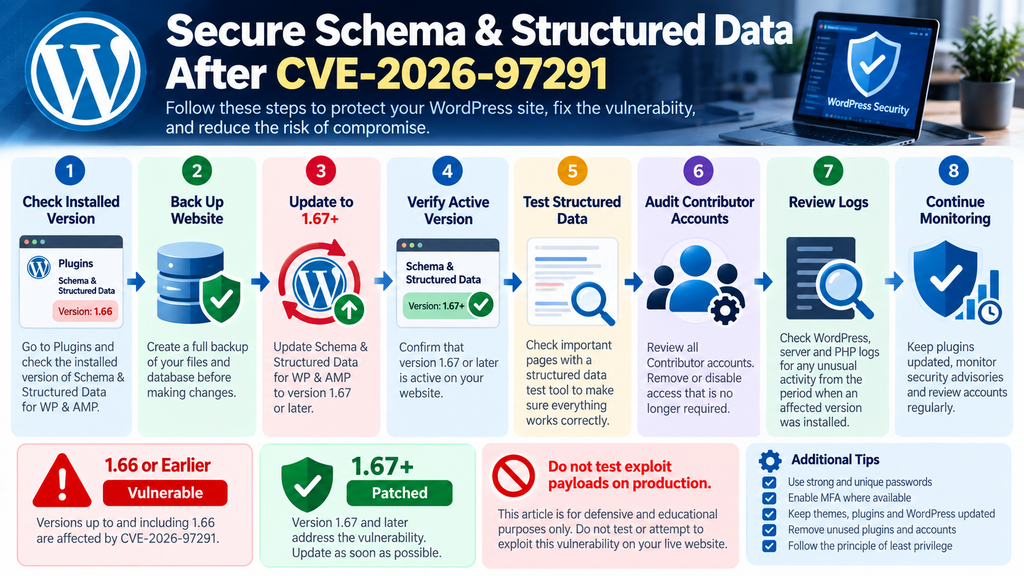
WordPress administrators can check the plugin version from the normal administrative interface. Open Plugins → Installed Plugins, locate Schema & Structured Data for WP & AMP, and review the version displayed beneath the plugin information.
Administrators who manage WordPress through WP-CLI can also use the standard plugin-listing functionality to inspect installed versions. There is no need to test the vulnerability itself on a production website. The objective is simply to establish whether an affected version remains installed.
Before making changes on an important production website, create a current backup of the database and files according to your normal maintenance process. On professionally managed sites, updates should ideally be tested in staging when plugin compatibility is critical.
Do not stop after seeing that automatic updates are enabled
Automatic updates are useful, but they should not be treated as proof that a particular security release has already been installed.
An update may have been delayed, disabled by hosting policy, blocked by filesystem permissions, interrupted, or excluded by centralized management software. Some agencies also intentionally disable WordPress automatic updates because deployment happens through Git or another controlled process. Verify the actual installed version.
After updating, reload the Plugins page or query the environment again and confirm that version 1.67 or newer is active.
Why plugin inventory matters
Security response becomes much easier when administrators maintain an accurate plugin inventory. A site owner should know which extensions are installed, which are active, which business functions depend on them, and who is responsible for updates.
Unused plugins create unnecessary uncertainty. Even an inactive plugin can complicate maintenance, and abandoned components make vulnerability triage harder.
If Schema & Structured Data for WP & AMP is essential to your SEO workflow, keep it maintained. If it is no longer used, evaluate whether it should remain installed at all.
Check staging and forgotten installations too
Production is not always the only WordPress installation that matters.
Organizations often maintain staging sites, development copies, migration clones, old campaign sites, or temporary test environments. These installations may share passwords, databases, backup archives, API credentials, or infrastructure with production. An administrator who patches only the main public website can therefore leave an unnecessary attack surface elsewhere.
When reviewing CVE-2026-97291, search your hosting account or management platform for every WordPress installation where the plugin might exist.
Why a Contributor Account Is Required
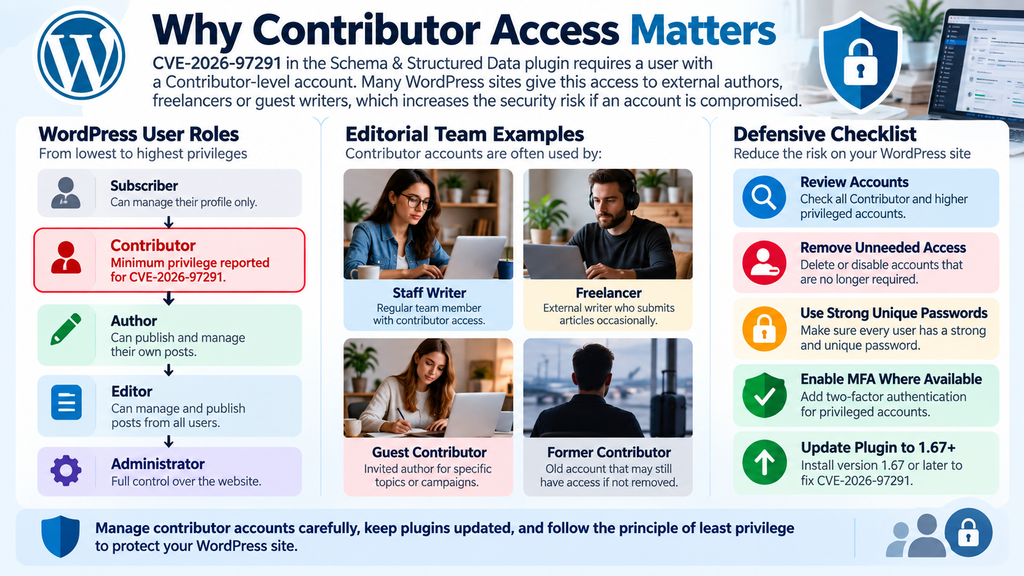
The most important practical detail in CVE-2026-97291 is the privilege requirement. The published vulnerability information specifies Contributor access. This means an attacker needs an authenticated WordPress account with Contributor-level privileges or greater before the vulnerable behavior becomes relevant.
That condition significantly changes the threat model. It does not eliminate the risk, but it means administrators should not describe CVE-2026-97291 as an ordinary vulnerability available to every anonymous visitor on the internet.
WordPress Contributors normally have limited editorial capabilities. They can create and edit their own posts, but their content generally requires review before publication. They do not normally receive the broad administrative privileges available to Editors or Administrators.
Security vulnerabilities can break assumptions behind those role boundaries.
Why low-privilege users still matter
It is easy to think of Contributors as trusted because an administrator intentionally created their accounts. In reality, authentication and trust are separate concepts.
A legitimate Contributor account can become compromised through password reuse, phishing, credential theft, malware on the user’s computer, an exposed session, or poor account lifecycle management.
A website can also retain Contributor accounts long after the associated writers stop working with the organization.
The security question is therefore not simply, “Would our writers attack us?”
A better question is, “What happens if one of those accounts is controlled by someone else?”
That perspective makes privilege-based vulnerabilities much easier to evaluate.
External authors increase practical exposure
CVE-2026-97291 deserves particular attention on websites that invite external authors.
Consider an online magazine with 30 freelance writers. Each writer receives a Contributor account. Some contribute weekly, while others submit only one article and never return.
Over time, forgotten accounts accumulate. One former contributor may reuse the same password on several services. Another may lose access to an old email account. A third may have created a simple password years earlier. The WordPress administrator may have excellent credentials and multifactor authentication, yet the overall security boundary includes every account capable of reaching functionality exposed to Contributors.
This is why least privilege and account lifecycle management matter.
Contributor access is not the same as Administrator access
It is also important not to overstate what the attacker starts with. A Contributor is not normally an Administrator. Contributors cannot simply install arbitrary plugins, modify themes, create administrators, or change every site setting through standard WordPress permissions.
The significance of CVE-2026-97291 is that a vulnerability may provide unintended behavior beyond what that role should normally access.
That is precisely why authenticated vulnerabilities receive serious attention. They can turn a deliberately restricted account into a starting point for actions that the normal permission model was designed to prevent.
Sites without Contributor accounts still need the update
If your WordPress installation has no Contributor or higher untrusted accounts, the immediate exposure profile may be narrower. That does not make remaining on a vulnerable release a sensible long-term strategy.
Accounts can be added later. Existing credentials can change hands. Plugin functionality can evolve. Other vulnerabilities can also interact with outdated components.
Updating removes the known vulnerable condition rather than depending on environmental assumptions forever. Security works best when known vulnerabilities are eliminated and access controls provide an additional layer, rather than when access controls become the only reason an old vulnerability cannot currently be reached.
Audit dormant users
After confirming the plugin version, review Users → All Users.
Look especially at Contributor, Author, Editor, and Administrator accounts that are no longer required. Verify that each account belongs to a person who still needs access.
Do not remove accounts blindly if they own published content. WordPress provides mechanisms for reassigning content when accounts are deleted. Organizations should follow their editorial and retention policies.
For temporary contributors, consider implementing an explicit onboarding and offboarding process. When a collaboration ends, access should end as well.
Strengthen authentication
Strong unique passwords reduce the chance that credentials leaked from another service will work on WordPress.
Multifactor authentication adds another useful barrier, particularly for privileged users and external contributors. Login rate limiting and suspicious-login monitoring can provide additional protection.
These controls do not replace the plugin update. They reduce the probability that an attacker obtains the prerequisite account in the first place.
When PHP Object Injection Can Lead to Code Execution
PHP Object Injection and remote code execution are related concepts in some security scenarios, but they are not synonyms. This distinction is central to understanding CVE-2026-97291 responsibly. Object injection occurs when attacker-controlled serialized information can cause PHP to instantiate or manipulate objects during deserialization. What happens after that depends on the classes available to the application and the behavior of those classes.
For severe secondary effects, an attacker generally needs a useful sequence of methods or operations commonly called a gadget chain.
The public information currently available for CVE-2026-97291 confirms the object-injection vulnerability but does not publicly identify a usable gadget chain for automatic code execution. One technical summary specifically notes that file operations or code execution depend on such a chain and that none is identified in the public advisory data.
What is a gadget chain?
A modern PHP application rarely consists of one file. WordPress websites can load WordPress core, a theme, dozens of plugins, Composer packages, SDKs, payment libraries, email libraries, backup systems, and other PHP components.
Some classes implement special PHP methods that perform actions automatically during certain object lifecycle events. Individually, those methods may be completely legitimate.
Security problems arise when attacker-controlled object properties can influence a sequence of those methods in an unintended way. Researchers call useful components in such a sequence gadgets. Multiple gadgets connected together form a gadget chain.
Why the installed environment matters
This creates an important property of PHP Object Injection vulnerabilities: impact can depend on the surrounding software environment. Two WordPress websites may run the same vulnerable plugin but load different themes and extensions. One environment may contain classes that increase the possible consequences of unsafe deserialization. Another may not expose the same usable combination.
Therefore, “PHP Object Injection” accurately describes the vulnerability class, while statements about guaranteed code execution require additional evidence.
Potential consequences remain serious
Administrators should not interpret this nuance as a reason to ignore the vulnerability. Unsafe deserialization can be dangerous. Depending on the available application components, object injection vulnerabilities may potentially contribute to unauthorized file operations, data modification, deletion, information exposure, or code execution.
The CVSS assessment for CVE-2026-97291 assigns High impact to confidentiality, integrity, and availability. The correct security posture is therefore straightforward: patch the confirmed vulnerability without claiming technical consequences that have not been demonstrated publicly.
Potential does not mean confirmed
Security writing becomes misleading when the words “potential” and “confirmed” are treated as interchangeable.
Suppose an advisory establishes that untrusted serialized data can instantiate PHP objects. That confirms an object-injection primitive. A separate analysis may be necessary to establish that the target application contains a reachable gadget chain capable of a specific action. Until that analysis exists, saying that arbitrary code execution is an inherent, automatic outcome goes beyond the available evidence.
This distinction is particularly important for publishers, security blogs, hosting companies, and WordPress administrators communicating with clients.
What CISA enrichment currently indicates
The CVE record includes CISA ADP enrichment that, at the time of publication, records Exploitation: none, Automatable: no, and Technical Impact: total. The record also shows that CVE-2026-97291 is not listed in CISA’s Known Exploited Vulnerabilities catalog at the time reflected by the available data.
“Exploitation: none” in this context should not be interpreted as proof that exploitation can never occur. It means the enrichment did not record evidence of active exploitation at that time.
Likewise, absence from the KEV catalog does not mean a vulnerability is safe to leave unpatched.
A patch is available. That fact should drive the immediate remediation decision.
Avoid testing exploit payloads on production
Administrators do not need to reproduce the vulnerability to determine whether their site requires action. If the plugin version is 1.66 or earlier, treat it as affected according to the published advisory and update it. Attempting to test deserialization payloads against production introduces unnecessary risk. A malformed test could disrupt the website, alter data, create misleading logs, or trigger security systems.
Security researchers working in controlled environments may perform deeper testing. Routine WordPress administrators should focus on version verification, patching, access review, and evidence preservation.
Updating to Version 1.67

The primary remediation for CVE-2026-97291 is to update Schema & Structured Data for WP & AMP to version 1.67 or later. Patchstack explicitly recommends this version threshold, and the CVE record marks 1.67 as unaffected by this vulnerability.
The official WordPress.org page also lists 1.67 and records a security fix reported by Ananda Dhakal of Patchstack in that release. At the time checked for this article, WordPress.org reports more than 100,000 active installations for the plugin.
Updating should be the priority rather than relying indefinitely on secondary mitigations.
Back up before updating
For a production WordPress site, create a current backup before significant plugin updates. A useful backup should cover both files and the database. Depending on your hosting environment, this may be handled by the hosting provider, a dedicated backup system, or an established administrative process. The backup is not a substitute for patching. It provides a recovery point if the update exposes an unrelated compatibility issue.
Confirm that the backup actually completed before continuing.
Install the patched release
Open the WordPress Dashboard and navigate to the Plugins area. Locate Schema & Structured Data for WP & AMP and install the available update.
Administrators using centralized WordPress management, deployment automation, Composer, or WP-CLI should follow the update mechanism appropriate to their infrastructure.
The security objective remains the same regardless of deployment method: the active version must be 1.67 or newer.
Do not rely only on the update notification disappearing. Verify the version after installation.
Test structured data after updating
Because this plugin affects structured data, administrators should check representative pages after the update. Review articles, pages, products, recipes, FAQs, or other content types that depend on the plugin. Confirm that the front end still loads correctly and that expected structured data remains present. For SEO-sensitive websites, use an appropriate structured-data validation tool to check important templates.
Security patches deserve priority, but basic post-update validation can catch compatibility problems quickly.
Clear caches when appropriate
WordPress sites frequently use page caching, object caching, reverse proxies, CDN caching, or server-level caching.
After updating, clear relevant caches according to your normal maintenance procedure if cached output could preserve older generated markup.
Avoid randomly deleting server files or database entries. Use the supported purge functions provided by your cache plugin, hosting panel, or CDN.
Then test the site from a fresh browser session.
Confirm the update on every installation
Agencies and server administrators often manage multiple WordPress websites.
Do not assume that updating one installation protects another.
Search your management inventory for the plugin slug and identify every installation running version 1.66 or older. This includes staging systems when they remain reachable from the internet.
Document the remediation date where change management or client reporting requires it.
What if version 1.67 cannot be installed immediately?
If compatibility problems prevent an immediate update, the safest next step depends on the site’s requirements. Patchstack reports that it has issued a mitigation rule for the vulnerability. Administrators using compatible security protection may have access to that mitigation. Other defensive options can include temporarily restricting Contributor access, disabling unnecessary external accounts, or temporarily deactivating affected functionality when operationally acceptable.
These are compensating controls, not permanent replacements for installing the fixed release.
Do not downgrade after patching
Occasionally, administrators downgrade a plugin because a newer version causes a compatibility issue. Doing so can silently restore a known vulnerability. If version 1.67 creates an unexpected problem, investigate the compatibility issue rather than automatically returning to 1.66 on a publicly accessible production site.
Contact the plugin developer, your hosting provider, or a qualified WordPress professional when necessary.
Auditing Contributor Accounts and PHP Logs
Installing version 1.67 removes the known vulnerable condition, but administrators may reasonably ask another question: what if the site was exposed before the update? That question becomes particularly relevant when Contributor accounts are available to external writers, temporary staff, agencies, contractors, or people who no longer work with the organization. A post-update review should focus on evidence rather than assumptions.
Start with WordPress accounts, authentication activity, administrative changes, web-server logs, security-plugin events, and relevant PHP errors. The objective is not to prove compromise from a single unusual entry. It is to identify activity that deserves further investigation.
Review all Contributor accounts
Open the WordPress user list and identify accounts assigned the Contributor role. For each account, determine whether the person still requires access. Pay particular attention to old freelancers, temporary writers, test users, imported accounts, and accounts whose owner is unclear. Then extend the review to Authors, Editors, and Administrators. Although Contributor is the minimum privilege reported for CVE-2026-97291, higher-privileged accounts naturally meet that threshold too.
Disable or remove access that is no longer necessary according to your organization’s account-management policy.
Look for unexpected privilege changes
Review whether any account received a higher role unexpectedly. A Contributor becoming an Editor or Administrator without an approved reason should be investigated. Likewise, look for newly created administrative users that nobody recognizes. WordPress itself does not provide a complete historical security audit trail for every action by default, so the evidence available depends on your hosting provider, security plugin, audit-logging configuration, and retention period.
Do not infer compromise solely because logging is incomplete.
Review authentication records
If your security tooling or hosting environment records WordPress logins, review activity associated with Contributor accounts during the period when the vulnerable plugin was installed. Look for unusual login locations, unexpected timestamps, repeated authentication attempts, or activity from an account that its owner says was not being used. These indicators are not proof by themselves. VPNs, mobile networks, changing IP addresses, shared corporate gateways, and legitimate travel can all make authentication records appear unusual.
Correlate multiple pieces of evidence before reaching conclusions.
Review PHP logs carefully
PHP logs can help identify application errors, unexpected exceptions, plugin warnings, or unusual failures. Search the relevant period for messages associated with the Schema & Structured Data plugin, deserialization, unexpected object handling, fatal errors, or unusual filesystem-related activity.
However, a PHP warning does not automatically prove exploitation. WordPress plugins can generate ordinary PHP warnings for many reasons, including compatibility problems, deprecated functions, malformed data, or unrelated bugs.
Use logs as evidence to investigate, not as automatic verdicts.
Preserve evidence before cleaning
If you discover genuinely suspicious activity, preserve relevant evidence before deleting accounts, clearing logs, reinstalling components, or restoring backups. Copy the relevant logs, record timestamps, note affected usernames, document plugin versions, and preserve hosting or security alerts. Evidence can help a security professional determine what actually happened.
Aggressive cleanup performed before evidence collection can make later analysis much more difficult.
Check for unexpected site changes
Review the website for changes that were not approved.
These may include unfamiliar Administrator accounts, unexpected plugin installations, modified themes, altered settings, unexplained scheduled tasks, unusual redirects, or content changes. Again, context matters. A legitimate developer or automated deployment process may explain some changes. Compare findings with your maintenance history.
If multiple suspicious indicators appear together, consider a more comprehensive incident-response review.
Consider credential rotation when compromise is suspected
If evidence suggests that an account or website may have been compromised, resetting affected credentials can be appropriate.
Prioritize WordPress accounts and other credentials that could have been exposed according to the incident’s scope.
For a serious confirmed compromise, administrators may also need to rotate application secrets, hosting credentials, database passwords, API keys, or other sensitive credentials.
The exact response depends on what evidence shows. Avoid changing every credential blindly before preserving the information needed for investigation.
Review active sessions
WordPress user sessions can remain valid after a password is initially exposed.
Where compromise is suspected, invalidating active sessions for affected accounts can prevent an existing authenticated session from continuing.
Account owners can then authenticate again using known-good credentials.
Combine session invalidation with password changes and stronger authentication when appropriate.
Audit the broader editorial workflow
CVE-2026-97291 provides a useful reason to examine how external contributors receive and retain WordPress access. Ask whether every writer genuinely needs a persistent WordPress account. Some editorial workflows can accept submissions through controlled forms, document systems, or temporary accounts instead. Where direct WordPress access is necessary, create accounts only when needed and remove or disable access when the collaboration ends. Security improves when access follows the user’s actual relationship with the site.
Establish a regular account review
Account auditing should not happen only after vulnerability disclosures. For active editorial sites, schedule periodic reviews of WordPress roles. Confirm who owns each privileged account, whether access remains necessary, whether MFA is enabled where supported, and whether dormant accounts should be disabled. A five-minute account review performed regularly can prevent years of forgotten access from accumulating.
Understanding the Real Risk for Editorial WordPress Sites
CVE-2026-97291 is especially instructive because it demonstrates how the same vulnerability can have different practical significance across WordPress environments.
A personal blog with one Administrator and no other users has a different exposure profile from a publication accepting articles from hundreds of external writers. Both should install the security update. However, the second environment has a much larger pool of accounts capable of satisfying the vulnerability’s Contributor-level privilege requirement.
Guest blogging changes the security boundary
Every external account expands the authentication boundary of a WordPress website. That does not mean guest blogging is unsafe. It means administrators should manage external identities deliberately. A guest writer should receive only the permissions needed for the assigned task. Credentials should be unique. Access should be reviewed periodically. Former contributors should not retain indefinite access merely because deleting accounts feels inconvenient. These practices limit the opportunity available to attackers even when a new plugin vulnerability appears.
Least privilege remains valuable
The principle of least privilege means users receive only the permissions necessary to perform their work.
It does not guarantee protection against software vulnerabilities. CVE-2026-97291 itself demonstrates that a flaw can expose behavior to a role that should otherwise be limited. Nevertheless, least privilege limits the starting capabilities available to a compromised account. An external writer should not receive Administrator privileges simply because that makes content management easier.
Plugin security and user security are connected
Administrators sometimes treat plugin updates and account security as separate subjects. In reality, they frequently intersect. An authenticated vulnerability requires both vulnerable software and an account capable of reaching the vulnerable functionality. Strong account security reduces one side of that equation, while patching removes the software flaw. Layered security addresses both.
Frequently Asked Questions
What is the Schema & Structured Data vulnerability?
The Schema & Structured Data vulnerability tracked as CVE-2026-97291 is a PHP Object Injection issue affecting the Schema & Structured Data for WP & AMP WordPress plugin. Public records classify it as CWE-502, or deserialization of untrusted data. Versions through 1.66 are affected, and version 1.67 contains the fix.
Which versions are vulnerable to CVE-2026-97291?
Schema & Structured Data for WP & AMP version 1.66 and all earlier versions are listed as affected by CVE-2026-97291. Administrators should update to version 1.67 or a later supported release.
Is version 1.67 safe from this vulnerability?
The CVE record marks version 1.67 as unaffected by CVE-2026-97291, and Patchstack identifies 1.67 as the patched version. WordPress.org also lists the security-related fix in the 1.67 changelog.
Does CVE-2026-97291 require authentication?
Yes. The published advisory identifies Contributor as the required privilege level. Therefore, the vulnerability should not be described as requiring no WordPress authentication.
Can a Subscriber exploit CVE-2026-97291?
The public advisory specifies Contributor privileges as the minimum requirement. It does not identify Subscriber access as sufficient. Administrators should rely on the published privilege requirement unless additional authoritative research demonstrates otherwise.
Does PHP Object Injection automatically mean remote code execution?
No. PHP Object Injection creates the possibility of unintended object behavior. More severe consequences such as code execution generally depend on the presence of a suitable gadget chain and other environmental conditions. The public information reviewed for CVE-2026-97291 does not identify such a gadget chain.
Has CVE-2026-97291 been exploited in the wild?
The CISA enrichment included with the public CVE data records exploitation as “none” at the time represented by that record. This should not be interpreted as a guarantee that exploitation will never occur. The availability of a patch remains sufficient reason to update.
Should I deactivate the plugin?
Updating to version 1.67 or later is the primary remediation. If an immediate update is impossible, temporary deactivation or other compensating controls may be considered depending on your website’s requirements. Patchstack also reports a mitigation rule for its users.
Should I delete all Contributor accounts?
Not automatically. Review them and remove access that is no longer required. Legitimate contributors can continue to use accounts when they need them, provided the plugin is patched and normal account-security practices are followed.
What should I check after updating?
Confirm the installed version, test important structured-data output, review Contributor and other privileged accounts, inspect relevant security and PHP logs, and investigate unexplained account or site changes. If evidence suggests compromise, preserve logs before beginning a larger cleanup.
A Patch Today Prevents a Bigger Investigation Tomorrow
CVE-2026-97291 is a useful example of why vulnerability descriptions need context.
The confirmed issue is a PHP Object Injection vulnerability in Schema & Structured Data for WP & AMP versions through 1.66. It requires Contributor-level access, carries a CVSS 3.1 score of 8.8, and has been addressed in version 1.67.
The phrase PHP Object Injection should not automatically be translated into “any visitor can instantly execute code.” Authentication is required in this case, and the publicly available technical information does not identify a gadget chain establishing automatic code execution.
At the same time, administrators should not use those qualifications as an excuse to postpone patching.
Contributor credentials can be stolen. Old accounts can remain active. Large editorial teams can contain many low-privileged users. WordPress environments can also include numerous plugins and PHP libraries that change the surrounding security context.
The sensible response is therefore simple: update to version 1.67 or later, verify that the update succeeded, review Contributor accounts, remove unnecessary access, and examine relevant logs if the website operated an affected version.
For editorial websites, this incident also provides a broader lesson. The security boundary does not stop at the Administrator account. Every person who can authenticate to WordPress forms part of that boundary.
Keep plugins current. Keep permissions narrow. Remove accounts that are no longer needed. Preserve evidence when something looks suspicious.
Those habits provide protection long after CVE-2026-97291 disappears from security headlines.
⚠️ Disclaimer and Source Hygiene
This article is provided for educational, defensive, and informational purposes. It does not provide a proof of concept, exploit payload, malicious serialized object, or instructions for compromising WordPress websites.
Security conditions can change after publication as vendors, researchers, and vulnerability databases publish additional technical information. Administrators should verify the latest plugin version and current security guidance before making production decisions. For high-risk environments or suspected compromises, consult a qualified WordPress security professional, hosting provider, or incident-response specialist.
The factual vulnerability information in this article was checked against the public CVE record, Patchstack’s vulnerability advisory, the official WordPress.org plugin listing and changelog, and additional vulnerability intelligence used to clarify the distinction between PHP Object Injection and confirmed code execution. Where public evidence does not establish a technical claim, this article deliberately avoids presenting that claim as confirmed.
🔔 For more tutorials like this, consider subscribing to our blog.
📩 Do you have questions or suggestions? Leave a comment or contact us!
🏷️ Tags: Schema & Structured Data vulnerability, CVE-2026-97291, WordPress security, PHP Object Injection, Schema Structured Data WP AMP, WordPress vulnerability, Contributor security, WordPress plugin update, PHP deserialization, WordPress cybersecurity
📢 Hashtags:
Sources and References
Patchstack Vulnerability Database
Patchstack’s advisory identifies CVE-2026-97291 as a PHP Object Injection vulnerability affecting Schema & Structured Data for WP & AMP version 1.66 and earlier. It identifies Contributor as the required privilege, assigns CVSS 8.8, and recommends updating to version 1.67 or later.
Patchstack CVE-2026-97291 advisory
Official WordPress.org Plugin Repository
The official WordPress.org listing provides the current plugin version and release changelog. Version 1.67, dated September 24, 2026, includes a vulnerability fix credited to research and reporting by Ananda Dhakal of Patchstack.
Schema & Structured Data for WP & AMP on WordPress.org
CVE Record and Vulnerability Metadata
The public CVE record identifies the issue as CWE-502, lists versions through 1.66 as affected, identifies 1.67 as unaffected, and records the CVSS 3.1 score of 8.8. It also includes the September 30, 2026 publication date and CISA ADP enrichment.
CVE-2026-97291 vulnerability record
WPScan Plugin Security History
WPScan maintains a vulnerability history for Schema & Structured Data for WP & AMP. Its database also documents other historical vulnerabilities affecting the plugin, which should be treated separately from CVE-2026-97291 rather than combined into a single issue.
WPScan Schema & Structured Data security history
Secondary Sources and Testimonials
Secondary vulnerability intelligence was reviewed to understand how CVE-2026-97291 is being described outside the primary advisory. One particularly important technical clarification is that object injection can enable dangerous behavior, but file operations or code execution depend on a suitable object or gadget chain. The reviewed public material does not identify such a chain for this CVE.
This distinction is why the article describes remote code execution as a possible consequence of PHP Object Injection under appropriate technical conditions, rather than claiming that CVE-2026-97291 automatically provides arbitrary code execution on every affected WordPress installation.
No individual testimonials or anecdotal compromise reports have been presented as evidence of exploitation. At the time reflected by the reviewed CVE enrichment, CISA’s SSVC data records exploitation as “none.” Administrators should continue monitoring authoritative vulnerability sources because exploitation status can change after disclosure.