
Table of Contents
A serious Motors plugin vulnerability tracked as CVE-2026-6806 can expose WordPress databases through unauthenticated time-based blind SQL injection. Learn which versions are affected, how the attack works, what data may be at risk, how to update safely, inspect server logs, and reduce database privileges.
Last updated: September 30, 2026
WordPress websites built for car dealerships and automotive classified listings often depend on specialized plugins to manage vehicle inventories, location searches, seller accounts, and advanced filtering. That convenience also means a security problem inside a major listing component can affect much more than the public vehicle catalog.
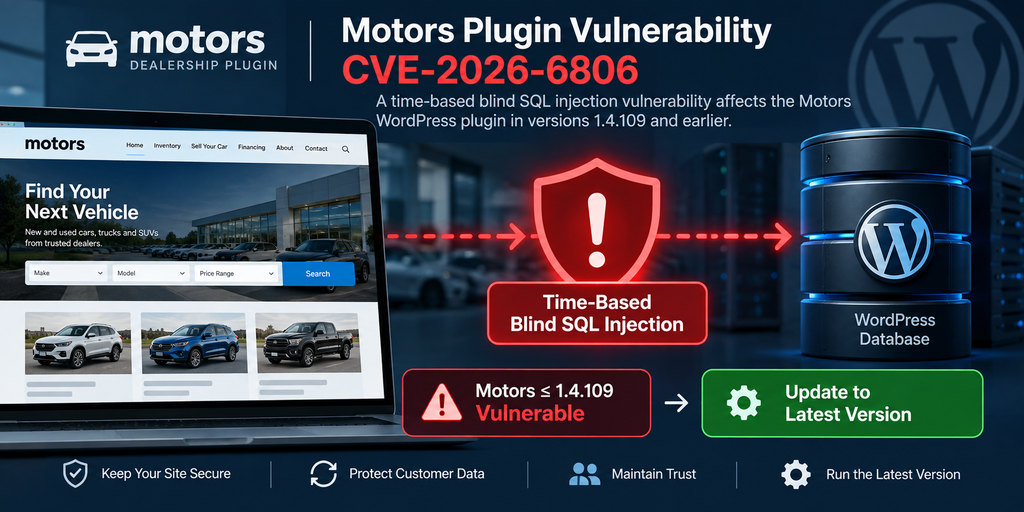
A newly disclosed Motors plugin vulnerability, tracked as CVE-2026-6806, deserves immediate attention from administrators running the Motors – Car Dealership & Classified Listings Plugin. The vulnerability affects versions up to and including 1.4.109 and involves unauthenticated time-based blind SQL injection through location-related input parameters. Public vulnerability information identifies the issue as CWE-89, or improper neutralization of special elements used in an SQL command.
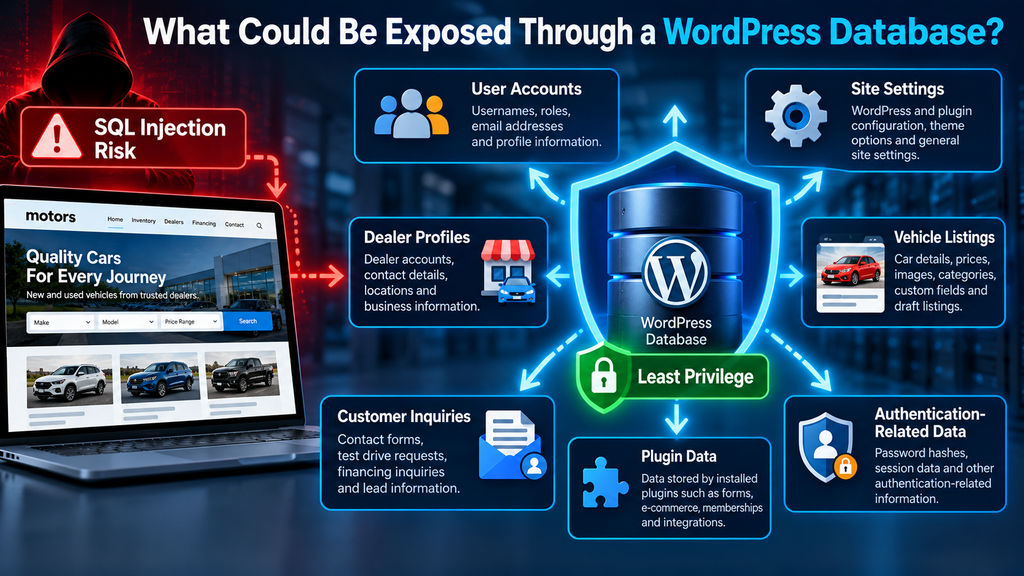
For dealership websites, this matters because the WordPress database is not limited to vehicle descriptions. Depending on the site’s configuration and installed extensions, it can contain WordPress accounts, email addresses, site settings, seller information, form submissions, plugin configuration, authentication-related values, and other operational data.
The response should therefore go beyond simply clicking an update button. Administrators should update the plugin, review relevant web-server and security logs, consider whether suspicious requests occurred before patching, verify WordPress accounts and configuration, and review how much authority the site’s database account actually has.
This guide explains that process from a defensive perspective. It does not provide working SQL injection payloads or instructions for exploiting vulnerable websites.
What Is CVE-2026-6806
CVE-2026-6806 is a security vulnerability affecting the Motors – Car Dealership & Classified Listings Plugin for WordPress. Public vulnerability records describe it as an unauthenticated time-based blind SQL injection issue affecting Motors versions through 1.4.109. The affected input is associated with location parameters used by the plugin.
SQL injection happens when externally supplied information can influence the structure of a database query instead of remaining strictly treated as data. OWASP explains that parameterized queries and prepared statements are among the primary defenses because they maintain a separation between the SQL command and the values supplied to it.
In the Motors case, published vulnerability information says insufficient handling of user-supplied values and insufficient preparation of an existing database query created the vulnerable condition. An unauthenticated attacker could potentially interact with the affected functionality without first having a legitimate WordPress account.
That unauthenticated characteristic makes the vulnerability especially relevant to public automotive sites. Vehicle inventory pages are normally designed to be accessible to everyone. Search, filtering, location, dealership, and listing features often accept visitor-controlled information because that is necessary for normal operation.
A security flaw in such a public route does not require an attacker to compromise an administrator password first. The vulnerable application functionality itself can become the initial point of contact with the database.
The CVSS 3.1 information associated with the CVE gives it a base score of 7.5, with the documented impact focused on confidentiality. In practical terms, administrators should treat the vulnerability as a potential database information-exposure issue rather than assuming that the published CVE establishes arbitrary database modification or complete server takeover.
Why Automotive Classified Sites Should Pay Attention
A small dealership may assume that its website contains little valuable information because most vehicle listings are intentionally public. That view overlooks the rest of the WordPress database.
The same installation can hold administrator accounts, registered dealers, customer inquiries, configuration settings, plugin options, user metadata, and information generated by other plugins. A site may also use WooCommerce, contact forms, CRM integrations, analytics systems, advertising tools, financing-request forms, or custom dealership functionality.
The exact information at risk therefore depends on the individual WordPress installation. It would be incorrect to claim that CVE-2026-6806 automatically exposes every possible piece of information on every Motors site. However, database-level information disclosure deserves serious attention because WordPress centralizes substantial application data in its database.
Public automotive websites also tend to receive large volumes of legitimate requests. That background traffic can make malicious probing harder to notice unless administrators retain useful access logs and know what patterns to investigate.
The safest response is straightforward: identify the installed Motors version, update immediately if it falls within the vulnerable range, and then determine whether there is evidence that suspicious interaction occurred before the patch was installed.
Which Motors Versions Are Vulnerable
Published CVE information identifies Motors versions 1.4.109 and earlier as affected by CVE-2026-6806. Version 1.4.110 is referenced as the patched release line associated with the security correction.
The official WordPress.org plugin directory shows that Motors has continued to receive releases after 1.4.110. Therefore, administrators should normally install the latest stable version available from the legitimate distribution channel, rather than intentionally stopping at the oldest release containing the fix.
A simple way to interpret the version status is:
Motors 1.4.109 or earlier: vulnerable to CVE-2026-6806 according to the published advisory information.
Motors 1.4.110: first release line identified as patched for the vulnerability.
Motors newer than 1.4.110: outside the published vulnerable range for CVE-2026-6806, although normal WordPress maintenance still requires keeping the plugin current.
This distinction matters because a WordPress administrator may see that a plugin is only a few versions behind and assume that the delay is harmless. Security vulnerabilities make version numbers more important than the apparent size of an update.
How to Check the Installed Motors Version
Open the WordPress administration dashboard and navigate to:
Plugins → Installed Plugins
Locate:
Motors – Car Dealership & Classified Listings Plugin
The installed version should appear in the plugin information. If the version is 1.4.109 or lower, treat the installation as affected by CVE-2026-6806 and update it.
Administrators with command-line access can also use WP-CLI to inspect installed plugin versions. The objective is simply to establish whether the vulnerable software is present. Avoid testing suspected exploitation against the production website.
If the site uses a staging environment, remember that staging copies can contain production data. An old staging installation that remains reachable from the internet can represent an overlooked security problem even when the public production site has already been patched.
Check development sites, forgotten subdomains, cloned dealership installations, demo sites, and old customer deployments as well.
Do Not Confuse CVE-2026-6806 With Other Motors Vulnerabilities
Motors has had other security issues disclosed separately. For example, Patchstack documents other vulnerabilities affecting versions through 1.4.109, including a different SQL injection issue tracked as CVE-2026-54812. That is a separate CVE from the time-based blind SQL injection issue discussed in this article.
This distinction is important when reviewing security reports. Two vulnerabilities can affect the same plugin and even the same version range while having different technical causes, attack paths, severity assessments, and CVE identifiers.
Do not assume that a report about one Motors vulnerability automatically describes CVE-2026-6806.
For remediation purposes, however, the practical message remains strong: installations still running Motors 1.4.109 or earlier should not remain on that branch.
How Time-Based Blind SQL Injection Works
To understand the Motors plugin vulnerability, it helps to understand the phrase time-based blind SQL injection without getting into offensive exploitation techniques.
A normal WordPress request can trigger database queries. For example, an automotive inventory page may ask the database to return vehicles matching a particular category, price range, location, manufacturer, model, or other criteria.
User-controlled values must remain data. They must not be allowed to change the meaning or structure of the underlying SQL query.
OWASP recommends parameterized queries because they force the application to establish the SQL structure separately from the values supplied to it. This separation prevents input data from being interpreted as part of the database command.
An SQL injection vulnerability appears when that separation fails.
Why It Is Called “Blind”
Some SQL injection flaws display database errors or query results directly on a page. Those cases can reveal obvious information to the person making the request.
Blind SQL injection works differently.
The vulnerable application may not directly print database results to the visitor. Instead, someone probing the vulnerability can potentially infer information by observing how the application behaves.
That is why the word blind appears in the vulnerability description. The attacker does not necessarily receive a convenient database response containing the requested information.
Instead, the application itself can act as an indirect information channel.
Why Timing Matters
In a time-based blind SQL injection scenario, differences in response timing can potentially reveal whether a condition evaluated in a particular way.
Imagine two otherwise similar requests. One receives a normal response quickly, while another consistently causes a measurable delay under controlled conditions.
Repeated timing differences can theoretically be used to infer information bit by bit, even when the application does not display database output.
This approach can be slower than direct data extraction. However, slower does not mean harmless.
Automated tools can make large numbers of requests and analyze response timing systematically. That is one reason administrators should pay attention to unusual repeated requests and strange latency patterns in server logs.
Why Normal Error Monitoring May Miss It
Blind SQL injection does not depend on displaying an obvious SQL error to the attacker. Consequently, an administrator should not conclude that a site was safe merely because visitors never saw database error messages.
The application can continue returning ordinary-looking HTTP responses while database activity behind those responses behaves differently.
Traditional monitoring that focuses only on HTTP 500 errors may therefore miss relevant activity.
Security investigation should consider request frequency, targeted parameters, source addresses, user agents, repeated query variations, unusual response times, and patterns of requests directed at inventory or location functionality.
No single indicator proves exploitation. The value comes from correlating several pieces of evidence.
Why Public Search Features Matter
Vehicle-classified websites are designed around search.
Visitors expect to filter cars by make, model, price, mileage, year, fuel type, transmission, condition,
and location. Many of those values eventually influence database queries.
This functionality is normal and useful. The security requirement is that every value reaching a query must be handled safely.
The Motors CVE demonstrates why even apparently simple search or location values deserve the same security attention as login forms and payment pages.
The vulnerability is associated with location-related input. Public CVE descriptions identify the affected parameters as stm_lat and stm_lng. Site owners can use those parameter names defensively when searching historical logs, but they should not attempt to construct attack payloads against production installations.
What WordPress Data Could Be Exposed
The exact information potentially reachable through an SQL injection vulnerability depends on the affected query, database permissions, WordPress configuration, installed plugins, and the success of any attempted exploitation.
For CVE-2026-6806, the published CVSS vector emphasizes confidentiality impact rather than integrity or availability impact. That is an important technical limitation to preserve when describing the vulnerability.
Still, confidentiality exposure can be serious.
A typical WordPress database contains much more than published posts.
WordPress User Information
The WordPress users table contains account-related records. Associated user metadata can contain additional information about accounts and roles.
WordPress passwords are not normally stored as readable plaintext passwords. They are stored using password hashes. Nevertheless, exposure of authentication-related database information remains a security concern.
Administrators investigating a potentially affected site should review existing WordPress users after patching.
Look for accounts that should not exist, unexpected administrator accounts, unusual email-address changes, role modifications, or other anomalies.
This review is particularly important on automotive classified sites that permit public registration for sellers or dealers because a legitimate site may already contain many accounts.
WordPress Configuration Data
WordPress stores substantial configuration information in its options data.
Plugins and themes frequently add their own settings there as well. Depending on the installed software, those records can contain integration settings, operational configuration, cached data, API-related information, email configuration, or other application values.
Not every option is sensitive. Many are ordinary settings such as site URLs and interface preferences.
However, administrators should assume that database confidentiality matters because WordPress extensions differ widely in what they store.
Automotive Listing Information
Vehicle listing data may include more than information visible on the public inventory page.
A dealership may store internal listing metadata, seller relationships, vehicle identifiers, draft listings, unpublished content, pricing details, location data, and other custom fields.
Some of this information is intended for public display. Some may not be.
Multi-vendor automotive marketplaces deserve particular attention because the database can contain records belonging to multiple independent sellers or dealerships.
Contact and Lead Information
Many automotive websites collect customer inquiries.
A visitor might request a test drive, ask for a price, contact a seller, request financing information, or submit a trade-in inquiry.
Whether those submissions are stored in the WordPress database depends on the plugin or integration handling the form.
Therefore, administrators should inventory the site’s other plugins rather than evaluating the Motors database tables in isolation.
A vulnerability in one component can provide a path toward information maintained by the broader application if the same database account has access to it.
WooCommerce and Other Plugin Data
Some automotive sites combine Motors with WooCommerce, membership systems, payment tools, advertising plugins, CRM integrations, or premium listing systems.
The presence of an SQL injection vulnerability does not mean that all information stored by those systems was necessarily accessed.
However, the database account’s permissions determine an important part of the potential exposure boundary.
That brings us to one of the most valuable security improvements site owners can make after patching: review database privileges.
Updating Motors to a Safe Version

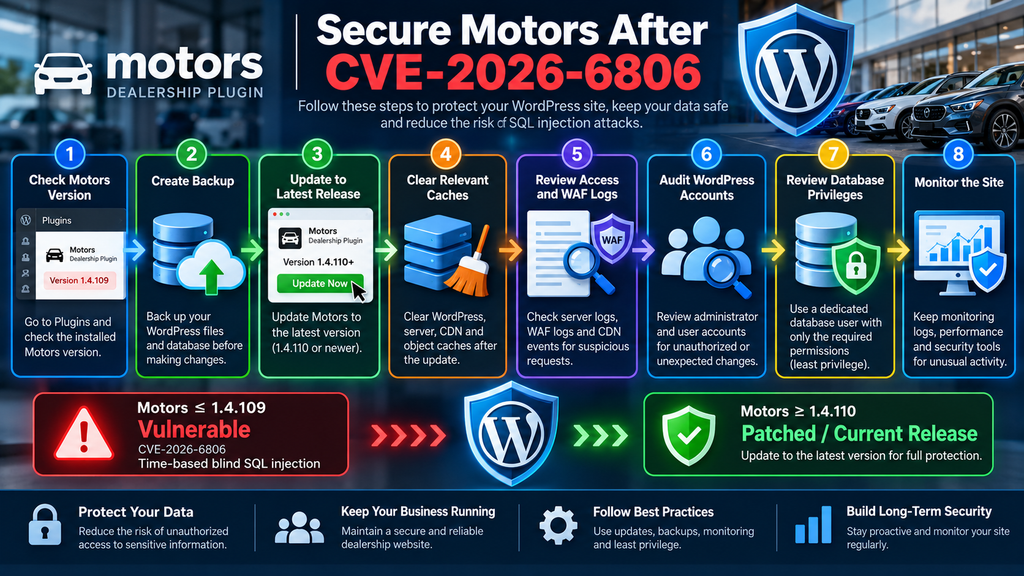
Updating should be the first remediation step for a vulnerable installation.
If the website is running Motors 1.4.109 or earlier, move away from that version immediately. Published vulnerability information identifies 1.4.110 as the patched version, and the official WordPress.org directory shows that newer releases are already available.
Whenever practical, install the latest stable release rather than using 1.4.110 as a long-term target.
Create a Backup Before Updating
Before changing a production dealership site, create a verified backup.
Back up both:
WordPress files
and
the WordPress database
A backup is not a substitute for patching. Its purpose is to provide a recovery point if an update introduces compatibility problems.
For a busy dealership website, confirm that the backup can actually be restored. A backup file that has never been tested provides less confidence than a documented recovery process.
Do not delay an urgent security update for days simply to build a perfect backup workflow. The goal is to combine prompt patching with responsible operational safeguards.
Update Through a Trusted Source
Open:
WordPress Dashboard → Plugins
Locate Motors and install the available update.
Administrators can also use established WordPress management systems or WP-CLI if those are already part of their maintenance workflow.
Avoid downloading replacement plugin ZIP files from unofficial repositories, file-sharing sites, random forums, or unknown download mirrors.
A security incident is the worst possible time to introduce software from an untrusted source.
The official WordPress.org plugin directory identifies Stylemix as the developer and provides the current Motors package and changelog.
Verify the Version After Updating
Do not assume the update completed merely because the button was clicked.
Return to the installed plugins screen and confirm that the old version is gone.
If a caching or deployment system is involved, verify the actual files deployed to the production server.
Managed environments sometimes have unusual update workflows. A staging site may update correctly while production remains unchanged. Deployment systems can also overwrite newly updated plugin files with an older codebase if the plugin is tracked in a repository or deployment package.
Version verification should therefore be an explicit step.
Test the Automotive Inventory
After updating, test normal site functionality.
Check vehicle inventory pages, search filters, individual vehicle pages, dealer pages, account functionality, location search, forms, and any custom templates that depend on Motors.
Perform tests as a normal visitor as well as an authenticated administrator where appropriate.
A security update should not be considered operationally complete until the website’s essential business functions have been checked.
Clear Relevant Caches
If the website uses page caching, object caching, a CDN, or a managed hosting cache, clear relevant caches after the update.
Caching does not normally keep vulnerable PHP code executing after files have been correctly replaced, but clearing application caches helps ensure that the website is tested against the current state.
For sites using Redis object caching, clear the WordPress object cache through the normal management process rather than deleting unrelated Redis data blindly.
Also consider PHP OPcache if your hosting environment has unusual deployment behavior. Most properly configured environments handle changed PHP files automatically, but administrators should follow their hosting platform’s documented process.
Updating Is Necessary, but Investigation May Still Be Necessary
Installing the patch closes the known vulnerable path. It does not tell you whether someone interacted with that path yesterday, last week, or earlier.
That is why remediation has two tracks:
Patch the vulnerability.
Investigate potential historical activity.
If logs show no suspicious evidence, that is useful information, although absence of evidence cannot always prove that no attempt occurred.
If logs reveal strongly suspicious activity, expand the investigation instead of assuming the plugin update finished the incident.
Detecting SQL Injection Attempts in Server Logs
Server logs can provide valuable evidence when investigating CVE-2026-6806.
The most useful sources often include web-server access logs, error logs, WAF logs, CDN security events, hosting security logs, reverse-proxy logs, and WordPress security-plugin records.
Availability depends on the hosting environment.
For cPanel-based hosting, raw access logs and error logs may be available through the hosting interface or directly on the server. VPS administrators may also have Apache or Nginx logs available through the operating system.
Preserve relevant logs before rotation removes older records.
Start With the Known Affected Parameters
Public CVE descriptions associate CVE-2026-6806 with the Motors location parameters:
stm_lat
and
stm_lng
These strings provide a useful starting point for defensive log analysis.
Search historical HTTP logs for requests containing those parameter names.
Do not assume every matching request is malicious.
Location parameters can be part of legitimate Motors functionality, so their presence alone is not evidence of an attack.
Instead, look at how the requests behave as a group.
Look for Repeated Requests
Time-based blind SQL injection generally requires repeated interaction because information is inferred indirectly.
Consequently, a large sequence of similar requests from the same source deserves attention.
Review whether one address repeatedly requested the same inventory endpoint while changing only small portions of query parameters.
Also inspect request frequency.
A normal visitor may search several locations while browsing vehicles. Hundreds or thousands of mechanically varied requests in a short period can look very different.
However, IP addresses alone should never be treated as definitive attribution. Attackers can use proxies, cloud infrastructure, compromised hosts, or distributed sources.
Examine Response Times
Because this CVE involves a time-based technique, unusual response duration can be useful evidence when your logging system records request processing times.
Compare suspicious requests with ordinary requests to the same endpoint.
Repeated, structured timing differences can justify further investigation.
Network congestion, database load, PHP workers, cache misses, external APIs, backups, and server resource pressure can also create slow responses.
Therefore, a slow request is not proof of SQL injection.
Investigators should correlate timing with request patterns and other indicators.
Check Unusual Query Strings
Look for parameters containing unexpectedly long or highly structured values.
A latitude or longitude field normally has a predictable format. Input that deviates dramatically from the application’s normal location values deserves investigation.
Defensive review can focus on anomalies without reproducing working SQL injection syntax.
A WAF may already identify suspicious database-oriented request patterns and label them as SQL injection attempts.
If you use a CDN or application firewall, review its historical events around the period when the vulnerable version was active.
Review HTTP Methods and Endpoints
Identify which URL paths received suspicious requests.
This helps distinguish automated scanning from ordinary user behavior.
Attackers frequently scan many sites using standardized request patterns. A sequence may include unrelated WordPress probes before or after requests targeting Motors.
Look at the complete activity associated with a suspicious source rather than examining one request in isolation.
For example, requests probing multiple plugin paths, WordPress login routes, XML-RPC, backup filenames, or unrelated endpoints can provide broader context.
Do not visit suspicious URLs copied from logs in a browser unless you understand exactly what they contain.
Preserve Evidence Before Cleaning
If you discover suspicious activity, preserve relevant logs before making major changes.
Record:
- the date and time
- source address
- requested endpoint
- HTTP method
- response status
- response duration when available
- user agent
- security-system alerts associated with the request
Preserving evidence makes later investigation easier.
Avoid publicly publishing complete malicious requests from your logs. They may contain reusable exploit material, tokens, personal information, or other sensitive data.
Review Database Privileges After the Motors Plugin Vulnerability
Patching the plugin fixes the vulnerable application path, but database permissions determine how much authority the WordPress application possesses when communicating with the database.
This is where least privilege becomes important.
OWASP recommends that application database accounts receive only the permissions they genuinely require. It specifically advises against using database administrative or root-style accounts for ordinary web applications.
A WordPress installation needs enough database authority to operate correctly. It needs to read content and settings and, during normal operation, create or modify records.
Updates and plugin installations may also require schema changes.
That does not mean the WordPress database user should automatically have unrestricted authority over every database on the server.
Give Each WordPress Site Its Own Database User
If a hosting account contains several WordPress websites, avoid configuring all of them to connect using one powerful database account whenever your hosting architecture allows proper separation.
Ideally, each site should use its own database and dedicated database user.
For example:
- Site A → Database A → User A
- Site B → Database B → User B
- Site C → Database C → User C
If Site A suffers an application-level vulnerability, its database credentials should not automatically grant access to the unrelated databases used by Sites B and C.
OWASP recommends separate database users for separate web applications and restricting each account to the databases it actually needs.
Do Not Use the MySQL Root Account for WordPress
WordPress should not connect to MySQL or MariaDB as root.
Check the database configuration carefully if you manage your own VPS.
WordPress database credentials are normally defined in wp-config.php.
Do not post that file publicly or paste its contents into public support forums because it contains sensitive database credentials and other security-related values.
If WordPress currently uses an unnecessarily powerful database account, create a dedicated account with appropriate privileges and test the change carefully.
Database Privileges Are Defense in Depth
Least privilege does not repair SQL injection.
That distinction is important.
The actual vulnerability must be fixed in the application code, which in this case means updating Motors to a patched version.
Database privilege restrictions provide defense in depth. They can reduce what a compromised application account is allowed to do.
OWASP describes least privilege as an additional defense intended to minimize potential damage if an SQL injection vulnerability succeeds.
Think of the controls as layers:
- Secure application code prevents the injection.
- Updates remove known vulnerable code.
- A WAF may block suspicious traffic.
- Logging helps detect attempted abuse.
- Database permissions limit unnecessary authority.
- Backups support recovery.
No single layer should be treated as a replacement for the others.
What to Do If You Find Suspicious Activity
Discovering unusual requests does not automatically prove that the database was compromised.
Internet-facing WordPress websites receive automated scanning constantly. Some scanners simply identify software versions. Others test generic vulnerabilities that do not apply to the target.
The correct response is to evaluate the evidence systematically.
First, confirm whether the site was running a vulnerable Motors version when the suspicious requests occurred.
If the site had already been updated beyond the affected range, the specific CVE may not explain the activity.
If the vulnerable version was active, preserve the relevant logs and expand the review.
Audit WordPress Administrator Accounts
Open the WordPress users section and review privileged accounts.
Verify that every administrator is expected.
Check for accounts with unfamiliar usernames or email addresses. Also investigate legitimate accounts whose roles changed unexpectedly.
If you suspect account compromise, reset credentials through a controlled incident-response process and invalidate active sessions where appropriate.
Do not simply delete an unfamiliar account before recording relevant evidence if you are conducting a formal investigation.
Inspect Recently Modified Files
Review recent filesystem changes.
Focus on WordPress core directories, active plugins, active themes, wp-content/uploads, MU plugins, and server configuration files.
Unexpected PHP files in upload directories deserve attention because ordinary WordPress media uploads should not normally require executable PHP scripts.
File timestamps alone are imperfect evidence. Updates and caching systems can legitimately modify files.
Compare questionable files against trusted packages whenever possible.
Check WordPress Core Integrity
WP-CLI can help administrators verify WordPress core checksums.
The purpose is to determine whether core files differ unexpectedly from official WordPress distributions.
Plugin integrity can be more complicated, especially when commercial plugins or customized code are involved.
Maintain trusted copies of custom themes and plugins so unexpected changes can be identified.
Review Scheduled Tasks
Inspect WordPress cron jobs and operating-system cron jobs if you control the server.
Attackers who gain deeper access sometimes attempt to create persistence mechanisms that survive simple plugin updates.
Again, CVE-2026-6806 by itself should not be described as proof of server takeover. This broader review is a precaution when other indicators suggest compromise.
Rotate Credentials When Evidence Justifies It
If investigation suggests that sensitive configuration or credentials may have been exposed, consider rotating affected credentials.
This may include:
WordPress administrator passwords, database credentials, API credentials, application passwords, hosting credentials, and relevant integration secrets.
Credential rotation should be deliberate.
Changing everything without documenting dependencies can cause outages and complicate an investigation.
For a business-critical dealership site, coordinate changes with the hosting provider or security professional if the environment is complex.
Hardening Automotive WordPress Websites Beyond This Patch
Security maintenance should not end when CVE-2026-6806 disappears from the vulnerability scanner.
Automotive sites can become attractive targets because they combine public search interfaces, user registration, seller accounts, contact forms, large media libraries, advertising integrations, and sometimes payment or financing functionality.
Reducing unnecessary complexity helps reduce the attack surface.
Remove Plugins You No Longer Use
A deactivated plugin can still leave files on the server.
If a plugin is no longer required, remove it rather than leaving abandoned code installed indefinitely.
Before removal, verify that the plugin is not required by a theme, shortcode, custom post type, or important data workflow.
Keep an inventory of the software that powers the site.
Keep WordPress Core Updated
Plugin security does not replace core security.
Run a supported WordPress release and apply security updates promptly.
The same principle applies to PHP, MariaDB or MySQL, the operating system, web server, control panel, and other components of the hosting stack.
A secure WordPress installation is an ecosystem rather than a single application.
Protect Administrative Access
Use strong, unique passwords for privileged accounts.
Enable multi-factor authentication where appropriate.
Limit the number of administrator accounts.
Someone who only needs to manage vehicle listings should not automatically receive full administrative authority over plugins, themes, users, and site configuration.
Role separation reduces the consequences of an individual account compromise.
Use a Web Application Firewall as an Additional Layer
A properly configured WAF can detect or block many common injection patterns.
However, it should never be used as an excuse to leave a known vulnerable plugin unpatched.
Firewall rules are a compensating control.
The application update remains the primary remediation.
A WAF can still be valuable for virtual patching during the short interval before an update is deployed and for blocking unrelated malicious traffic afterward.
Maintain Useful Logs
Logs have little incident-response value if they disappear before anyone needs them.
Choose a retention period appropriate for the site’s risk, storage capacity, and privacy obligations.
Make sure timestamps are accurate and preferably synchronized.
Know where Apache, Nginx, CDN, firewall, PHP, WordPress security, and hosting logs are stored before an incident occurs.
A five-minute inventory today can save hours during an investigation.
A Practical Remediation Checklist for Dealership Owners
Owners of Motors-powered websites do not need to become database-security specialists to respond responsibly.
Start by determining the installed version.
If Motors is version 1.4.109 or earlier, update it immediately to the latest stable release from a trusted source. Confirm the new version after installation and test the vehicle inventory and search functionality.
Next, determine how long the vulnerable version was publicly accessible.
Preserve available web-server, CDN, WAF, and security-plugin logs covering that period.
Search those logs for unusual interaction involving the affected location functionality. Pay particular attention to repetitive requests, abnormal input shapes, suspicious automation, and unusual timing patterns.
Review privileged WordPress accounts and inspect the installation for unexpected modifications if the logs provide reason for concern.
Finally, review database architecture.
Confirm that WordPress does not use a MySQL or MariaDB root account and that the site’s database credentials do not unnecessarily provide authority over unrelated databases.
This approach handles both sides of the problem: removing the vulnerable code and reducing the potential consequences of future application vulnerabilities.
Frequently Asked Questions
What is the Motors plugin vulnerability?
The Motors plugin vulnerability discussed here is CVE-2026-6806, an unauthenticated time-based blind SQL injection affecting the Motors – Car Dealership & Classified Listings Plugin for WordPress. Published CVE information says the flaw can potentially be used to infer sensitive information from the database.
Which Motors versions are affected by CVE-2026-6806?
Published vulnerability records identify Motors versions up to and including 1.4.109 as vulnerable. Version 1.4.110 is identified as the first patched release line. Newer releases are available, so administrators should generally update to the latest stable version.
Does an attacker need a WordPress account?
The CVE is classified as unauthenticated, meaning exploitation of the vulnerable path does not require a legitimate authenticated WordPress account.
What does time-based blind SQL injection mean?
It is a form of SQL injection where information can potentially be inferred from differences in application response timing rather than being displayed directly on the page. This can make malicious activity less obvious than an SQL error that exposes database information immediately.
Can CVE-2026-6806 delete the entire WordPress database?
The published CVSS information for this specific CVE emphasizes confidentiality impact, not integrity or availability impact. Therefore, administrators should not automatically describe CVE-2026-6806 as providing arbitrary database deletion. Its documented concern is unauthorized database information extraction.
Is updating Motors enough?
Updating closes the known vulnerable path, but administrators should also review historical logs when the vulnerable version was publicly accessible. If suspicious activity appears, expand the investigation to WordPress accounts, files, configuration, and other relevant systems.
Should I deactivate Motors instead of updating it?
If an immediate update is impossible, disabling vulnerable functionality can reduce exposure temporarily. However, a dealership that depends on Motors may lose essential inventory features. Updating to a patched, supported release is the preferred long-term solution.
What should I search for in server logs?
Start with requests involving the affected location functionality and the publicly documented parameter names stm_lat and stm_lng. Look for repetitive automated patterns, unusual input, high request volumes, and abnormal response timing. The presence of these parameters alone is not proof of malicious activity.
Should WordPress use the MySQL root account?
No. WordPress should use a dedicated database account with only the authority required for the application. OWASP recommends avoiding administrative database accounts for ordinary web applications and applying the principle of least privilege.
Does a firewall replace the Motors security update?
No. A firewall can provide another defensive layer and may block suspicious requests, but the vulnerable plugin should still be updated. The application patch removes the known vulnerability instead of relying entirely on traffic filtering.
Patch First, Then Verify What Happened
The Motors plugin vulnerability CVE-2026-6806 is a useful reminder that public search functionality deserves the same security attention as login pages and administrative interfaces.
Versions through 1.4.109 are affected, while 1.4.110 represents the first patched release line referenced by vulnerability sources. Because newer Motors releases are available, sites should move to the latest stable supported release rather than treating 1.4.110 as a permanent target.
For automotive classified sites, the correct response has several layers. Patch Motors, verify the installed version, preserve and inspect historical logs, investigate suspicious requests, audit privileged accounts when necessary, and review database permissions.
Database least privilege deserves particular attention. WordPress should not connect to the database with a root or unnecessarily powerful account, and separate websites should not casually share a database identity with broad cross-site access. OWASP recommends limiting application database accounts to the resources and permissions they actually require.
Most importantly, do not wait for visible symptoms.
A blind SQL injection vulnerability is specifically concerning because information can potentially be inferred without producing an obvious database dump or dramatic error page.
Patch first. Then verify.
⚠️ Disclaimer and Source Hygiene
This article is provided for educational, defensive cybersecurity, WordPress administration, and incident-prevention purposes. It does not provide exploitation payloads or instructions for attacking vulnerable websites.
Vulnerability information can change as CVE records, vendor advisories, security research, and software releases are updated. Always verify the current Motors release and official security information before making production changes.
If you believe a business website has been compromised, preserve relevant evidence and consider consulting your hosting provider, WordPress developer, database administrator, or qualified cybersecurity professional before performing destructive cleanup actions.
The technical explanations in this article are based on publicly available vulnerability information, the official WordPress.org plugin directory, vulnerability databases, and OWASP guidance on SQL injection prevention and database least privilege.
🔔 For more tutorials like this, consider subscribing to our blog.
📩 Do you have questions or suggestions? Leave a comment or contact us!
🏷️ Tags: Motors plugin vulnerability, CVE-2026-6806, Motors WordPress plugin, WordPress SQL injection, WordPress security, SQL injection vulnerability, automotive WordPress security, car dealership WordPress, WordPress database security, Motors security update
📢 Hashtags: #WordPressSecurity, #CVE20266806, #MotorsPlugin, #SQLInjection, #WordPress, #CyberSecurity, #WebsiteSecurity, #DatabaseSecurity, #CarDealership, #WordPressPlugins
Stay Updated With More WordPress Security Guides
For more tutorials like this, consider subscribing to our blog.
Do you have questions or suggestions? Leave a comment or contact us!
Sources and References
WordPress.org – Motors – Car Dealership & Classified Listings Plugin: Official plugin directory, current release information, plugin description, and changelog.
CVE-2026-6806 public vulnerability record: Documents the unauthenticated time-based blind SQL injection, affected Motors versions through 1.4.109, associated location parameters, CWE-89 classification, and CVSS information.
Security advisory information: Confirms the affected version range, unauthenticated attack condition, SQL injection classification, and potential sensitive-information extraction.
OWASP SQL Injection Prevention Cheat Sheet: Guidance covering parameterized queries, prepared statements, input validation, and least-privilege database accounts.
OWASP Database Security Cheat Sheet: Guidance for limiting database permissions, avoiding administrative application accounts, restricting database access, and separating application database users.
OWASP Query Parameterization Cheat Sheet: Additional guidance explaining why parameterized database queries are a primary defense against SQL injection.
Secondary Sources and Testimonials
Patchstack separately documents additional security issues affecting Motors versions through 1.4.109, including another SQL injection vulnerability. These records provide useful context showing why administrators should evaluate the plugin’s broader security history rather than confusing separate CVEs with CVE-2026-6806.
No unverifiable user testimonials or fabricated administrator experiences have been included. Security recommendations are based on published vulnerability information and established defensive guidance rather than anecdotal claims.
1 thought on “Motors Plugin Vulnerability: SQL Injection Warning”