
Table of Contents
A newly disclosed Simply Schedule Appointments vulnerability can allow local file inclusion through the ssa_locale parameter. Although formally classified as requiring Subscriber-level access, researchers report that the vulnerable behavior may be reachable without authentication, making prompt WordPress plugin updates and security auditing especially important.
What Is CVE-2026-89294
CVE-2026-89294 is a security vulnerability affecting the Simply Schedule Appointments WordPress plugin. The issue involves Local File Inclusion, commonly shortened to LFI, and is associated with the plugin’s handling of the ssa_locale parameter. Security information published on September 30, 2026 identifies Simply Schedule Appointments versions up to and including 1.6.12.27 as vulnerable. The reported CVSS 3.1 score is 7.5, placing the vulnerability in the High severity category. The weakness is associated with CWE-98, which covers improper control of filenames used in PHP include or require operations.
The vulnerability deserves attention because Simply Schedule Appointments is not an obscure experimental plugin. It is an established scheduling solution used by WordPress websites to provide appointment booking functionality. At the time of this disclosure, the WordPress.org plugin directory reported more than 50,000 active installations. That does not mean every installation has been attacked or compromised. A vulnerable version simply means the underlying software contains the affected code path. Site owners should therefore respond by updating and auditing rather than assuming compromise.
The Affected Versions
The published vulnerability information identifies all Simply Schedule Appointments versions through 1.6.12.27 as affected by CVE-2026-89294. Administrators running one of these releases should treat the installation as outdated from a security perspective. The safest response is not to investigate whether a particular site configuration appears exploitable before updating. Updating removes the known vulnerable code path and reduces unnecessary exposure.
The WordPress.org plugin directory currently lists version 1.6.12.33. Security tracking information also identifies a later release as containing the fix. Because plugin development can continue after an article is published, administrators should always install the latest stable release offered through the official WordPress update system rather than treating a version number mentioned in an article as a permanent recommendation.
Why Local File Inclusion Matters
Local File Inclusion occurs when an application allows an untrusted value to influence which local file PHP loads. A normal application should decide which files are safe to include and should restrict choices to a predefined set of legitimate resources. User-controlled input should never become an unrestricted instruction telling PHP which local file to process.
The security impact depends heavily on the files available on the server and the surrounding configuration. In some cases, file inclusion may expose information. In more serious circumstances, it can cause PHP code already present on the server to execute within the WordPress application’s context. This is why LFI vulnerabilities deserve prompt attention even when exploitation requires additional conditions.
CVSS Does Not Tell the Entire Story
CVE-2026-89294 has been reported with the CVSS vector AV:N/AC:H/PR:L/UI:N/S:U/C:H/I:H/A:H. In simple terms, the published vector describes a network-reachable vulnerability with high attack complexity, low privileges, no required user interaction, unchanged scope, and potentially high confidentiality, integrity, and availability impact.
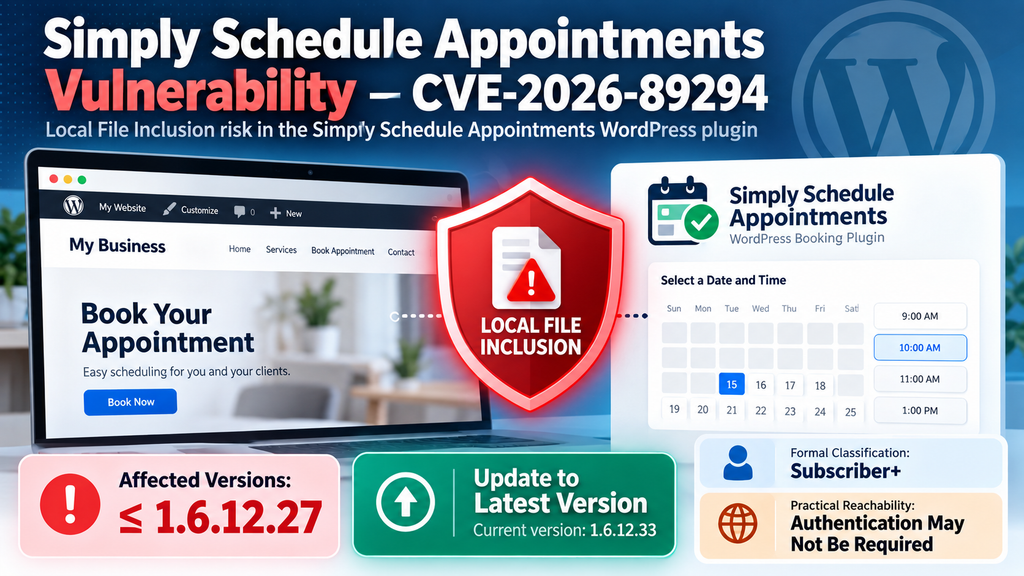
However, administrators should avoid treating a CVSS vector as a complete description of real-world reachability. In this particular case, an important discrepancy exists between the formal Subscriber+ classification and the reported behavior of the affected code. That difference is central to understanding why this Simply Schedule Appointments vulnerability deserves additional attention.
Why Authentication Is Not Required in Practice
The most interesting part of CVE-2026-89294 is the apparent difference between its formal classification and the practical reachability described in the vulnerability disclosure. The issue is commonly titled as an authenticated Subscriber+ Local File Inclusion vulnerability. Reading only that title could lead a WordPress administrator to conclude that an attacker must first obtain a valid account.
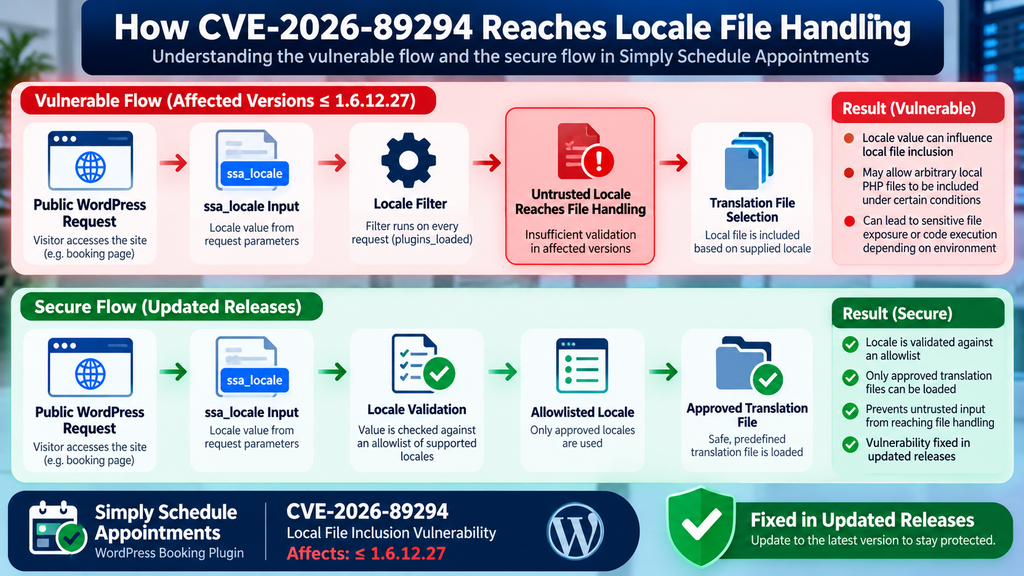
The detailed vulnerability description adds an important qualification. It states that exploitation does not require authentication in practice because the relevant locale filter is installed unconditionally on requests during WordPress’s plugins_loaded phase. The callback involved in processing the locale value reportedly does not perform a capability or nonce check before returning the supplied parameter value.
What Subscriber+ Normally Means
WordPress has several standard user roles. Subscriber is the lowest traditional role on a normal WordPress installation. Subscribers generally have very limited capabilities compared with Contributors, Authors, Editors, and Administrators.
When a vulnerability is labeled Subscriber+, administrators normally understand that an attacker needs a legitimate authenticated WordPress account with at least Subscriber privileges. That requirement can significantly reduce exposure on websites where public user registration is disabled.
That assumption becomes unreliable when the vulnerable function itself can be reached before an authentication or authorization requirement is enforced. The title may still reflect the original classification or scoring methodology, while the technical path exposes the behavior more broadly.
Authentication and Authorization Are Different Controls
Authentication answers the question, “Who is making this request?” Authorization answers a different question: “Is this user permitted to perform this action?”
Secure WordPress code often needs both controls. A request may need a logged-in user, an appropriate capability such as an administrative permission, and a nonce that protects a sensitive action against unintended requests.
The reported CVE-2026-89294 behavior is important because the locale-processing path reportedly lacks the expected nonce or capability gate before processing the relevant value. Consequently, administrators should not assume that disabling public WordPress registration neutralizes the vulnerability.
Why the Distinction Changes Risk Assessment
Imagine two vulnerabilities with identical technical consequences. The first can only be reached by an authenticated Editor. The second is reachable by any remote visitor. Although both might involve the same unsafe file operation, their practical exposure differs substantially.
A website with no untrusted Editors could have limited exposure to the first issue. The second issue places the vulnerable code on a much broader attack surface because arbitrary visitors can interact with the public website.
CVE-2026-89294 illustrates why administrators should read vulnerability details rather than relying exclusively on labels. The published description explicitly notes the practical authentication issue. That information should influence patching urgency.
It Does Not Mean Every Website Is Already Compromised
An unauthenticated code path does not mean successful exploitation is guaranteed. Local File Inclusion vulnerabilities often depend on additional environmental conditions. The attacker may need a suitable local PHP file to exist at an accessible location, for example.
Server configuration, filesystem permissions, upload restrictions, PHP behavior, WordPress hardening, and other security controls can all influence the final outcome.
Therefore, administrators should avoid two extremes. The first is dismissing the issue because its title says Subscriber+. The second is assuming every outdated installation has already been taken over. The appropriate response lies between those positions: update immediately, inspect the environment, review logs, and investigate anomalies.
Public Booking Functionality Increases the Importance of Input Handling
Appointment plugins naturally expose functionality to anonymous visitors. That is their purpose. Customers need to view schedules, choose appointment times, select languages, and submit booking information without becoming WordPress users.
Public functionality is not inherently unsafe. However, developers must treat every value arriving from a public request as untrusted. A locale selector should ultimately resolve only to legitimate language resources. It should never become a general mechanism for choosing arbitrary server files.
That principle extends beyond appointment plugins. Any WordPress plugin accepting filenames, template names, export paths, language codes, or document identifiers must tightly control how those values reach filesystem operations.
How the ssa_locale Parameter Enables File Inclusion
The ssa_locale functionality has a legitimate purpose. Simply Schedule Appointments supports multilingual booking experiences, and its documentation explains that a booking calendar can use a specified locale. A locale value normally represents a language or regional variation rather than a filesystem path.
For example, a website might need different booking interfaces for visitors using different languages. The application can use the selected locale to determine which translation resources should be loaded. That is standard behavior and is common throughout WordPress.
The security problem appears when an externally controlled locale value influences a file inclusion operation without sufficiently restricting that value to a safe list of known locales.
A Locale Should Be Data, Not a File Instruction
A secure design treats a locale as a symbolic identifier. The application receives the identifier, verifies that it matches an allowed locale, and then maps it internally to a known translation resource.
That mapping is important. The visitor should effectively say, “I want this supported language,” rather than, “Load this server file.”
When those two concepts become blurred, path manipulation becomes possible. An attacker may attempt to make the application interpret something other than an approved locale as a resource location. If validation fails to constrain the resulting filename, Local File Inclusion can occur.
Allowlisting Is Stronger Than Cleaning Arbitrary Paths
Developers sometimes try to secure filesystem input by removing suspicious characters. That approach is fragile because path formats and encoding behavior can create unexpected combinations.
A safer architecture uses an allowlist. If a plugin supports a defined collection of locales, the code can compare the requested value against those supported identifiers. Anything outside that collection should be rejected or replaced with the site’s default locale.
This approach dramatically reduces ambiguity. Instead of attempting to identify every possible malicious value, the application accepts only values known to be legitimate.
The Role of WordPress Filters
WordPress filters allow plugins and themes to modify values as WordPress processes a request. They are an essential part of the platform’s extensibility model.
A filter is not automatically dangerous simply because it runs early. The problem arises when untrusted request data reaches a security-sensitive operation without the appropriate validation.
According to the CVE description, the relevant Simply Schedule Appointments locale filter was installed unconditionally during plugins_loaded. The associated callback reportedly returned the raw GET parameter without a nonce or capability check. That implementation detail explains why the Subscriber+ label can underestimate practical reachability.
The Parameter Is Not the Vulnerability by Itself
Administrators should not misunderstand the role of ssa_locale. Having a parameter with that name is not inherently a security problem. Parameters are simply ways to pass information to an application.
The vulnerability emerges from how a supplied value is validated and later used.
This distinction matters when reviewing logs. Seeing a legitimate ssa_locale value associated with normal multilingual booking traffic does not indicate an attack. Security teams should look for abnormal patterns, unexpected path-like input, unusual errors, repeated probes, and related filesystem activity rather than treating every locale request as malicious.
Why Publishing Exploit Strings Is Unnecessary
Administrators do not need a working attack payload to defend a WordPress website against this issue. The defensive priorities are straightforward: identify the installed plugin version, update it, review suspicious requests, inspect filesystem changes, and investigate unexpected PHP files.
Publishing functional traversal strings or ready-to-run requests provides little additional value to ordinary site owners. It can instead make unsafe testing easier on websites where the tester lacks authorization.
For defensive auditing, the important indicator is the concept: unexpected or path-like data supplied through locale-related requests deserves investigation.
When Local File Inclusion Becomes Code Execution
Local File Inclusion and Remote Code Execution are related concepts in some attack chains, but they are not identical. This distinction is particularly important when discussing CVE-2026-89294 accurately.
LFI means the vulnerable application can be manipulated into including a local file that it should not include. Code execution becomes possible when the included resource contains PHP code that the server subsequently interprets and executes.
The CVE description specifically notes that the vulnerability can allow arbitrary PHP files already present on the server to be included and executed. However, reaching that outcome can require additional conditions.
File Inclusion Does Not Automatically Create a Malicious File
The vulnerable locale mechanism does not magically place arbitrary attacker-controlled PHP code on the server. A suitable PHP file must already exist or become available through another mechanism before inclusion can execute its contents.
That distinction explains part of the reported high attack complexity. A vulnerable website can contain the LFI weakness while lacking an obvious route that turns it into code execution.
Nevertheless, defenders should not depend on that limitation. WordPress installations frequently contain many writable locations, plugins, themes, cache files, temporary files, backup files, and upload-processing components. A second weakness elsewhere in the environment could potentially change the impact of the LFI.
Vulnerability Chaining Changes the Picture
Security incidents often involve more than one weakness. A minor upload problem may look relatively limited on its own. An LFI flaw may also appear constrained if an attacker cannot place executable content on the server.
Combined, however, separate weaknesses can sometimes create a more serious chain.
This is why WordPress administrators should evaluate the entire installation rather than only the vulnerable plugin. Outdated themes, abandoned plugins, insecure upload handlers, writable directories, exposed backups, and compromised administrator accounts can all increase overall risk.
PHP Upload Restrictions Still Matter
A properly configured WordPress website normally prevents ordinary visitors from uploading executable PHP files through standard media functionality. Web servers can also be configured to prevent PHP execution from upload directories.
These controls provide valuable defense in depth. They should remain in place even after Simply Schedule Appointments has been updated.
However, defense in depth is not a substitute for patching. A vulnerable plugin should still be updated because administrators cannot reliably guarantee that no usable local file exists now or will exist later.
Sensitive Information Can Matter Even Without RCE
The security discussion should not focus exclusively on code execution. Local file access can have serious consequences even when an attacker cannot execute arbitrary PHP.
Configuration files and application resources may reveal information about the server, installed software, internal paths, or application behavior. Depending on the exact inclusion mechanism and environment, that information can support later attacks.
For this reason, administrators should treat LFI as a significant security category rather than waiting for proof that full remote code execution is possible on their particular server.
Confidentiality, Integrity, and Availability
The published CVSS information assigns High potential impact to confidentiality, integrity, and availability. These categories represent three fundamental security goals.
Confidentiality concerns preventing unauthorized disclosure. Integrity concerns preventing unauthorized modification. Availability concerns keeping systems operational and accessible.
Successful code execution can threaten all three. An attacker executing PHP within a WordPress application could potentially interact with the site’s data and application environment according to the permissions available to the web server process.
The exact outcome always depends on configuration, permissions, and the attack chain. CVSS represents potential severity rather than evidence that every affected website will experience the maximum impact.
Updating Simply Schedule Appointments

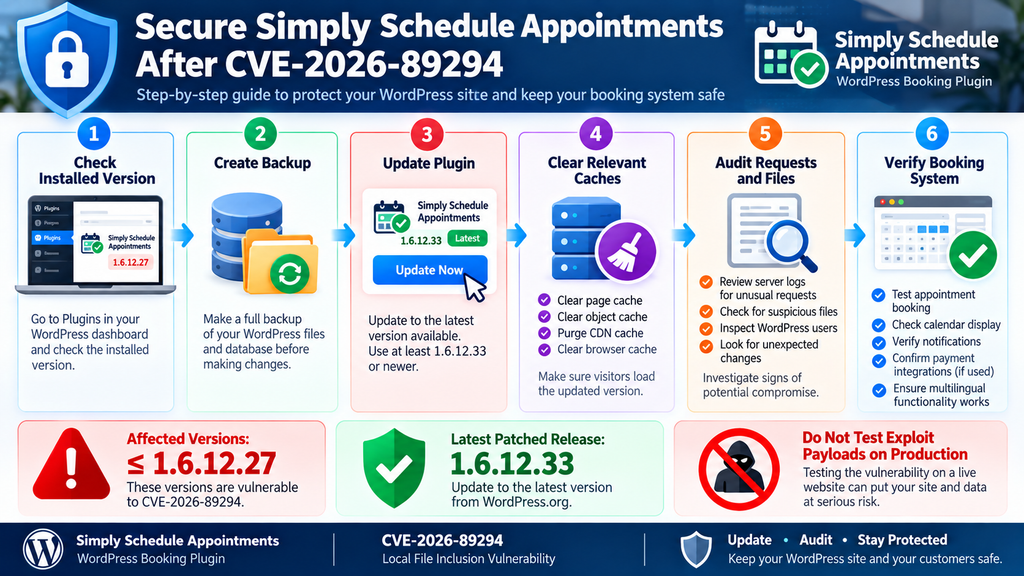
The first defensive action is simple: update Simply Schedule Appointments.
Administrators using version 1.6.12.27 or an earlier release should not postpone the update while investigating whether their particular configuration is exploitable. The vulnerability is already publicly documented, and maintaining an affected version provides no meaningful benefit.
At the time of writing, WordPress.org lists Simply Schedule Appointments 1.6.12.33 as the current release. Because plugin versions can change quickly, administrators should install the latest stable version available from the official WordPress plugin update system.
Check the Installed Version First
Open the WordPress Dashboard and navigate to the Plugins page. Locate Simply Schedule Appointments and review its installed version.
If WordPress reports an available update, create an appropriate backup and apply the update promptly.
Administrators managing WordPress through WP-CLI can also use normal plugin-management commands to inspect installed versions and perform legitimate updates. There is no need to probe the vulnerable parameter to determine whether the website requires patching. Version identification is sufficient.
Update Beyond 1.6.12.27
The affected range ends at 1.6.12.27 according to the CVE information. Administrators should therefore use a release newer than the affected range.
Rather than manually installing the earliest possible patched build, the better maintenance practice is to use the newest stable release offered by the official plugin channel. Later versions can contain additional security hardening, compatibility changes, and unrelated bug fixes.
At the time this article was prepared, version 1.6.12.33 was available through WordPress.org.
Back Up Before Updating
Security updates should be installed quickly, but administrators still need a recovery path. A recent backup makes it easier to restore service if an unexpected compatibility problem occurs.
The backup should cover the WordPress database and relevant website files. Ideally, it should be stored separately from the live web root rather than only inside a publicly reachable website directory.
A backup created after suspected compromise should not automatically be considered clean. Keep earlier restore points according to your site’s retention policy.
Clear Caches After the Update
WordPress installations can contain several caching layers. These may include page caches, object caches, CDN caches, reverse proxies, opcode caches, and hosting-level optimization systems.
After applying a security update, clear relevant caches according to your hosting environment. Then verify that the booking interface still works correctly.
Test normal appointment functionality, language selection, notifications, calendar integrations, and payment workflows if your site uses them. The objective is to confirm both security remediation and business continuity.
Do Not Downgrade After Patching
A backup restoration can accidentally reintroduce a vulnerable plugin version. This is an easy mistake to make during troubleshooting.
If a full-site backup predates the security update, restoring that backup can return Simply Schedule Appointments to an affected release. Always recheck plugin versions after restoring WordPress.
The same rule applies when migrating staging environments to production. An old staging copy should not overwrite a patched production plugin.
Remove the Plugin if It Is No Longer Needed
Unused plugins expand the amount of code administrators must maintain. If Simply Schedule Appointments is installed but no longer needed, removing it can be more appropriate than leaving it inactive indefinitely.
Deactivation alone leaves plugin files on the server. Although an inactive plugin usually does not execute through normal WordPress loading, obsolete files still complicate inventory and incident response.
Before removal, verify whether you need appointment records, configuration data, or exports for business purposes. Follow the plugin’s documented uninstall and data-retention procedures.
Auditing WordPress for Suspicious Files and Requests
Updating closes the known vulnerable path, but patching alone cannot tell you whether someone interacted with the vulnerability before the update. Administrators who operated an affected version should therefore perform a proportionate security review.
The depth of that review should depend on the importance of the website, available logging, exposure period, and presence of unusual activity. A small informational website and a business site processing appointments and customer information may justify different levels of investigation.
Start with evidence that is easiest to preserve: server access logs, security plugin logs, hosting logs, file modification times, WordPress user accounts, plugin inventories, and recent administrative changes.
Review Requests Involving ssa_locale
Because the reported vulnerability involves ssa_locale, web server and security logs should be reviewed for unusual requests involving that parameter.
Normal multilingual functionality can generate legitimate locale-related activity. Therefore, the presence of the parameter alone should not be treated as evidence of compromise.
Look instead for values inconsistent with normal language identifiers, repeated probing patterns, abnormal request volumes, unexpected server errors, or requests originating from sources that simultaneously probe other sensitive WordPress paths.
Review HTTP Error Patterns
File inclusion probing can produce errors when a requested resource cannot be located or processed. Consequently, a sudden cluster of PHP warnings, 500 responses, or unusual application errors around suspicious requests can provide useful context.
Errors alone do not prove exploitation. WordPress websites routinely generate errors because of plugin conflicts, bots, broken URLs, and normal software bugs.
Correlating multiple signals is more useful. A suspicious locale request followed by an application error, filesystem modification, new administrator account, and unexpected outbound connection deserves considerably more attention than an isolated malformed URL.
Inspect WordPress Core Integrity
WordPress core files should generally match the official release files. Unexpected modifications require investigation.
Administrators can use trusted WordPress integrity tools or WP-CLI checksum verification to compare core files against official checksums. A mismatch does not automatically prove malicious activity because some hosting environments or maintenance tools modify files. Nevertheless, unexplained changes should be examined.
Avoid deleting suspicious files immediately if you believe an incident may have occurred. Preserve evidence first, especially on business-critical systems.
Inspect Plugin and Theme Directories
Review installed plugins and themes for unexpected files, recently modified PHP files, unfamiliar directories, and extensions that should not be present.
Pay particular attention to abandoned plugins, manually uploaded code, old theme copies, backup directories, and plugins that are not visible through the normal WordPress dashboard.
Attackers sometimes use filenames that resemble legitimate WordPress components. Therefore, judging files only by their names is unreliable. Compare questionable components against known-clean packages obtained from trusted sources.
Examine the Uploads Directory
The standard WordPress uploads directory primarily contains media. Unexpected executable server-side files in media locations deserve investigation.
Some legitimate plugins may store specialized files under uploads, so context matters. Do not delete a file solely because its extension looks unusual.
Instead, determine which plugin created it, when it appeared, whether the web server can execute it, and whether the file matches documented application behavior.
Check Administrator Accounts
Review WordPress users, especially accounts with Administrator privileges. Look for unfamiliar usernames, unexpected email changes, newly created privileged users, and accounts whose roles changed without authorization.
An attacker who gains code execution may attempt to create persistent administrative access. Removing one suspicious PHP file would not fully remediate the incident if a malicious administrator account remains active.
Also review application passwords and other authentication mechanisms available on the site. Revoke credentials that cannot be confidently verified.
Review Scheduled Tasks
WordPress uses WP-Cron for legitimate scheduled operations. Plugins and themes routinely register scheduled events.
During an incident review, however, unfamiliar scheduled callbacks deserve investigation because persistence mechanisms can use scheduled execution.
Compare cron events against active plugins and documented functionality. A strange task is not automatically malicious, but an event with no identifiable owner should be examined.
Check wp-config.php and Server Configuration
The wp-config.php file contains critical WordPress configuration. Review it for unexplained additions, unexpected includes, unusual PHP statements, or configuration changes.
Server-level files also deserve attention. Depending on the hosting stack, this can include .htaccess, PHP configuration files, web server virtual host configuration, and user-level initialization files.
Attackers who achieve code execution may attempt to establish persistence outside the obvious plugin directory. That is why a complete investigation should not focus exclusively on Simply Schedule Appointments.
Review Database Changes
Some malicious persistence mechanisms live in the database rather than the filesystem. Review suspicious administrator accounts, active plugin settings, unexpected options, modified URLs, injected scripts, and unfamiliar scheduled data.
Be careful when editing serialized WordPress data manually. Incorrect changes can corrupt settings.
For significant incidents, work from a database backup and use established WordPress administration or forensic tools rather than making speculative changes directly in production.
Look for Unexpected Outbound Connections
Compromised applications can communicate with external systems. Hosting firewalls, endpoint monitoring, reverse proxies, or server security products may provide outbound connection information.
Unexpected PHP processes connecting to unfamiliar destinations can be an important indicator when correlated with other evidence.
Again, context is essential. WordPress plugins legitimately communicate with payment gateways, email providers, calendar services, update servers, analytics systems, APIs, and CDNs.
Rotate Credentials When Compromise Is Suspected
If the audit produces credible evidence of code execution or unauthorized administrative access, credential rotation becomes appropriate.
This may include WordPress administrator passwords, hosting credentials, database passwords, SFTP or SSH credentials, API keys, application passwords, payment integration secrets, and other credentials accessible to the affected environment.
Rotation should happen after containment is planned carefully. Changing one credential while leaving malicious persistence active can provide only temporary protection.
Consider a Clean Rebuild After Confirmed Compromise
A confirmed server-side compromise creates a trust problem. Finding one malicious file does not prove that no other persistence mechanism exists.
For high-value websites, rebuilding from known-clean WordPress core files, clean plugin packages, trusted themes, and a verified database may provide greater confidence than manually removing individual suspicious files.
The appropriate response depends on the incident. Administrators handling customer information or commercial systems should consider professional incident-response assistance when the scope cannot be confidently determined.
Understanding the Broader WordPress Security Lesson
CVE-2026-89294 highlights a broader lesson about WordPress security reporting. Vulnerability titles are useful summaries, but they cannot capture every implementation detail.
The phrase “Authenticated (Subscriber+)” sounds reassuring on a website where visitors cannot register. Yet the technical description states that authentication may not actually be required to reach the vulnerable behavior.
Site owners should therefore evaluate affected versions, vulnerable components, required conditions, patch availability, and technical notes together.
Public Parameters Need Strict Boundaries
Booking plugins need public inputs. Contact forms need public inputs. Search pages need public inputs. E-commerce websites need public inputs.
Security does not come from eliminating user input. It comes from establishing strict boundaries around what each input can influence.
A language selector should choose a language. A booking field should contain booking data. A template selector should choose from approved templates. None should silently become unrestricted filesystem controls.
Least Privilege Reduces Consequences
Filesystem permissions can limit the damage caused by application vulnerabilities. The web server should not have unnecessary write access throughout the hosting account.
WordPress itself needs write access in certain environments, especially for uploads and automatic updates. However, administrators should avoid overly permissive ownership and permission settings simply to make installation problems disappear.
A vulnerability that reaches PHP execution becomes more dangerous when the web server process can freely modify sensitive files across multiple websites.
One Hosting Account Can Contain Multiple Sites
Administrators running several WordPress websites on the same server should consider cross-site implications. Weak isolation can allow a compromise in one application to affect files belonging to another.
Proper account separation, filesystem permissions, PHP isolation, backups, and hosting architecture can reduce that risk.
This consideration is particularly important for VPS and reseller environments where many WordPress installations share infrastructure.
Security Plugins Are a Layer, Not the Patch
A Web Application Firewall may block suspicious requests. A WordPress security plugin may detect changed files. Hosting security tools may stop known attack patterns.
These controls are valuable, but none should become a reason to leave a known vulnerable plugin installed.
A patch addresses the vulnerable code itself. Security products provide additional detection and mitigation around it. The strongest approach combines timely updates with monitoring, backups, least privilege, and incident-response readiness.
Frequently Asked Questions
What is the Simply Schedule Appointments vulnerability?
CVE-2026-89294 is a Local File Inclusion vulnerability affecting Simply Schedule Appointments versions up to and including 1.6.12.27. The issue involves the handling of the ssa_locale parameter and can allow unintended local PHP files to be included under vulnerable conditions.
Is CVE-2026-89294 an authenticated vulnerability?
It is formally described as an authenticated Subscriber+ vulnerability. However, the published technical description states that authentication is not required in practice because the affected locale filter is installed on every request and the callback lacks a nonce or capability check before processing the supplied value.
Does an attacker need a WordPress account?
According to the detailed CVE description, not necessarily. This is the important distinction between the formal Subscriber+ classification and the practical behavior reported for the vulnerable code path.
Which Simply Schedule Appointments versions are vulnerable?
Published vulnerability information identifies versions up to and including 1.6.12.27 as affected. Administrators should install the latest stable version available through the official WordPress plugin update system rather than remaining on any release within the vulnerable range.
Is Simply Schedule Appointments 1.6.12.33 available?
Yes. At the time this article was prepared, WordPress.org listed Simply Schedule Appointments version 1.6.12.33. Because versions can change after publication, always verify the current release directly through WordPress.org or the WordPress Dashboard.
Does Local File Inclusion automatically mean remote code execution?
No. LFI and code execution are not automatically equivalent. Code execution generally requires a suitable PHP file or another usable resource to be present on the server. Additional environmental conditions can therefore influence the final impact.
Should I remove Simply Schedule Appointments?
Not necessarily. If you actively use the plugin, the appropriate first response is to update to a patched release and perform a security review. If you no longer use the plugin, removing unnecessary software reduces the amount of code that must be maintained.
How can I tell whether my website was attacked?
Review web server logs, security logs, unusual ssa_locale requests, filesystem changes, administrator accounts, scheduled tasks, plugin and theme files, and unexpected PHP files. A single unusual request does not prove compromise, so correlate multiple indicators before drawing conclusions.
Should I test the vulnerability against my production website?
There is normally no reason to send exploit payloads to production simply to decide whether an update is required. If your installed version falls within the affected range, update it. Authorized security testing should be performed in a controlled environment with appropriate backups and permission.
What should I do if I find suspicious PHP files?
Preserve evidence before deleting files, especially if the website is important to your business. Determine when the files appeared, identify related requests and account activity, isolate the affected environment when appropriate, and consider professional incident-response assistance if code execution appears to have occurred.
A Small Classification Detail With Major Security Meaning
The most important lesson from the Simply Schedule Appointments vulnerability is not merely that another WordPress plugin required a security update. CVE-2026-89294 demonstrates how a short vulnerability label can hide an important implementation detail.
The formal Subscriber+ classification suggests that an attacker needs a WordPress account. The detailed disclosure tells a more nuanced story: the affected locale filter is reportedly installed on requests without the authentication, nonce, or capability boundary that administrators might expect. As a result, the vulnerable behavior may be reachable by an unauthenticated visitor.
That difference matters when prioritizing remediation. Sites running Simply Schedule Appointments 1.6.12.27 or earlier should update rather than relying on disabled registration or the absence of Subscriber accounts as protection.
Patching should then be followed by a reasonable audit. Review suspicious locale-related requests, filesystem changes, administrator accounts, WordPress core integrity, plugin and theme directories, uploads, scheduled tasks, and server configuration.
Most importantly, avoid assuming that vulnerability equals compromise. Security advisories identify weaknesses and potential impact. Logs and forensic evidence determine what actually happened on an individual website.
⚠️ Disclaimer and Source Hygiene
This article is provided for educational, defensive cybersecurity, WordPress administration, and vulnerability-awareness purposes. It does not provide exploit payloads or instructions for compromising websites. Do not perform security testing against systems you do not own or do not have explicit authorization to test.
Vulnerability information can change as researchers, vendors, CVE authorities, and plugin developers publish additional details. Version information in this article reflects publicly available information checked on September 30, 2026. Always verify the current plugin release and security status before making production decisions.
For business-critical websites, suspected compromises, regulated environments, or systems containing sensitive customer information, consider consulting a qualified WordPress security specialist, hosting provider, or incident-response professional.
🔔 For more tutorials like this, consider subscribing to our blog.
📩 Do you have questions or suggestions? Leave a comment or contact us!
🏷️ Tags: Simply Schedule Appointments vulnerability, CVE-2026-89294, WordPress vulnerability, WordPress security, Local File Inclusion, LFI vulnerability, WordPress plugin security, ssa_locale vulnerability, WordPress security update, Simply Schedule Appointments
📢 Hashtags: #WordPress, #WordPressSecurity, #CVE202689294, #CyberSecurity, #SimplyScheduleAppointments, #WordPressPlugin, #SecurityUpdate, #LocalFileInclusion, #WebsiteSecurity, #WordPressTips
Sources and References
CVE and Vulnerability Information
The primary vulnerability information used for this article identifies CVE-2026-89294 as a Local File Inclusion vulnerability affecting Simply Schedule Appointments through version 1.6.12.27. The disclosure reports a CVSS 3.1 score of 7.5 and specifically notes the difference between the formal Subscriber+ classification and practical unauthenticated reachability.
Primary vulnerability reference: Wordfence Threat Intelligence entry for CVE-2026-89294, referenced by the CVE record and security databases.
CVE aggregation and technical details: SecAlerts, “CVE-2026-89294 – Simply Schedule Appointments <= 1.6.12.27 – Authenticated (Subscriber+) Local File Inclusion via ssa_locale Parameter.”
Official WordPress Plugin Information
The official WordPress.org listing was used to verify the current Simply Schedule Appointments release, active installation count, compatibility information, and recent changelog entries.
At the time of research, WordPress.org listed version 1.6.12.33 and more than 50,000 active installations.
Simply Schedule Appointments Documentation
Official Simply Schedule Appointments documentation explains the legitimate use of ssa_locale for displaying booking calendars in different languages. This provides important context: locale selection itself is a normal plugin feature, while the vulnerability concerns unsafe handling of the supplied value in affected releases.
Secondary Sources and Testimonials
Secondary security databases were used to cross-check affected versions, CVE classification, CVSS information, remediation status, and the reported distinction between authenticated classification and unauthenticated practical reachability.
No anonymous testimonials, fabricated attack reports, or unsupported claims of active exploitation have been included. Unless reliable evidence emerges showing otherwise, administrators should distinguish clearly between a website being vulnerable and a website being compromised.
Verified references for publication
The CVE record states that versions through 1.6.12.27 are affected, assigns CVSS 7.5 / CWE-98, and explicitly documents why authentication may not be necessary in practice. SecAlerts
The official WordPress.org listing currently shows Simply Schedule Appointments 1.6.12.33, released September 22, 2026, with 50,000+ active installations and testing through WordPress 7.1.2.
1 thought on “Simply Schedule Appointments Vulnerability: LFI Risk”