
Table of Contents
A high-severity wpForo vulnerability allows unauthenticated attackers to target WordPress databases through the referer parameter. Learn which wpForo versions are affected by CVE-2026-5097, why administrators still using the 2.x branch should act quickly, and how to upgrade safely while checking for suspicious activity.
wpForo Vulnerability Puts Older Forum Installations at Risk
WordPress forums often contain much more information than administrators realize. Beyond public discussions, a forum can connect directly with WordPress user accounts, email addresses, profile information, moderation data, configuration records, and other database content. That makes a serious SQL injection vulnerability particularly important for websites running a community through wpForo.
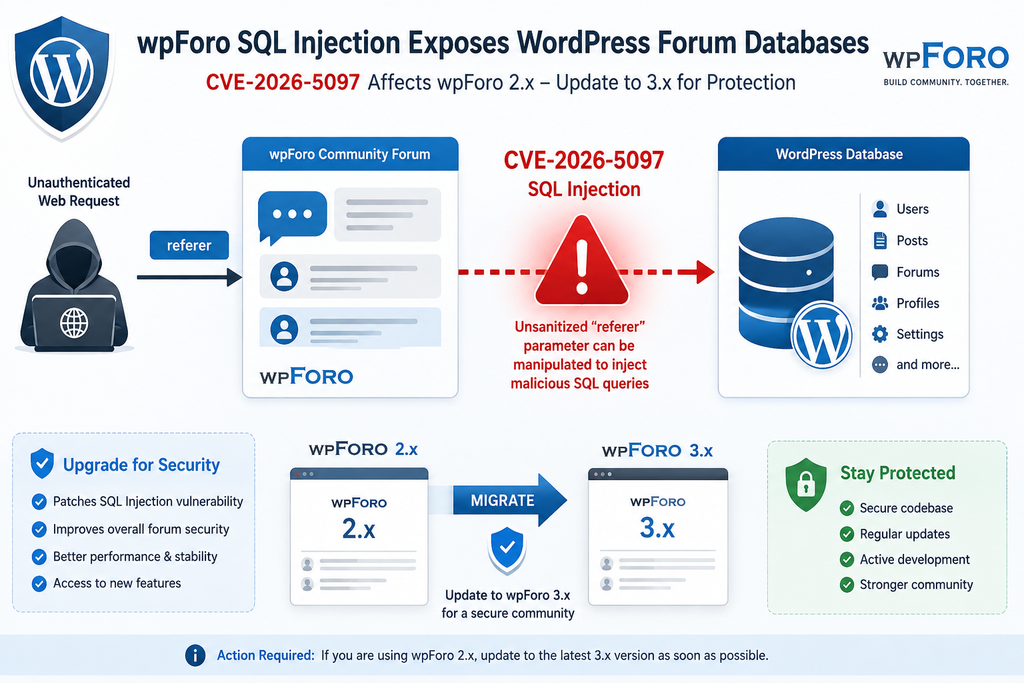
The newly disclosed wpForo vulnerability tracked as CVE-2026-5097 affects installations running wpForo Forum 2.4.17 and earlier. The vulnerability involves insufficient handling of the user-controlled referer parameter before that information reaches a database query. Because exploitation does not require an authenticated WordPress account, publicly accessible forums running an affected version deserve immediate attention.
Security databases classify the vulnerability as High severity with a CVSS 3.1 score of 7.5. The reported vector indicates that an attacker can reach the vulnerable functionality remotely, without privileges and without requiring another user to interact with the request. The primary documented impact is loss of confidentiality because successful SQL injection can potentially expose sensitive information stored in the WordPress database.
The situation is especially important for administrators who intentionally remained on the wpForo 2.x branch. Version 2.4.17 was the final 2.x release, while wpForo 3 introduced a major upgrade. The plugin developers even implemented protections against automatically moving sites from 2.x to 3.x because a major upgrade should be performed carefully rather than unattended.
That sensible upgrade protection now creates an important operational consideration. Administrators cannot assume that a site running the final wpForo 2.x release remains sufficiently protected simply because no newer 2.x update appears. CVE-2026-5097 affects 2.4.17 itself, meaning the security path now requires moving beyond the old branch.
Current security status:
- Vulnerability: CVE-2026-5097
- Plugin: wpForo Forum
- Vulnerability type: SQL Injection
- CWE: CWE-89
- Authentication required: No
- User interaction required: No
- Affected versions: wpForo 2.4.17 and earlier
- First fixed version: wpForo 3.0.0
- Severity: High
- CVSS 3.1 score: 7.5
- Primary documented impact: Database confidentiality
- Recommended action: Perform a controlled upgrade to a current wpForo 3.x release
Administrators should treat this as both a security update and a major-version migration. Installing the newest wpForo release is important, but preserving forum data, testing compatibility, reviewing logs, and verifying the site after migration are equally important parts of the response.
What Is CVE-2026-5097
CVE-2026-5097 is a SQL injection vulnerability affecting the wpForo Forum plugin for WordPress. Public vulnerability information identifies versions up to and including 2.4.17 as affected. The weakness exists because attacker-controlled information from the referer parameter was not handled safely enough before being incorporated into an SQL query.
SQL injection occurs when an application fails to maintain a safe boundary between user-supplied data and database instructions. Instead of treating incoming information strictly as data, an improperly constructed query can allow specially formed input to influence how the database interprets that query.
That distinction matters because WordPress stores a significant amount of information in its database. The exact content varies between websites, but a typical installation includes WordPress users, settings, posts, comments, taxonomy information, metadata, plugin configuration, and data created by plugins such as wpForo.
CVE-2026-5097 is particularly concerning because the reported attack does not require the attacker to authenticate first. An attacker does not need to register as a forum member, obtain a Subscriber account, become a Contributor, or compromise an administrator password before reaching the vulnerable path.
The published CVSS vector is AV:N/AC:L/PR:N/UI:N/S:U/C:H/I:N/A:N. In practical terms, this indicates a remotely reachable vulnerability with low attack complexity, no required privileges, and no user interaction. The documented security impact focuses heavily on confidentiality rather than directly modifying or destroying data.
That does not mean every vulnerable wpForo installation has already been compromised. A vulnerability describes a condition that can potentially be exploited. Administrators still need evidence from logs, database activity, security monitoring, or other forensic sources before concluding that a particular website was attacked successfully.
However, the absence of visible symptoms should never be treated as evidence that exploitation has not occurred. SQL injection aimed at extracting information may not change the homepage, create an administrator, modify forum topics, or leave an obvious malicious file behind. A website can continue functioning normally while sensitive information has potentially been queried.
Why CVE-2026-5097 Is More Serious Than a Normal Plugin Bug
Many WordPress bugs affect appearance, compatibility, or specific administrative workflows. CVE-2026-5097 belongs to a different category because it crosses the boundary between an Internet-facing input and the database layer.
The lack of an authentication requirement increases the exposed attack surface. A private administrative vulnerability may require an attacker to obtain credentials first. An unauthenticated vulnerability can potentially be reached directly from the public Internet when the affected functionality is accessible.
The CVSS score of 7.5 reflects that difference. Administrators should therefore avoid postponing the upgrade simply because the forum appears to work correctly.
Why SQL Injection Is Dangerous in WordPress
WordPress relies heavily on its MySQL or MariaDB database. Even websites with extensive caching eventually depend on database records for accounts, content, options, relationships, and plugin information.
Secure WordPress development normally requires database queries to be constructed in a way that prevents untrusted values from changing SQL syntax. WordPress provides mechanisms such as prepared queries to help developers maintain that separation.
Escaping alone is not always enough if data eventually reaches a query in an unsafe structural context. Proper query preparation, strict validation, safe allowlists where appropriate, and careful handling of user-controlled input all form part of secure database programming.
CVE-2026-5097 demonstrates why these safeguards matter. A seemingly ordinary request parameter can become security-sensitive when its value eventually influences an SQL statement.
Which wpForo Versions Are Affected
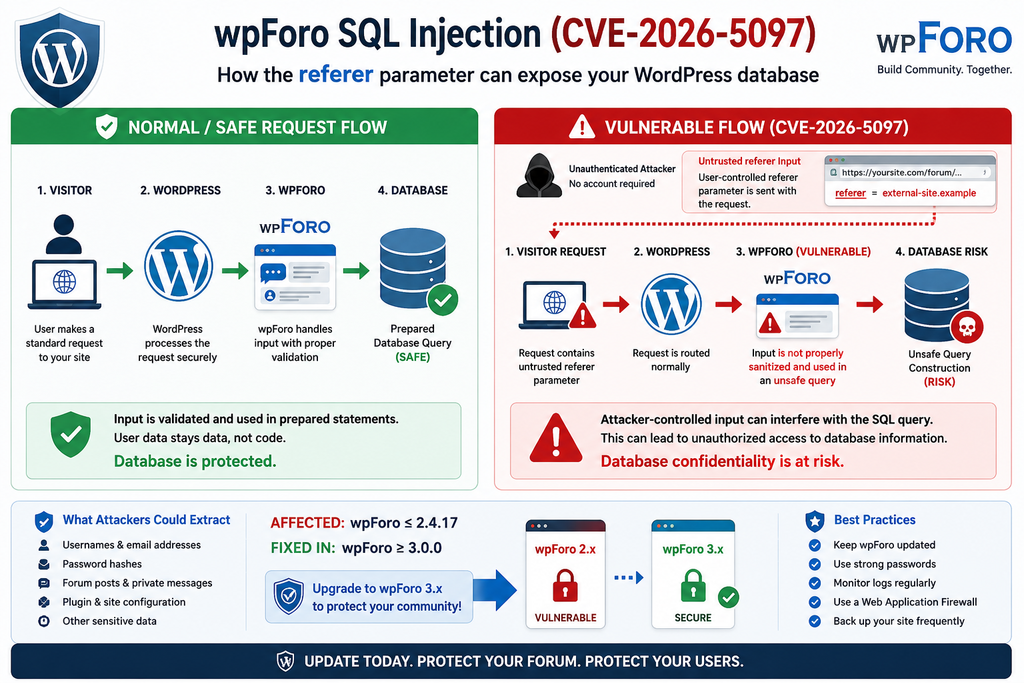
The most important version boundary for CVE-2026-5097 is straightforward: wpForo Forum 2.4.17 and all earlier versions are affected. The vulnerability is fixed beginning with wpForo 3.0.0.
This distinction deserves attention because version 2.4.17 was not simply an abandoned old build buried several years in the plugin’s history. It was explicitly identified by wpForo as the last 2.x version. Administrators who deliberately stayed on the 2.x branch may therefore believe they are already running its final and safest release.
For CVE-2026-5097, that assumption is no longer safe.
A website running wpForo 2.4.17 should not wait for a hypothetical 2.4.18 security release unless the developer publishes one. The documented remediation path is to move into the fixed 3.x branch.
At the time of writing, WordPress.org lists wpForo 3.1.5 as the current release, while 3.0.0 represents the version boundary where CVE-2026-5097 was addressed. Administrators performing a migration should generally evaluate the current maintained release rather than intentionally stopping at the oldest version containing this particular fix.
Version Status at a Glance
wpForo 2.4.17: Vulnerable to CVE-2026-5097.
wpForo 2.4.16: Vulnerable.
Earlier wpForo 2.x releases: Vulnerable to CVE-2026-5097 and may also contain additional vulnerabilities fixed during later 2.x releases.
wpForo 3.0.0: CVE-2026-5097 is fixed from this version.
Current wpForo 3.x releases: Administrators should prefer a currently maintained patched version after confirming compatibility.
This last point is important. Security maintenance should not focus on one CVE in isolation. wpForo has received additional security fixes over time, including fixes within the 3.x branch. Installing only version 3.0.0 because it represents the CVE-2026-5097 patch boundary could leave the website without subsequent security and bug fixes.
Why wpForo Did Not Automatically Upgrade Every 2.x Website
The wpForo 2.4.16 release introduced an important safeguard: automatic updates from 2.x to 3.x were intentionally blocked. The developers also replaced the normal automatic-update behavior with warnings and backup reminders when the major version became available.
This design makes sense. A major plugin release can change database structures, templates, integrations, add-ons, styling, settings, and other behavior. Automatically applying such a migration on a production community could create downtime or compatibility problems.
However, that protection means administrators must now take deliberate action.
A WordPress site can have automatic plugin updates enabled and still remain on wpForo 2.x because the major migration was specifically designed not to happen unattended. Therefore, checking whether “automatic updates” are enabled is not enough.
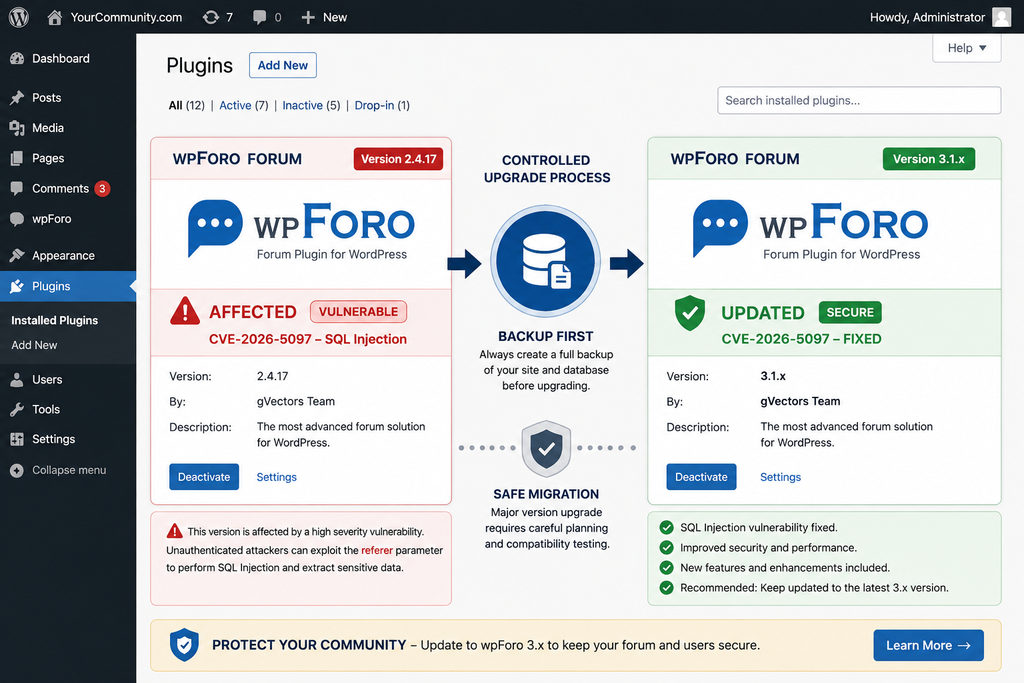
Open WordPress Dashboard → Plugins → Installed Plugins and verify the exact wpForo version.
Administrators managing multiple sites should check each installation individually or use their trusted management platform to inventory plugin versions.
Do Not Assume a Disabled Forum Is Automatically Safe
If wpForo is still active but its forum page has been removed from navigation, the plugin code may remain reachable through other routes or actions. Hiding a menu link is not a security control.
Likewise, placing the forum behind a visual login form does not necessarily prove that every plugin endpoint requires authentication. CVE-2026-5097 is documented as unauthenticated, so administrators should rely on a patched plugin version rather than attempting to hide the affected functionality.
If the forum is no longer needed, consider removing wpForo completely after creating an appropriate backup and confirming how forum data should be retained. Reducing unused software is generally safer than leaving obsolete components installed indefinitely.
How the Referer Parameter Reaches the Database
Understanding CVE-2026-5097 does not require reproducing an exploit. The important defensive concept is the path that untrusted information takes through an application.
A web request can contain many different values. Some arrive through URLs, form fields, cookies, headers, or parameters used by application logic. Developers must assume that information originating from a client can be manipulated.
In this wpForo vulnerability, public advisories identify the referer parameter as the attacker-controlled input involved in the SQL injection.
The security problem occurs when that value moves through wpForo’s application logic and eventually contributes to a database query without sufficient protection. The published vulnerability description specifically attributes the issue to insufficient escaping of user-supplied data combined with inadequate preparation of the existing SQL query.
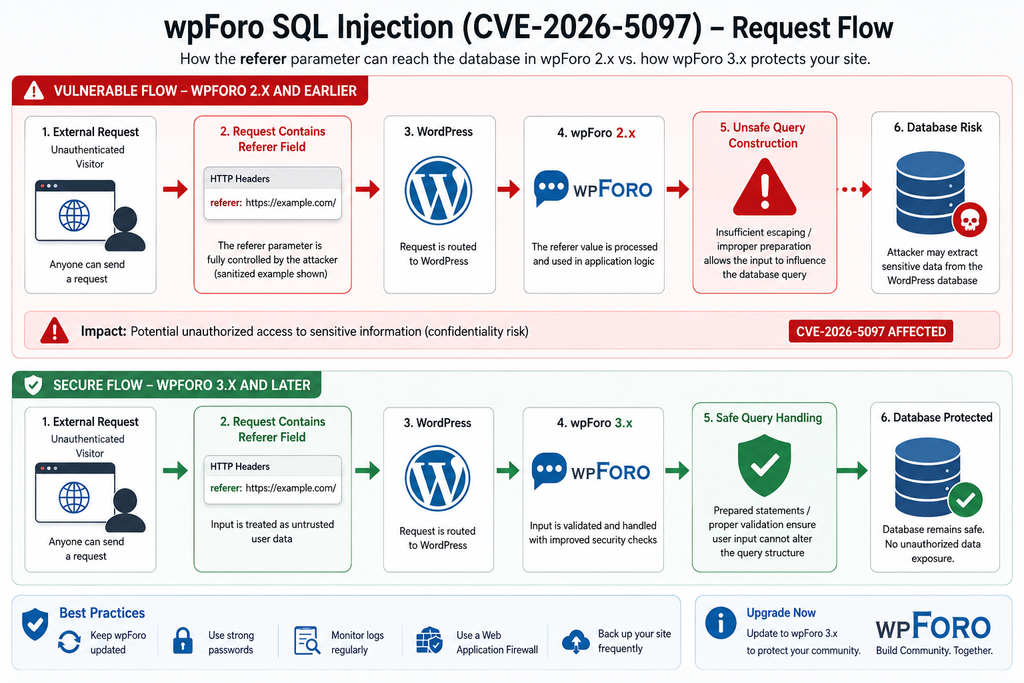
Conceptually, the vulnerable flow looks like this:
External request → attacker-controlled referer value → wpForo processing → insufficiently protected SQL query → WordPress database
A secure implementation must break that dangerous relationship. User input should remain data. It should never be able to become part of the database command structure.
Why the Parameter Name Can Be Misleading
Administrators sometimes see a name such as referer and assume it contains harmless navigation information. That assumption is dangerous in application security.
The name assigned to an input does not determine whether it is trustworthy. If the browser can send it, an attacker can usually manipulate it. Server-side code must validate and safely process the value according to how it will be used.
The same principle applies to WordPress AJAX parameters, REST API fields, shortcode attributes, query-string variables, cookies, form inputs, and request headers.
Security should therefore focus on the complete data flow rather than the apparent purpose of a parameter.
Prepared Queries Matter
WordPress developers commonly use $wpdb when interacting directly with the database. When dynamic values must be included in SQL statements, prepared queries and appropriate placeholders help prevent user input from being interpreted as SQL syntax.
Developers must still understand the context of the query. Not every part of an SQL statement can be handled identically, and dynamic identifiers or ordering clauses may require strict allowlists rather than ordinary string escaping.
For site administrators, however, the practical response is much simpler: do not attempt to repair wpForo’s SQL code manually on a production website.
A local modification can be overwritten during the next update, may introduce new errors, and creates an installation that differs from the officially maintained plugin. The safer response is to install the vendor’s patched release.
Why We Are Not Publishing an Exploit Payload
Administrators do not need a working SQL injection string to secure their sites. Publishing a functional payload would provide little additional defensive value while making exploitation easier for inexperienced attackers.
Log analysis can instead focus on behavioral indicators: unusual requests involving the affected parameter, repeated encoded characters, abnormal request lengths, suspicious bursts from a single source, database errors, unusual response times, and firewall detections.
This approach gives defenders useful information without turning a security advisory into an exploitation tutorial.
What Information Attackers Could Extract

The documented impact of CVE-2026-5097 is sensitive information disclosure from the database. Exactly what information could be exposed on a particular website depends on its WordPress configuration, installed plugins, database permissions, table structure, and the data stored by the site.
A standard WordPress database may contain user records, email addresses, password hashes, posts, comments, settings, metadata, taxonomy information, and plugin-specific tables.
A community website can contain additional data created by forum software. wpForo stores information needed to operate discussions, users, topics, posts, moderation features, and other community functionality.
This does not mean that CVE-2026-5097 automatically exposes every file on the server. SQL injection targets the database context. Files stored outside the database belong to a different security layer.
Likewise, WordPress does not normally store users’ plaintext passwords. WordPress stores password hashes. That distinction is important when accurately describing database exposure.
However, password hashes are still sensitive security data and should never be considered harmless if obtained by an unauthorized party.
Potentially Sensitive WordPress Data
Depending on the database and permissions available to the WordPress installation, potentially valuable information can include:
- WordPress usernames
- Email addresses
- Password hashes
- User metadata
- Administrator account identifiers
- Published and unpublished content
- Private forum information
- WordPress configuration stored in the options table
- Plugin settings
- Session-related information
- Forum topics and posts
- Moderation records
- Plugin-specific metadata
- Integration settings stored in database tables
Some plugins also store API credentials or tokens in the database. Whether any particular secret is present depends entirely on the website and plugin architecture. Administrators should therefore avoid assuming that the impact stops with forum messages.
Database Exposure Can Lead to Secondary Risk
A confidentiality breach can become the first step in a larger attack.
For example, leaked usernames and email addresses can improve targeted phishing attempts. Exposed configuration information can help an attacker understand the site’s architecture. Stolen password hashes may be subjected to offline cracking attempts, particularly when users have chosen weak passwords.
Reused passwords create additional danger. If a forum member uses the same password elsewhere, compromise of one credential can potentially affect unrelated accounts.
Administrators should therefore consider the broader security context when evidence suggests successful exploitation.
Does SQL Injection Mean the Website Has Been Completely Taken Over?
No.
The published CVSS information for CVE-2026-5097 indicates high confidentiality impact while listing no direct integrity or availability impact in the assessed vector. It would therefore be inaccurate to claim that this vulnerability automatically provides remote code execution or complete server control.
Security reporting should distinguish demonstrated capabilities from theoretical attack chains.
Nevertheless, unauthorized database extraction is serious enough to justify an urgent update. WordPress administrators have a responsibility to protect user and community information even when a vulnerability does not immediately provide complete website takeover.
What to Do If You Suspect Data Was Extracted
Do not immediately delete all logs or reinstall the site without preserving evidence. First create a secure copy of relevant access logs, application logs, firewall records, database logs where available, and current WordPress files.
Document the installed wpForo version and the approximate period during which the vulnerable version was publicly accessible.
Then investigate whether suspicious requests correspond with unusual database behavior, account activity, or other indicators.
For a business or community that handles personal information, suspected unauthorized access may also create legal or regulatory obligations. Requirements depend on jurisdiction, the nature of the information, and whether a breach actually occurred. Consult an appropriate security or legal professional when necessary.
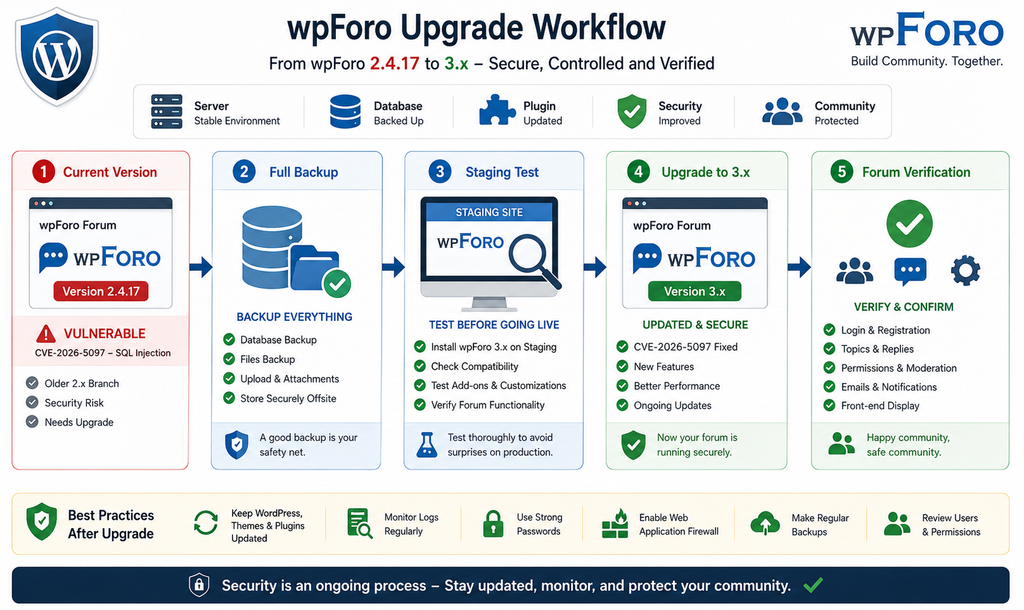
Safely Upgrading wpForo from Version 2.x
The safest response to CVE-2026-5097 is not simply pressing the update button on a busy production forum without preparation. wpForo 3.x represents a major-version transition, and the wpForo developers intentionally prevented unattended automatic migration from 2.x.
A controlled upgrade reduces the chance that a security fix creates avoidable operational problems.
Start by identifying the exact environment. Record the current WordPress version, PHP version, wpForo version, active wpForo add-ons, theme, custom forum templates, caching plugins, security plugins, and integrations.
Next, create a complete backup.
The backup should include both files and the database. A database-only backup may not preserve customized plugin files or uploads, while a files-only backup cannot restore forum topics, users, settings, and other database content.
Confirm that the backup can actually be restored. A backup that has never been tested should not be treated as guaranteed recovery.
Step 1: Verify the Installed wpForo Version
Navigate to:
WordPress Dashboard → Plugins → Installed Plugins
Locate wpForo Forum and note the installed version.
If it is 2.4.17 or older, treat the installation as affected by CVE-2026-5097.
Do not rely exclusively on an update notification. Cached management dashboards, disabled update checks, repository connectivity problems, or major-version protections can make update status misleading.
Step 2: Inventory wpForo Add-ons and Customizations
Community sites often use more than the base plugin.
Record any wpForo add-ons, custom CSS, template overrides, theme modifications, snippets, hooks, integrations, membership plugins, profile integrations, caching rules, and custom code that interacts with forum functionality.
A migration can succeed technically while still breaking an important community workflow.
Pay particular attention to:
- Login and registration
- User profiles
- Forum permissions
- User groups
- Topic creation
- Replies
- Moderation
- Attachments
- Search
- Notifications
- Email delivery
- Private content
- SEO URLs
- Structured data
- Caching exclusions
- Third-party add-ons
This inventory becomes your post-upgrade test plan.
Step 3: Create a Full Backup
Back up the WordPress database and files immediately before the migration.
Store at least one copy somewhere independent of the production server. If an update damages the site and the only backup sits on the same failed server, recovery becomes much harder.
Record the backup timestamp so you know exactly which forum activity it contains.
For active communities, consider temporarily placing the forum into a maintenance state during the final migration. Otherwise, users may create new posts after the backup that disappear if a rollback becomes necessary.
Step 4: Use a Staging Environment When Possible
Clone the website to staging and perform the 2.x-to-3.x upgrade there first.
A staging environment lets you discover compatibility problems without interrupting the public forum. It also provides an opportunity to test database migrations and confirm that custom styling remains usable.
Protect staging from public indexing and unauthorized access. A staging copy contains the same sensitive information as production and should not become a forgotten, weakly protected duplicate.
Step 5: Update wpForo and Its Compatible Components
Once the backup is confirmed and compatibility has been evaluated, upgrade wpForo into the maintained 3.x branch.
Do not deliberately remain on 3.0.0 simply because it is the first release that fixes CVE-2026-5097. Subsequent 3.x releases contain additional bug and security fixes.
Use the latest stable release appropriate for your environment after reviewing current release information and compatibility requirements.
Update compatible wpForo add-ons as needed. Major-version mismatches between a core forum plugin and extensions can create errors even when the main plugin itself updates correctly.
Step 6: Clear Caches
After the upgrade, clear relevant caches.
This may include:
- WordPress page cache
- Object cache
- Redis cache
- CDN cache
- Server cache
- Browser cache during testing
Caching does not normally determine whether the underlying SQL injection exists, but stale assets or cached pages can make an otherwise successful migration appear broken.
Step 7: Test the Forum as Different User Roles
Administrator testing alone is not enough.
Check the forum as a logged-out visitor, normal registered member, moderator, and administrator where applicable.
Create a temporary test topic. Reply to it. Edit it. Test moderation. Check user profiles, search, pagination, notifications, attachments, and permissions.
Verify that private forums remain private.
Major updates sometimes reveal permission assumptions that were invisible during ordinary administrator testing.
Step 8: Check Database and PHP Errors
Review PHP logs, WordPress debugging information where safely enabled, web server errors, and database errors after the migration.
Repeated warnings can identify an outdated add-on or custom integration before users begin reporting problems.
Do not leave WP_DEBUG_DISPLAY enabled on a public production website because error output can reveal paths and other implementation details.
Step 9: Confirm the Final Version
Return to the Plugins screen and confirm that the production installation is actually running the intended wpForo 3.x version.
Also verify that the site has not been restored from an older snapshot or deployment package containing wpForo 2.x.
Security fixes can accidentally disappear when deployment systems overwrite production with an outdated copy.
Step 10: Keep the Backup but Protect It
Do not leave downloadable SQL backups inside publicly accessible WordPress directories.
Database exports frequently contain more sensitive information than the live frontend exposes. Store backups in a protected location and apply appropriate retention policies.
Reviewing Server Logs for SQL Injection Attempts
Updating closes the known vulnerable path, but it does not answer an equally important question: was someone already trying to exploit it?
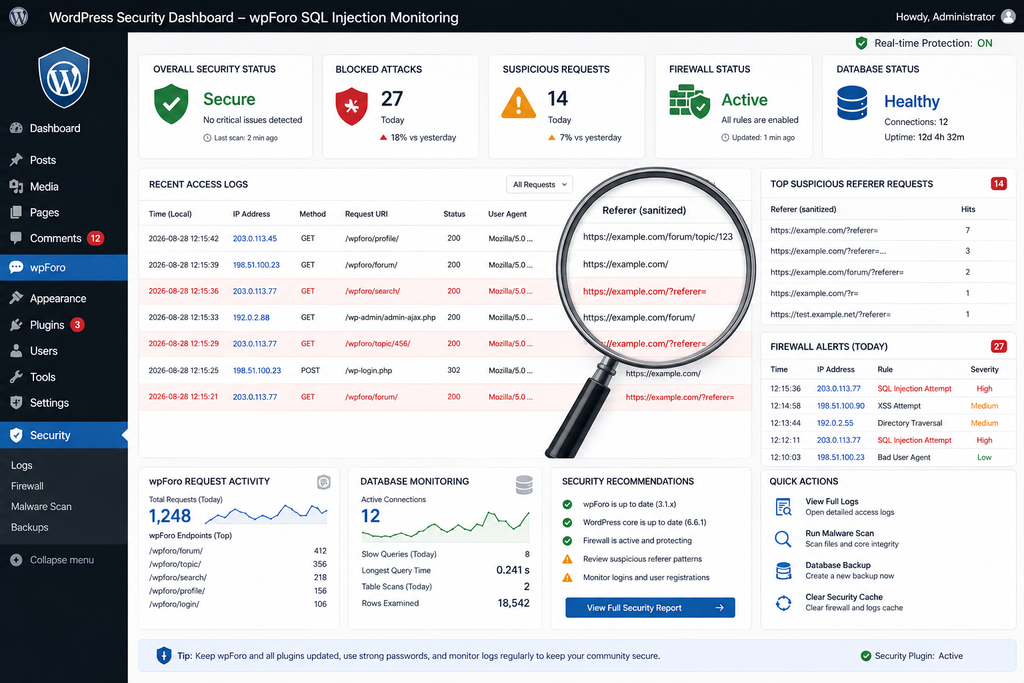
Administrators who operated an affected wpForo version should preserve and review available logs.
Useful sources can include Apache access logs, Nginx access logs, reverse-proxy records, CDN security events, Web Application Firewall events, WordPress security-plugin logs, hosting security logs, and database logs where appropriate.
Because CVE-2026-5097 involves the referer parameter, requests interacting with that input deserve particular attention.
However, avoid treating every appearance of the word referer as malicious. Legitimate software may use similarly named values. Context matters.
Indicators Worth Investigating
Look for unusual patterns rather than relying on one exact exploit string.
Potential indicators include:
- Repeated unusual requests involving
referer - Unexpectedly long parameter values
- Heavy URL encoding
- Repeated requests with small variations
- Requests generating database errors
- Abnormal response delays
- Large bursts from a single source
- Requests to unusual wpForo actions
- WAF alerts associated with SQL injection signatures
- Similar probes from multiple addresses
- Activity occurring before the plugin was upgraded
A time-based SQL injection technique can sometimes produce unusual response timing, but response delay alone is not proof of exploitation. Network latency, overloaded servers, database contention, caching, and normal application behavior can all affect request duration.
Do Not Search Only for Famous SQL Keywords
Attackers frequently encode, split, transform, or otherwise obscure suspicious input. Searching logs for one familiar SQL keyword will not provide complete coverage.
WAF systems can help because they evaluate multiple patterns, but they are not perfect either.
The strongest investigation combines request logs, timestamps, firewall information, application behavior, database events, and other evidence.
Preserve Logs Before Rotation Removes Them
Many hosting environments retain access logs only for a limited period. High-traffic websites can rotate logs quickly.
If the site ran wpForo 2.x recently, preserve relevant records now.
Compress and store copies securely before performing extensive cleanup. Record the server timezone because correlating events becomes difficult when one system logs in UTC and another uses local time.
Investigate Database Errors
SQL injection probes can sometimes trigger database errors. Search PHP and application logs for unexpected SQL-related warnings or repeated database failures corresponding with suspicious web requests.
Again, an error is not automatically proof of compromise. Poorly written plugins, failed migrations, server interruptions, and database maintenance can generate similar messages.
Correlation provides stronger evidence than any single log entry.
Review Security Plugin and WAF Events
If the site uses a Web Application Firewall, examine its security history around the vulnerable period.
Search for SQL injection classifications, unusual parameter manipulation, blocked requests targeting wpForo paths, and repeated probing.
A blocked request can indicate that someone attempted exploitation without proving that the attack reached wpForo successfully.
Conversely, the absence of a WAF alert does not prove the site was never targeted.
Avoid Automatically Blocking Every Source Forever
IP addresses are useful investigative indicators but weak identities.
Attackers can use VPNs, proxies, compromised devices, hosting providers, and rotating infrastructure. Permanent blocking of individual addresses does not replace patching.
The priority remains upgrading wpForo.
Firewall rules are a supporting defense, not a substitute for removing the vulnerable code.
What to Check After the wpForo Security Upgrade
A successful plugin update should be followed by a security review.
Start with administrator accounts. Confirm that every administrator is recognized and still requires that level of access.
Then review WordPress users, active plugins, themes, scheduled tasks, recently modified files, and security alerts. Check whether unfamiliar plugins or administrator accounts appeared during the period when the vulnerable wpForo version was installed.
Database-focused vulnerabilities do not necessarily create files, so a clean malware scan alone cannot prove that no information was extracted. Still, file-integrity checking remains useful because attackers sometimes combine multiple weaknesses.
Check forum permissions and private content as well. Verify that forums intended for restricted groups remain inaccessible to guests.
Recommended Post-Upgrade Checklist
- Confirm wpForo is running a current 3.x release
- Confirm WordPress core is updated
- Update wpForo add-ons
- Update other plugins and themes
- Review administrator accounts
- Review recently created users
- Check forum permissions
- Verify private forum access
- Inspect access and error logs
- Review WAF security events
- Check WordPress file integrity
- Scan for unexpected files
- Review scheduled tasks
- Check database users and permissions where appropriate
- Verify backups
- Test login and registration
- Test topics and replies
- Test moderator functions
- Test email notifications
- Confirm caching works correctly
- Document the remediation date
For high-value community sites, consider having a security professional review the environment when logs show credible signs of exploitation.
Why Staying on wpForo 2.x Is No Longer a Good Security Strategy
There are understandable reasons administrators avoid major plugin upgrades. A forum may have years of custom CSS, custom templates, integrations, add-ons, and community-specific workflows. Breaking any of these features can disrupt an active website.
Before CVE-2026-5097, an administrator might have decided that remaining on the final 2.x release temporarily offered the best balance between stability and security.
The new vulnerability changes that calculation.
Version 2.4.17 itself is affected, and 3.0.0 is identified as the fixed version boundary. Staying on 2.x therefore means knowingly remaining on a branch affected by a remotely reachable, unauthenticated SQL injection vulnerability.
A controlled migration is preferable to an indefinite delay.
If a specific customization prevents the upgrade, administrators should identify exactly what breaks, reproduce it on staging, and either update or replace that component.
The worst strategy is ignoring the vulnerability because migration feels complicated.
Frequently Asked Questions
What is the wpForo vulnerability CVE-2026-5097?
CVE-2026-5097 is a high-severity SQL injection vulnerability in the wpForo Forum WordPress plugin. It involves insufficient handling of the user-controlled referer parameter before the value reaches a database query.
Which wpForo versions are vulnerable?
wpForo Forum 2.4.17 and earlier are affected. Version 2.4.17 is the final release in the wpForo 2.x branch.
Which version fixes CVE-2026-5097?
The vulnerability is fixed beginning with wpForo 3.0.0. Administrators should evaluate and install a current maintained 3.x version rather than stopping at an older 3.x release solely because it contains this particular fix.
Does an attacker need a WordPress account?
No. CVE-2026-5097 is documented as an unauthenticated SQL injection vulnerability, meaning an attacker does not need a registered WordPress or wpForo account to reach the vulnerable condition.
What is the CVSS score?
CVE-2026-5097 carries a CVSS 3.1 score of 7.5, placing it in the High-severity category.
Can the vulnerability expose WordPress passwords?
SQL injection can potentially expose information accessible through the WordPress database. WordPress normally stores password hashes rather than plaintext passwords. Those hashes are still sensitive and must be protected.
Does CVE-2026-5097 provide remote code execution?
The published assessment focuses on database confidentiality. It should not be described as automatic remote code execution or complete server takeover without evidence of an additional exploit chain.
Can I stay on wpForo 2.4.17?
From a security perspective, administrators should not consider 2.4.17 protected against CVE-2026-5097. The recommended path is a controlled migration to the maintained wpForo 3.x branch.
Should I upgrade directly on my production forum?
A staging test is preferable for an important community. Create a full backup, inventory add-ons and customizations, test the 3.x migration on staging, and then perform the production upgrade during a controlled maintenance period.
How can I tell whether my site was attacked?
Review web server access logs, WAF events, security-plugin logs, application errors, and other available records. Look for suspicious requests involving the affected parameter and correlate them with database or application anomalies. Logs can provide evidence, but the absence of obvious alerts does not guarantee that no attack occurred.
The Safe Path Forward for wpForo Administrators
CVE-2026-5097 creates a clear security boundary for WordPress communities still running wpForo 2.x. The vulnerability affects wpForo 2.4.17 and earlier, requires no authenticated account, and can potentially allow attackers to extract sensitive information through SQL injection.
The key response is not panic but controlled action.
Verify the installed version. Preserve relevant logs. Create a complete backup. Test the migration on staging when possible. Move the forum to a current wpForo 3.x release. Then review users, permissions, logs, database activity, and overall WordPress integrity.
Administrators should also remember that updating prevents future exploitation of the patched vulnerability but cannot retroactively determine whether the old installation was previously targeted. That is why log preservation and post-update review belong in the same response plan as the plugin upgrade.
For websites that depend heavily on their forum community, the extra preparation required by a major upgrade is worthwhile. A short, controlled maintenance period is far preferable to leaving an Internet-facing database vulnerability unresolved.
⚠️ Disclaimer and Source Hygiene
This article is intended for defensive cybersecurity education and WordPress administration. It does not provide functional SQL injection payloads or exploitation instructions. Vulnerability details, affected-version information, severity data, and remediation guidance were checked against current public security advisories and official WordPress plugin information available at the time of publication. Security information can change as vendors publish new releases or researchers update their findings. Always verify the latest wpForo version and current vendor guidance before performing production changes. If you believe sensitive information was accessed, preserve evidence and consult a qualified cybersecurity professional. Organizations handling personal information should also seek appropriate legal or data-protection advice when a confirmed or suspected breach may trigger regulatory obligations.
🔔 For more tutorials like this, consider subscribing to our blog.
📩 Do you have questions or suggestions? Leave a comment or contact us!
🏷️ Tags: wpForo vulnerability, CVE-2026-5097, wpForo SQL injection, WordPress security, wpForo security, WordPress vulnerability, SQL injection, WordPress database security, wpForo 3.x, WordPress forum security
📢 Hashtags: #wpForo, #WordPressSecurity, #CVE20265097, #SQLInjection, #WordPress, #CyberSecurity, #WebsiteSecurity, #WordPressVulnerability, #DatabaseSecurity, #wpForoSecurity
Sources and References
WordPress.org – wpForo Forum
The official WordPress.org plugin page provides the wpForo release history, identifies 2.4.17 as the last 2.x version, documents the special major-update protection introduced before wpForo 3.0, and provides current plugin release information.
WPScan – wpForo Forum Security Vulnerabilities
WPScan lists the newly disclosed issue as “wpForo Forum < 3.0.0 – Unauthenticated SQL Injection via ‘referer’ Parameter,” with a High-severity CVSS score of 7.5 and version 3.0.0 identified as the fixed release.
CVE-2026-5097 Security Advisory Data
Current CVE reporting identifies wpForo Forum through version 2.4.17 as vulnerable to unauthenticated SQL injection through the referer parameter. The weakness is classified as CWE-89: Improper Neutralization of Special Elements used in an SQL Command.
WordPress Security Best Practices
Administrators should combine timely plugin updates with full backups, least-privilege account management, server-log retention, file-integrity monitoring, firewall protection, strong authentication, and regular review of installed software.
Secondary Sources and Testimonials
Secondary vulnerability databases and security monitoring services corroborate the affected version range and High-severity classification. However, administrators should prioritize the official wpForo/WordPress.org release information and established vulnerability databases when making remediation decisions.
Community reports can be useful for identifying upgrade compatibility problems, but testimonials and forum comments should not override confirmed security advisories. When information conflicts, verify version numbers, publication dates, vulnerability identifiers, and vendor release notes before taking action.
Sign in with a Subscriber account to vote.