
Table of Contents
Two newly disclosed Modern Events Calendar vulnerabilities could expose sensitive booking information and create database security risks for WordPress event websites. This practical guide explains affected versions, Subscriber-level access, potential attendee and payment data exposure, safe updating procedures, and essential security checks after installing version 7.37.0. falconinternet.net
Modern Events Calendar helps WordPress website owners publish events, manage reservations, and organize attendee information. It supports websites ranging from small community calendars to professional event platforms. When visitors book an event, they trust the website to handle their information responsibly. That trust makes security especially important. A vulnerability affecting booking records can create problems beyond a broken calendar or a failed reservation. It may expose personal information, disrupt operations, or require a formal investigation.
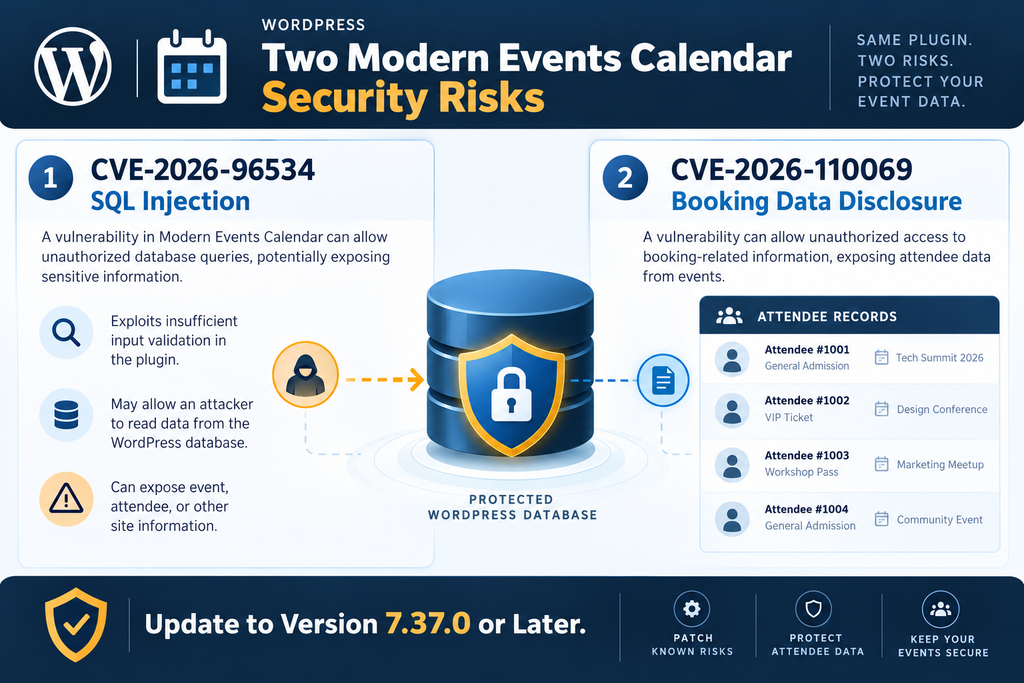
Two security issues, CVE-2026-96534 and CVE-2026-110069, were publicly documented on October 18, 2026. Both affect Modern Events Calendar installations running versions earlier than 7.37.0, although their edition coverage and technical impact differ. One involves SQL injection, while the other concerns unauthorized access to booking and attendee information. Both deserve prompt attention because attackers may only need a basic authenticated WordPress account.
This guide explains what website owners need to know, without assuming they understand programming or database security. It covers the differences between the two vulnerabilities, why Subscriber accounts matter, which information could be exposed, and how to update safely. It also provides practical examples for reviewing user accounts, server logs, and booking exports. The goal is to help event organizers make informed decisions, protect visitors, and distinguish a confirmed security problem from a possible risk.
What Are CVE-2026-96534 and CVE-2026-110069
Although the two vulnerabilities affect the same event management ecosystem, they represent different security weaknesses. Understanding that distinction matters because the potential consequences and investigation methods are not identical. One weakness involves how information enters a database query. The other concerns whether a logged-in user should receive certain booking records at all. Both can undermine the confidentiality of event information, but neither advisory alone proves that a particular website has been attacked.
CVE-2026-96534: SQL Injection in Modern Events Calendar
CVE-2026-96534 is an authenticated SQL injection vulnerability affecting Modern Events Calendar Lite and Pro before version 7.37.0. The published advisory identifies insufficient sanitization and escaping of a parameter used in a database statement. The affected functionality is associated with mec_fes_csv_export. A user with Subscriber-level access or higher may be able to influence the query in an unintended way. This is a database security issue rather than a normal permission to export information.
SQL stands for Structured Query Language. WordPress uses database queries to retrieve and manage information such as posts, accounts, settings, and plugin records. Normally, a plugin builds a query that performs a specific, authorized task. For example, an event administrator might request a list of registrations for a workshop. If untrusted input becomes part of the query without proper protection, the database may interpret that input differently from what the developer intended. This is the central problem behind SQL injection.
The potential impact depends on database permissions, the vulnerable query, and the application’s environment. Unauthorized reading of records is a serious concern. Some SQL injection weaknesses can also support modification or deletion of information, but the published summary does not establish every possible outcome for this specific case. Importantly, SQL injection is not automatically the same as complete server takeover. Access to database information and control over the operating system are separate security outcomes.
CVE-2026-110069: Unauthorized Booking Data Disclosure
CVE-2026-110069 affects Modern Events Calendar Lite before version 7.37.0. It concerns missing security checks in two WordPress AJAX actions, mec_event_bookings and mec_attendees. According to the advisory, these actions lack appropriate capability, nonce, and ownership checks before returning booking information. Consequently, an authenticated user with a basic Subscriber account may be able to retrieve information about reservations they do not own or administer.
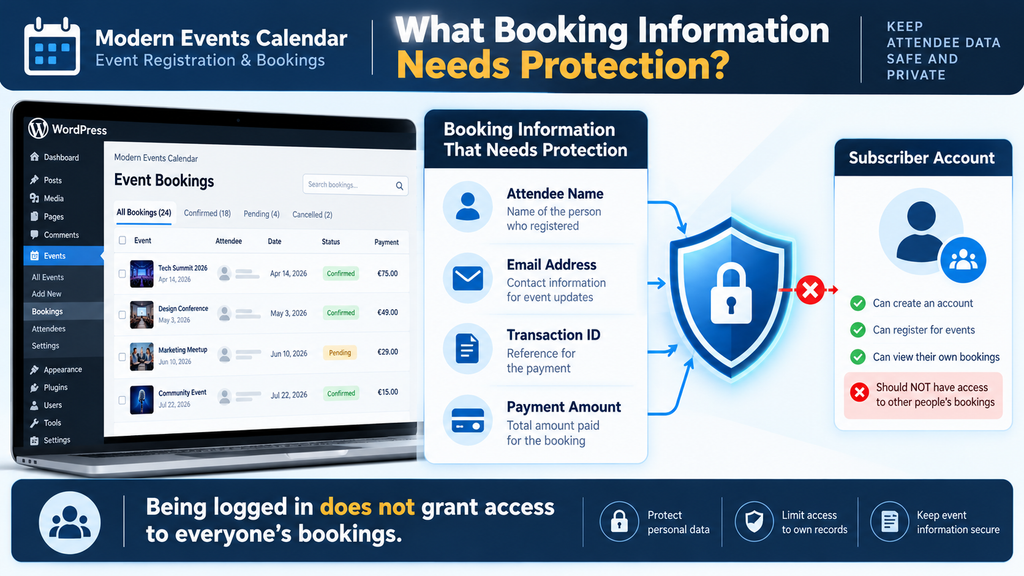
This vulnerability is particularly concerning for event websites that allow public registration. Imagine a local conference where visitors create accounts to manage their tickets. Those visitors should only see their own reservations, unless the website explicitly grants broader access. The vulnerability breaks that expected separation. A basic account could potentially receive names, email addresses, transaction identifiers, and payment amounts associated with other bookings. The published advisory identifies these categories, but it does not establish that complete payment card numbers or banking credentials are exposed.
Why the Two Vulnerabilities Matter Together
The first vulnerability concerns the safety of database queries, while the second concerns access to booking records. Together, they highlight two essential security principles: applications must handle user-controlled input safely, and they must verify permissions before disclosing information. A website could have a properly configured firewall, strong administrator passwords, and HTTPS enabled while still being vulnerable through plugin functionality. Those protections remain useful, but they cannot replace secure application code.
Security issue comparison
| Security detail | CVE-2026-96534 | CVE-2026-110069 |
|---|---|---|
| Weakness | SQL injection | Sensitive data disclosure |
| Affected editions | Lite and Pro | Lite |
| Minimum access | Subscriber | Subscriber |
| Relevant component | CSV export query | Booking and attendee AJAX actions |
| Primary concern | Database confidentiality | Booking information confidentiality |
| Fixed version | 7.37.0 | 7.37.0 |
For administrators, the immediate response is similar: identify the installed edition, confirm its version, update through a trusted source, and review the possibility of earlier unauthorized access. However, the investigation should consider both types of activity. Unexpected export-related requests may be relevant to the SQL injection issue. Unusual requests involving booking and attendee data may be relevant to the disclosure issue. Neither type of request automatically confirms exploitation, so evidence must be reviewed carefully.
Which Modern Events Calendar Editions Are Affected
The affected edition is important because the two vulnerabilities do not have identical product coverage. CVE-2026-96534 applies to both Modern Events Calendar Lite and Modern Event Calendar Pro in versions earlier than 7.37.0. CVE-2026-110069 specifically identifies the Lite edition before 7.37.0. Administrators should not assume that an advisory covering Lite automatically applies to Pro, or that Pro is safe from every vulnerability reported in the same period. The precise edition and version boundaries determine what the published findings establish.
Check the Installed Plugin Version
The simplest starting point is the WordPress administration dashboard. Sign in using an administrator account and open Plugins → Installed Plugins. Search for Modern Events Calendar and examine its displayed version number. If the installed version is 7.36.x, for example, it is below the documented 7.37.0 security boundary. A version of 7.37.0 or later addresses the reported issues according to the published advisories, provided it is the authentic updated release and the installed files match that version.
Some websites use premium plugin packages installed separately from the WordPress plugin directory. Others have multiple event-related extensions that work alongside the main calendar plugin. In those situations, review the exact plugin name, edition, and installed version rather than relying on a general dashboard notification. If the plugin is not listed where expected, check whether it was installed through a custom deployment process, managed hosting service, or multisite network administration panel.
Understand the Difference Between Lite and Pro
Lite and Pro may share portions of their underlying code while offering different features or distribution methods. That does not mean every vulnerability affects both editions equally. The SQL injection advisory explicitly includes both. The booking disclosure advisory names Lite. A Pro website owner should still apply the SQL injection fix and review the security of connected booking functionality, but should not describe the second CVE as confirmed in Pro without supporting evidence.
| Edition | CVE-2026-96534 | CVE-2026-110069 | Recommended action |
|---|---|---|---|
| Modern Events Calendar Lite before 7.37.0 | Affected | Affected | Update immediately |
| Modern Event Calendar Pro before 7.37.0 | Affected | Not identified in the published scope | Update immediately |
| Version 7.37.0 or later | Fixed according to advisory | Fixed for Lite | Verify and monitor |
Check Websites That Are Not Used Every Day
Security reviews should include more than the main public website. Event organizers sometimes maintain a staging installation, an older campaign website, or a separate calendar for private bookings. These installations can remain accessible long after a campaign ends. If they use an affected plugin version and allow authenticated users, they may still represent a security risk. Review each installation individually and avoid assuming that updating the production website automatically updates every copy.
For WordPress Multisite, a network administrator should inspect the plugin version and activation status across the network. A plugin may be network-activated or enabled on individual sites. The update process can also affect multiple calendars at once, so backups and compatibility testing are especially important. If a website no longer needs Modern Events Calendar, consider removing the unused plugin after safely preserving any records required for business, accounting, or legal purposes.
How a Subscriber Can Reach the Vulnerable SQL Query
WordPress uses roles to decide what users can do. An Administrator normally manages the entire website, while an Editor can manage substantial editorial content. Authors and Contributors receive narrower publishing permissions. Subscribers usually have the least powerful role. They may sign in, maintain their profile, and use membership features provided by plugins. On a well-designed event website, that limited access should not include the ability to read every attendee record or manipulate administrative database queries.
Why Subscriber Accounts Are a Security Concern
A Subscriber account is not inherently dangerous. Many websites depend on such accounts to provide useful services. For example, a training center might let visitors register to see upcoming classes, while a community organization might use accounts to manage recurring attendance. The risk appears when plugin functionality incorrectly treats any logged-in user as sufficiently trusted. An attacker does not necessarily need an administrator password if the vulnerable feature is reachable by a basic authenticated account.
Consider a fictional website named Riverside Events. It allows anyone to create an account and reserve a place at a local workshop. A legitimate Subscriber should see their own registration confirmation and perhaps cancel their own booking. They should not see reservations belonging to unrelated visitors. If a plugin checks only whether the visitor is signed in, rather than verifying the required capability and ownership, the security boundary becomes much weaker than the website owner expects.
What Happens When a Database Query Is Not Protected
The SQL injection issue is associated with mec_fes_csv_export, a component connected to CSV export functionality. CSV files are commonly used to move tabular information into spreadsheet software. Event administrators might export booking records to prepare attendance sheets or analyze registration totals. That legitimate use case does not justify giving every logged-in account access to the underlying query. The plugin must validate the request and keep user-supplied values separate from SQL instructions.
The vulnerability description identifies a parameter that was not adequately sanitized and escaped before being used in a SQL statement. That is enough to establish a security weakness, but the public summary does not fully document every query behavior or resulting database operation. Website owners do not need to reproduce the exploit to protect their systems. Attempting SQL injection against a live event platform could damage data, interfere with bookings, or create unnecessary legal and operational problems.
Authentication Is Not Authorization
Authentication answers one question: who is signed in? Authorization answers another: what is that user allowed to do? These concepts are often confused. A visitor may successfully log in with a legitimate Subscriber account while having no authority to view other people’s bookings. Secure WordPress plugins must check the appropriate capability for each sensitive operation. Where information belongs to a specific customer, the application must also verify that the requesting user owns that information or has an authorized administrative role.
For example, a customer viewing their own booking confirmation is normal activity. The same customer accessing another person’s registration without permission is not. Similarly, an event manager downloading an approved attendee list may be performing an expected administrative task. A Subscriber reaching the same data through a poorly protected request is a security failure. This distinction explains why low-privilege account vulnerabilities deserve attention even when administrators use strong passwords and multifactor authentication.
Why a WordPress Nonce Is Not Enough
WordPress nonces help protect certain requests against cross-site request forgery. They are useful security controls, but they do not establish whether a user has permission to access sensitive information. A nonce can confirm aspects of a request’s origin or context without proving that the user should receive another customer’s booking details. Proper security therefore combines request validation, capability checks, and ownership verification. The booking disclosure advisory specifically identifies missing checks in these areas.
A secure event management workflow should also limit the information returned by each request. A customer confirmation page might need the event title, date, booking status, and a limited set of contact details. It should not automatically retrieve the entire attendee database. This principle, often called data minimization, reduces unnecessary exposure. It also makes legitimate administrative activity easier to distinguish from unexpected access when reviewing application logs and incident records.
What Attendee and Payment Data Can Be Exposed
Booking information is often more sensitive than it first appears. A registration record may contain a visitor’s name, email address, event selection, booking reference, and payment-related metadata. Individually, some of these details may seem ordinary. Together, they can reveal a person’s interests, professional activities, travel plans, or participation in particular events. The seriousness of exposure depends on the event context and the specific fields stored by the website.
Information Identified in the Disclosure Advisory
The published description of CVE-2026-110069 identifies four categories of information: attendee names, email addresses, transaction IDs, and payment amounts. It states that the affected AJAX actions may disclose booking information across the site to an authenticated Subscriber. These details are enough to create privacy concerns, even without access to passwords or complete card numbers. A transaction identifier can be sensitive operational information, especially when combined with other booking details. CVE.report
For example, a fictional attendee named Alex registers for a €75 professional seminar. The booking database records a name, email address, transaction reference, and payment amount. Alex expects the event organizer and authorized staff to access the information when necessary. Another ordinary account holder should not receive those records. If unauthorized disclosure occurs, the event organizer may need to investigate what was accessed, whether the information was retained, and whether affected individuals require notification.
Does the Vulnerability Expose Credit Card Numbers?
The advisory identifies transaction IDs and payment amounts, not full payment card numbers. That distinction is important. Many WordPress payment integrations use external processors that handle sensitive card details outside the main website database. However, payment configurations vary, and a security assessment should confirm which information is actually stored. Administrators should not assume that card details were exposed, nor should they promise that every payment-related record is safe without examining their own environment.
The SQL injection issue introduces a separate question about database access. Depending on the affected query and database permissions, information beyond booking records might be at risk. However, the published technical description does not prove that every table can be extracted or modified in this particular vulnerability. A responsible incident investigation should identify actual evidence, determine the accessible data categories, and avoid presenting hypothetical worst-case outcomes as confirmed facts.
Why Event Registration Data Deserves Special Care
Not every event carries the same privacy implications. A public technology conference and a private support workshop may collect similar booking fields, but disclosure could have very different consequences. Even ordinary registrations can reveal a person’s location, interests, or association with an organization. Event websites should therefore treat attendee lists as protected information, not merely administrative spreadsheets. Access should be limited to staff who genuinely need the records for their responsibilities.
The Difference Between Data Exposure and Data Theft
A vulnerability that permits unauthorized access does not automatically mean someone has used it. Security researchers may discover a weakness before attackers exploit it, and a website may remain unaffected despite running a vulnerable version. Nevertheless, administrators should not rely on the absence of obvious symptoms. Unauthorized data access may leave no visible change in the WordPress dashboard. Events can continue accepting reservations normally while sensitive requests occur in the background.
Security investigations should distinguish three situations. The first is potential exposure because vulnerable software was installed. The second is evidence that an unauthorized request reached the affected functionality. The third is evidence that sensitive information was actually retrieved or misused. These situations require different conclusions and potentially different responses. A server log showing a suspicious request may justify further investigation, but it does not always prove that booking data was successfully obtained.
How Exposed Booking Information Could Be Misused
Email addresses and booking details may help criminals create convincing fraudulent messages. For example, a message mentioning the correct event name and payment amount may appear more credible than a generic scam. An attacker could pretend to represent the event organizer and ask attendees to confirm their registration through an unfamiliar website. This is a possible downstream misuse of exposed information, not a claim that the reported Modern Events Calendar vulnerabilities have already caused such campaigns.
Event organizers can reduce this risk through clear communication practices. Official booking emails should use recognizable domains, avoid unnecessary personal information, and direct customers to trusted website pages. Administrators should also explain how genuine payment changes or booking corrections are handled. If a security incident is confirmed, customers may benefit from practical guidance on recognizing impersonation attempts. Communication should remain factual and should never exaggerate the evidence available.
Consider GDPR Obligations for European Event Websites
For websites processing personal data in the European Union, a confirmed breach may trigger obligations under the General Data Protection Regulation. The GDPR defines a personal data breach broadly enough to include certain unauthorized disclosures or access to personal information. However, a vulnerable plugin alone does not automatically establish that a reportable breach occurred. Organizations must assess what happened, what data was involved, and the risks to affected individuals.
Under Article 33, a controller generally must notify the competent supervisory authority without undue delay and, where feasible, within 72 hours of becoming aware of a personal data breach, unless the breach is unlikely to result in a risk to individuals’ rights and freedoms. Article 34 addresses communication to affected individuals when a breach is likely to result in a high risk. Organizations should document their assessment and obtain qualified privacy or legal advice where appropriate.
For example, a Belgian event organizer investigating unauthorized access to attendee records may need to consult the Belgian Data Protection Authority. The organizer should preserve evidence, identify the affected records, and establish when it became aware of the incident. It should not automatically notify every customer based solely on a security advisory, but it also should not delay a required notification while waiting for perfect certainty. The specific legal response depends on the facts.
Updating Modern Events Calendar to Version 7.37.0

Updating the affected plugin is the most important immediate corrective action. Both reported vulnerabilities have a documented fixed-version boundary of 7.37.0. Patchstack and WPScan identify that release as the relevant security update for the SQL injection issue, while the booking disclosure advisory identifies the same boundary for Lite. Administrators should install version 7.37.0 or a later trusted release compatible with their website.
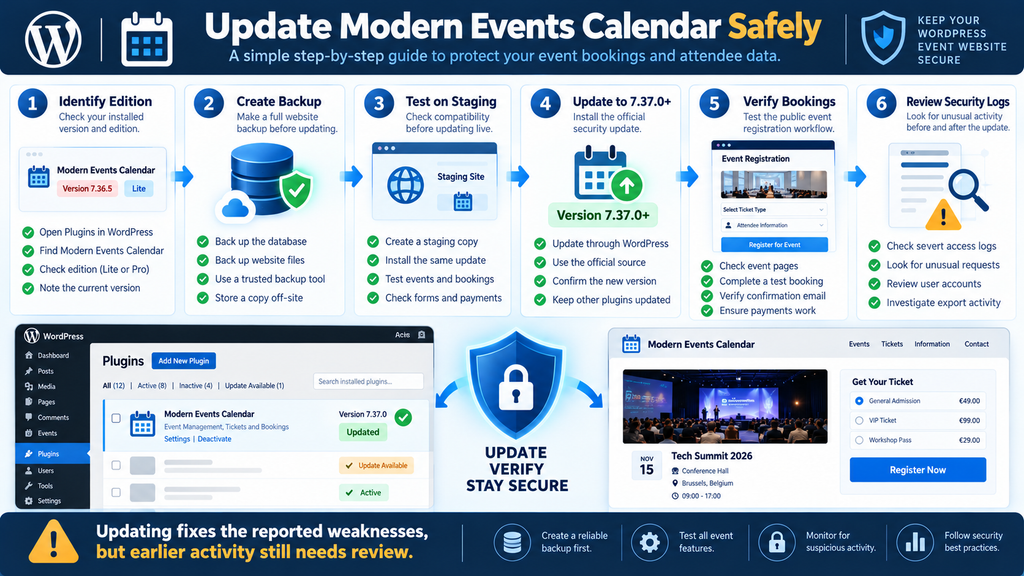
Step 1: Identify the Edition and Confirm the Current Version
Open your WordPress administration dashboard and navigate to Plugins → Installed Plugins. Find Modern Events Calendar and check the displayed version. Record the edition, version number, and date of the review. For a larger organization, add this information to a maintenance record or support ticket. That record helps demonstrate which installations were checked and when the security response began.
For example, suppose a website shows Modern Events Calendar Lite version 7.36.5. Because the version is below 7.37.0, the administrator should treat it as affected by both reported issues. If another website uses the Pro edition at a version below 7.37.0, the SQL injection advisory applies. Avoid assuming that a plugin is secure merely because WordPress displays no update notification. Premium plugins may depend on an active license or a separate vendor update channel.
Step 2: Create a Reliable Backup Before Updating
A backup protects against operational problems during the update. Event websites may contain active reservations, payment statuses, event descriptions, ticket settings, and customized templates. Before changing plugin files, create a backup of the WordPress database and relevant website files. Use a trusted hosting backup system or established backup solution. Confirm that the backup completed successfully and that the restore process is understood.
A useful backup should include the database, the wp-content directory, relevant configuration files, and any custom code associated with event functionality. Store a protected copy outside the public website directory. If bookings continue arriving during maintenance, remember that a backup represents a specific moment in time. Restoring it later may remove reservations created after that moment. For busy websites, coordinate maintenance carefully and preserve transaction records before considering any restoration.
Step 3: Test the Update on a Staging Website
A staging website is a separate environment used to test changes before applying them to visitors. It is especially helpful when Modern Events Calendar interacts with WooCommerce, payment providers, membership plugins, multilingual features, or custom registration forms. Create a staging copy with appropriate access restrictions and privacy safeguards. Where possible, replace real customer information with fictional test data before allowing developers or external contractors to use the environment.
On staging, install the updated plugin and perform the normal event workflow. Create a fictional event, register a test attendee, and verify the confirmation message. If the website uses paid tickets, use the payment provider’s sandbox or test mode rather than processing a real charge. Confirm that cancellation, booking management, and administrative exports still behave as expected. A successful staging test cannot guarantee a problem-free production update, but it reduces avoidable compatibility surprises.
Step 4: Install the Official Security Update
Return to the production dashboard and open Dashboard → Updates or Plugins → Installed Plugins. If WordPress offers an authentic update for Modern Events Calendar, review the target version and proceed. For a premium installation, follow the vendor’s official update instructions and obtain the package through the authorized distribution channel. Avoid downloading replacement plugin archives from unknown websites, file-sharing services, or unofficial mirrors.
During installation, WordPress replaces the relevant plugin files. Depending on the website configuration, visitors may briefly experience maintenance behavior. On a busy booking website, choose an appropriate maintenance window and communicate any planned interruption to staff. Do not interrupt the update unnecessarily. If the process fails, investigate the reported error rather than repeatedly deleting plugin files. Manual replacement can create additional problems when custom integrations or active reservations depend on the plugin.
Step 5: Verify That Version 7.37.0 or Later Is Active
After the update finishes, return to the installed plugins screen and confirm the displayed version. The expected result is 7.37.0 or a later supported release. Also verify that the correct plugin edition remains active. If the website uses a managed deployment system, check that its installed files and version metadata match the intended release. A successful update message is helpful, but checking the active version provides an additional confirmation.
If the expected version does not appear, investigate the update channel, file permissions, licensing status, and possible caching of administrative information. Do not treat the website as patched until the installed release has been verified. For environments with several WordPress installations, repeat this verification for each one. Updating one website does not automatically protect separate staging copies, subdomains, or independent installations.
Step 6: Test the Booking Experience After Updating
Open the public event calendar in a private browser window. Confirm that events appear correctly, dates and locations display as expected, and registration buttons work. Next, create a fictional booking using a dedicated test account. Verify the confirmation page, notification email, and administrative booking record. If the website supports attendee management, check that authorized staff can still view and manage registrations without receiving unexpected errors.
For paid events, use a payment sandbox whenever possible. Confirm that the correct amount appears, the test transaction is recorded, and the booking status changes appropriately. If the website sends tickets or QR codes, test those features too. Finally, inspect the mobile layout because event visitors often register using phones. A technically successful plugin update is not the same as a fully verified booking workflow.
Step 7: Clear Relevant Caches Carefully
After confirming the update, clear caches that could retain outdated page content or JavaScript assets. Depending on the website, this may include a WordPress caching plugin, a content delivery network, a server-side page cache, or an object cache. Clearing the cache helps visitors receive current resources, but it is not a substitute for installing the security fix. The vulnerability exists in application behavior, not simply in an outdated cached page.
Avoid indiscriminately clearing or deleting database tables in an attempt to improve security. If the website uses Redis or another object cache, follow the hosting configuration and cache plugin documentation. Some caches may contain temporary booking or session information. Perform a controlled refresh and retest the calendar afterward. The objective is to deliver current assets while preserving legitimate reservations and normal customer activity.
Step 8: Record the Update and Continue Monitoring
Document the update date, previous version, new version, backup reference, and testing results. If an external developer or hosting provider performed the work, ask for a concise maintenance summary. This documentation can be valuable if suspicious activity is discovered later. It also helps distinguish the period when the website was running a vulnerable release from the period after the patch was installed.
Keep monitoring after the update. A patched plugin prevents the documented weakness from remaining available in the same way, but it does not reverse information that may already have been disclosed. Likewise, an update cannot automatically identify an unauthorized account or determine whether suspicious activity occurred before maintenance. Those questions require a separate review of users, requests, and available evidence.
What to Do When the Update Is Not Immediately Available
Sometimes the update is unavailable because of a license problem, a restricted hosting environment, or an outdated deployment process. In that situation, contact the plugin vendor or hosting provider and explain that the installed version is below 7.37.0. Ask for a supported path to the fixed release. Do not install an unknown archive merely because its filename contains the expected version number.
If updating must be delayed, consider temporarily restricting access to the affected event functionality or disabling the plugin after assessing the operational consequences. A properly configured application firewall may provide additional protection, but generic firewall rules should not be assumed to block every authenticated request. Restricting public registration can reduce opportunities for new account creation, but it does not eliminate risk from existing accounts. The preferred solution remains the official security update.
Auditing WordPress Accounts, AJAX Requests and Exports
Updating closes the documented weaknesses, but administrators may still need to examine activity that occurred before the fix. A useful audit looks at three connected areas: WordPress user accounts, requests reaching the affected functionality, and booking or CSV export activity. Each provides a different part of the picture. Account records show who could sign in. Request logs may show what the server received. Export records, where available, may help establish whether information was accessed or transferred.
Step 1: Review Subscriber and Other User Accounts
Open Users → All Users in the WordPress dashboard. Review accounts assigned the Subscriber role, along with any custom membership roles that provide basic authenticated access. Look for accounts that staff cannot recognize, unexpected registration patterns, and profiles created during suspicious periods. A large number of Subscribers is not automatically a warning sign on an event website. The important question is whether the accounts match the website’s normal registration activity.
For example, an event website might usually receive 20 new registrations each week. A sudden group of hundreds of accounts created within a short period could justify closer examination, especially if many have no corresponding legitimate bookings. However, a popular event announcement could also explain unusual registration volume. Compare account creation dates with marketing campaigns, event launches, and other business activity before reaching conclusions.
Do not delete unfamiliar accounts immediately. Some may belong to legitimate customers, and deletion can remove useful evidence or disrupt reservations. Instead, document the findings, verify ownership where appropriate, and consider temporarily restricting suspicious accounts. If there is credible evidence of account misuse, revoke relevant sessions and require credential changes according to the website’s incident response policy. Preserve evidence before making irreversible changes.
Step 2: Examine Account Roles and Permissions
Review whether users have more permissions than they need. A customer account should not have event management privileges unless the website intentionally grants them. Custom roles created by membership or booking plugins deserve particular attention because their capabilities may differ from the standard WordPress roles. Administrators should inspect these permissions using a trusted role management tool or a qualified developer, rather than editing database capability records directly.
A common mistake is granting broad permissions to solve a temporary plugin problem. For example, if a booking export fails, someone may assign an event staff member the Administrator role instead of identifying the specific capability required. That change increases the consequences of a compromised account. Use the principle of least privilege: give each account only the access necessary for its actual tasks, and remove temporary privileges when the work ends.
Step 3: Review WordPress AJAX Requests
WordPress commonly processes asynchronous plugin requests through wp-admin/admin-ajax.php. AJAX allows a page to exchange information with the server without requiring a complete reload. Event calendars may use it for searching events, updating booking information, or retrieving administrative data. The use of AJAX is normal. The security concern arises when sensitive actions are accessible without appropriate authorization or when user input is handled unsafely.
For CVE-2026-110069, the relevant action names are mec_event_bookings and mec_attendees. Administrators can ask their hosting provider or security team to review historical requests involving these actions. The investigation should consider the account involved, request time, source IP address, response status, and available application context. The presence of an action name alone does not prove that unauthorized data was returned. Legitimate administrative activity may use the same functionality.
Step 4: Understand What Server Logs Can Show
Web server access logs typically record information such as request paths, timestamps, response codes, and source addresses. Apache and Nginx configurations differ, and hosting providers may retain different levels of detail. A standard access log may not record the POST body containing an AJAX action name. Consequently, searching for an action string in ordinary access logs may produce incomplete results even when the relevant endpoint was accessed.
If the website uses cPanel, administrators can begin by reviewing the available raw access logs or asking the hosting provider for historical records. A security plugin, web application firewall, or application monitoring system may provide additional request details. However, logs should be handled carefully because they may contain IP addresses, session information, or other personal data. Export only the information necessary for the investigation and store it securely.
Step 5: Examine Export-Related Activity
The SQL injection advisory identifies mec_fes_csv_export as the affected functionality. CSV export features may be used legitimately by event managers who need attendance sheets, financial summaries, or registration records. During an audit, compare known staff exports with available logs and administrative activity. Look for unexpected export requests, unusual timing, or activity associated with accounts that should not perform administrative tasks.
For example, a conference administrator may export the attendee list at 9:00 a.m. before registration opens. That could be normal. Repeated export-related activity associated with a newly created Subscriber account may require investigation. However, request metadata alone may not establish whether a SQL injection succeeded or which records were returned. A qualified incident responder may need to correlate application logs, database records, firewall events, and available backups.
Step 6: Build a Timeline of Relevant Events
A timeline helps investigators understand what happened and when. Start with the earliest known period when the affected plugin version was installed. Add available account creation dates, unusual authentication events, relevant AJAX requests, export activity, the time the security issue was identified, and the time the update was completed. Include the source of each observation so that later reviewers can distinguish verified facts from assumptions.
An example timeline might show that an older plugin version was active during a particular week, several unusual accounts appeared, and the security update was installed afterward. That sequence establishes a reason to investigate, not proof that those accounts exploited the vulnerability. A careful timeline records uncertainty and identifies missing evidence. If logs were rotated or deleted before the review, document that limitation rather than filling the gap with speculation.
Step 7: Preserve Evidence Before Cleaning Up
If suspicious activity appears credible, preserve relevant logs, account records, and database backups before deleting anything. Security teams often work with copies of evidence so that the original material remains available for verification. Access to those copies should be restricted. Avoid sending raw logs containing customer information through public support forums or unsecured email attachments.
Evidence preservation is especially important when an incident may involve personal data or payment-related information. The organization may need to explain its investigation to a regulator, insurer, payment provider, or affected customer. A clear record of actions taken is more useful than an undocumented sequence of emergency changes. If the situation is serious, involve a qualified incident response professional before performing destructive cleanup.
Step 8: Check for Broader Signs of Compromise
Although the published vulnerabilities focus on SQL injection and booking information disclosure, an investigation may uncover unrelated security problems. Review administrator accounts, unexpected plugin installations, unfamiliar scheduled tasks, and suspicious changes to important WordPress settings. Use file integrity tools where appropriate, but do not assume that a clean malware scan proves no data was accessed. Confidentiality incidents may occur without any malicious file being installed.
Check database integrity when there is evidence suggesting unauthorized changes. Compare suspicious records against reliable backups or application records rather than modifying production tables directly. If an administrator account appears compromised, investigate how access was obtained and whether sessions or credentials remain active. The response should follow the evidence rather than treating every anomaly as a direct consequence of these two CVEs.
Step 9: Determine Whether Customer Notification Is Necessary
After gathering available evidence, evaluate whether unauthorized access or disclosure occurred and which individuals may have been affected. Consider the type of data, number of records, potential consequences, and applicable legal obligations. Involve the organization’s privacy contact, legal adviser, or data protection officer where appropriate. The result may be a documented finding that no breach was established, a continuing investigation, or a confirmed incident requiring notifications.
If customer communication is necessary, explain the confirmed facts in plain language. Identify the affected information, the steps taken to secure the website, and practical precautions customers can consider. Avoid saying that payment cards were stolen unless evidence supports that claim. Similarly, do not assure customers that nothing happened simply because the website is now updated. Accuracy and transparency are essential for maintaining trust.
Step 10: Improve Monitoring for Future Events
A security audit should lead to practical improvements. Consider enabling appropriate authentication logging, reviewing user registration controls, and configuring alerts for unusual account activity. Maintain an inventory of installed plugins and their versions. Where feasible, centralize important security logs and establish a reasonable retention policy. A busy event website may also benefit from periodic reviews of administrative exports and custom role permissions.
Monitoring should remain proportional to the website’s size and risk. A small community calendar may not need the same infrastructure as a national ticketing platform. Nevertheless, both should know who can access booking data, how updates are installed, and whom to contact when a vulnerability is announced. The most useful security process is one that staff can understand, maintain, and follow consistently.
Additional Security Measures for WordPress Event Websites
Keep Plugin Updates Under Control
Modern Events Calendar is only one component of a WordPress installation. Themes, payment integrations, membership tools, and other plugins can introduce their own security risks. Review available updates regularly and remove extensions that are no longer necessary. For business-critical event systems, consider a managed update process that combines vulnerability monitoring with compatibility testing. This reduces the chance that a rushed update will interrupt an important registration period.
Automatic updates can be useful, but they require planning. A simple brochure website may tolerate an automatic plugin update more easily than a complex ticketing platform with customized checkout behavior. Use reliable backups, test important changes where practical, and establish a procedure for urgent security releases. The objective is not to delay patches indefinitely, but to apply them quickly without overlooking the website’s operational requirements.
Protect Administrator and Event Manager Accounts
Enable multifactor authentication for privileged users wherever supported. Use strong, unique passwords and avoid sharing administrator accounts between staff members. Individual accounts improve accountability because activity can be associated with the person responsible. When an employee or contractor leaves, review and revoke unnecessary access promptly. These measures cannot repair a plugin authorization vulnerability, but they reduce other common risks that can complicate an incident.
Event managers should receive only the capabilities required for their responsibilities. Someone responsible for checking attendees at the entrance may need access to registration status, but not plugin installation or global website settings. A financial administrator may require transaction reports without needing permission to edit themes. Separating responsibilities reduces unnecessary exposure and helps organizations understand which accounts should legitimately access sensitive information.
Minimize Stored Booking Information
Review the information collected during registration. If a field is not necessary for organizing the event, consider removing it. For example, a free public workshop may not need a home address or date of birth. Collecting less information reduces the amount that could be exposed during a security incident. It also makes privacy notices clearer and helps administrators establish reasonable data retention policies.
Payment-related information deserves particular attention. Prefer established payment integrations that handle sensitive card details through appropriate secure systems. Confirm what the WordPress website stores locally and what remains with the payment processor. Retain transaction records for legitimate business and legal purposes, but avoid keeping unnecessary sensitive details. Deleting required accounting records prematurely can create a different problem, so retention decisions should follow applicable obligations.
Configure Backups and Recovery Procedures
Backups support recovery from technical failures, accidental changes, and some security incidents. They should be protected against unauthorized access and tested periodically. A backup stored only on the same compromised server may not provide adequate resilience. Consider encrypted offsite storage and access controls appropriate to the organization’s resources. Establish who is responsible for restoring the website and how booking transactions will be reconciled afterward.
A restoration plan should address reservations created after the selected backup. For example, restoring yesterday’s database could remove today’s ticket purchases or registration changes. Before restoring production data, determine whether more recent legitimate records can be preserved. In a serious incident, coordinate recovery with the hosting provider, payment processor, and relevant technical staff. Recovery is not simply replacing files; it is restoring trustworthy operations without losing important customer activity.
Review Custom WordPress Login Systems
Some event websites replace the standard WordPress login screen with a custom registration or membership system. That can improve the visitor experience, but it does not automatically change the underlying permissions assigned to users. If a custom form creates ordinary WordPress Subscriber accounts, those accounts remain relevant to vulnerabilities that require Subscriber-level authentication. The appearance of the login page does not determine whether the affected plugin code is accessible.
Administrators should verify the roles assigned to newly registered users and review how the custom system handles sessions. Confirm that registration endpoints include appropriate anti-abuse controls and that disabled accounts cannot continue using old sessions unexpectedly. If the website uses social login or external identity providers, understand how those accounts map to WordPress roles. A well-designed login interface is helpful, but secure authorization must also exist inside the event management plugin.
Establish a Simple Incident Response Plan
An incident response plan does not need to be complicated. It should identify the people responsible for technical investigation, customer communication, legal review, and operational decisions. It should also explain where logs and backups are stored, how suspicious accounts are restricted, and how urgent plugin updates are approved. Even a short internal document can prevent confusion when a security advisory appears during a busy event period.
Practice the process occasionally. For example, staff can simulate discovering an outdated event plugin and walk through the steps for confirming the version, preparing a backup, testing the update, and documenting the result. This type of exercise helps identify missing access credentials, outdated contact information, or unclear responsibilities before a real incident occurs. The purpose is to improve readiness without exposing actual customer information.
Frequently Asked Questions
1. What is the Modern Events Calendar vulnerability?
The term refers here to two separately documented WordPress security issues: CVE-2026-96534 and CVE-2026-110069. The first involves SQL injection affecting older Lite and Pro versions. The second involves unauthorized booking information disclosure in older Lite versions. Both are relevant to authenticated users with Subscriber-level privileges. Website administrators should identify their installed edition, verify the version, and install the documented security update. The presence of vulnerable software establishes potential exposure, but it does not prove that an attacker accessed a particular website.
2. Which Modern Events Calendar version is safe?
Version 7.37.0 is the documented fixed-version boundary for both reported vulnerabilities. Administrators should install version 7.37.0 or a later trusted release and verify that the correct edition is active. A fixed version addresses these specific reported weaknesses, but no software release can guarantee protection against every possible security issue. Continue updating WordPress, themes, and other plugins, and maintain reasonable monitoring. If an update is unavailable through the normal dashboard, obtain guidance from the official vendor or your hosting provider.
3. Can a Subscriber account expose event booking information?
Yes. CVE-2026-110069 describes a weakness that may allow an authenticated Subscriber to access booking and attendee information through insufficiently protected AJAX actions in affected Lite versions. The SQL injection issue also has a Subscriber-level authentication requirement. This does not mean every Subscriber has malicious intentions or that all accounts were used improperly. It means the application did not adequately enforce certain security boundaries. Administrators should update the plugin and review suspicious activity rather than automatically deleting every ordinary customer account.
4. Does the vulnerability affect Modern Events Calendar Pro?
CVE-2026-96534 explicitly affects both Lite and Pro versions earlier than 7.37.0. CVE-2026-110069 specifically identifies Modern Events Calendar Lite. Pro administrators should therefore prioritize the SQL injection update and continue following official security notices. It would be inaccurate to claim that both vulnerabilities are confirmed in Pro based on the published descriptions. If a website uses a combination of Lite, Pro, and additional extensions, review each installed component and its applicable security advisories separately.
5. Can attackers steal credit card information?
The booking disclosure advisory specifically identifies attendee names, email addresses, transaction IDs, and payment amounts. It does not establish that full credit card numbers are exposed. Payment information storage varies between websites and payment providers. Some integrations process sensitive card details externally, while others may store different forms of transaction metadata locally. An investigation should determine exactly which information was accessible and whether unauthorized access occurred. Avoid making claims about stolen payment credentials without supporting technical evidence.
6. Is updating the plugin enough to secure the website?
Updating is essential because it addresses the documented vulnerable code. However, the update cannot determine whether information was accessed before installation. Administrators should also review account activity, relevant server logs, export records, and signs of unusual access. The depth of investigation should match the available evidence and the sensitivity of stored information. A website that never had an affected version may require a different response from one that ran the vulnerable release for an extended period with public account registration enabled.
7. Can a firewall protect the website before updating?
A properly configured web application firewall may reduce exposure to certain malicious requests, especially when it includes rules designed for a specific vulnerability. However, generic firewall protection cannot be assumed to stop every authenticated attack or authorization failure. The booking disclosure issue is particularly relevant because ordinary logged-in requests may reach functionality that should require additional permission checks. A firewall is a supplementary control, not a replacement for the official plugin update. If immediate patching is impossible, seek a supported temporary mitigation from a qualified provider.
8. How can I tell whether someone accessed attendee records?
Begin with available WordPress account records, web server logs, application logs, and export history. Look for activity inconsistent with normal booking administration, especially around the affected AJAX actions or CSV export functionality. Correlate suspicious requests with account roles, timestamps, and expected staff activity. Be aware that standard access logs may not contain request bodies or enough information to confirm what data was returned. If evidence suggests unauthorized access, involve a qualified incident responder. The absence of obvious errors does not establish that no information was disclosed.
9. Should I disable public registration on my event website?
Disabling public registration may reduce the creation of new low-privilege accounts while an affected plugin remains unpatched. However, it can interrupt legitimate bookings and does not remove access from existing users. It also does not repair the underlying vulnerability. Treat registration restrictions as a possible temporary risk-reduction measure, not the primary fix. Once the plugin has been updated and verified, decide whether public registration is appropriate for your business model. Maintain strong authorization checks regardless of whether accounts are created publicly or privately.
10. Must I notify customers about a possible booking data breach?
A security advisory alone does not automatically establish that a reportable personal data breach occurred. Notification requirements depend on the evidence, the affected information, the applicable jurisdiction, and the risk to individuals. For organizations subject to GDPR, Articles 33 and 34 establish important rules for regulatory and individual notifications. If unauthorized access is suspected, document the investigation promptly and obtain professional privacy guidance where necessary. Communications should explain confirmed facts, practical protective measures, and remaining uncertainties without making unsupported claims.
Protecting Event Bookings Starts With the Right Update
The Modern Events Calendar vulnerabilities illustrate how two different coding weaknesses can threaten the same essential business function: protecting information entrusted to an event website. CVE-2026-96534 concerns unsafe database query handling in Lite and Pro editions. CVE-2026-110069 concerns unauthorized disclosure of booking information in Lite. Both affect versions earlier than 7.37.0, and both highlight why a basic WordPress account should never be treated as permission to access sensitive administrative data.
For website owners, the priorities are clear. Confirm the installed edition and version, create a reliable backup, install the official fixed release, and test the booking experience. Then review user accounts, available request logs, and relevant export activity. Where suspicious evidence exists, investigate carefully and assess privacy obligations. Updating reduces future exposure to these documented issues, while auditing helps answer the separate question of whether earlier unauthorized activity occurred.
The broader lesson applies to every WordPress website that handles registrations, appointments, tickets, or customer records. Security depends on more than strong passwords and a familiar login screen. Applications must validate requests, enforce appropriate permissions, and protect stored information. Regular maintenance, limited account privileges, reliable backups, and sensible monitoring help make that protection sustainable. Visitors may never see these safeguards, but they are an important part of earning and maintaining their trust.
⚠️ Disclaimer and Source Hygiene
This article provides general educational information about WordPress security and the publicly documented vulnerabilities CVE-2026-96534 and CVE-2026-110069. It is not a penetration-testing report, legal opinion, forensic finding, or guarantee that any specific website has been compromised. The technical descriptions and affected-version boundaries are based on publicly available security advisories reviewed on October 19, 2026. Vulnerability assessments, severity ratings, and vendor guidance may change as additional research becomes available.
Website administrators should consult official plugin documentation, trusted vulnerability databases, and qualified security professionals when planning remediation or investigating possible unauthorized access. Organizations handling personal information should obtain appropriate privacy or legal advice when evaluating notification requirements. No exploit payloads, attack instructions, or unauthorized testing procedures are required to follow the defensive recommendations in this guide.
Have you already updated Modern Events Calendar to version 7.37.0 or later? Sharing your experience with compatibility testing, booking verification, or plugin maintenance may help other WordPress administrators prepare their websites more effectively. Please avoid posting customer information, private server logs, credentials, or security-sensitive details in public comments.
Sources and References
The following references provide the published vulnerability descriptions, affected version information, and security remediation guidance used in this article.
- CVE-2026-96534 – SQL Injection Advisory – Published October 18, 2026. Details the SQL injection issue affecting Modern Events Calendar Lite and Pro before version 7.37.0.
- CVE-2026-110069 – Booking Data Disclosure Advisory – Published October 18, 2026. Identifies the booking and attendee information disclosure issue affecting Lite.
- WPScan – Modern Events Calendar Security Vulnerabilities – Plugin security records, including the SQL injection vulnerability and its fixed version.
- Patchstack – Modern Events Calendar SQL Injection – Security assessment and update recommendation.
- OpenCVE – CVE-2026-110069 – Structured vulnerability details and affected functionality.
- European Data Protection Board – European guidance and resources relating to personal data protection.
- Belgian Data Protection Authority – National data protection guidance for organizations operating in Belgium.
- WordPress Developer Resources – Official development documentation for WordPress permissions, database access, AJAX functionality, and secure plugin development.
Secondary Sources and Testimonials
Additional vulnerability summaries were reviewed to cross-check the publicly reported version boundaries and technical scope. These include Fused’s CVE-2026-96534 overview and Feedly’s vulnerability summary.
No independently verified customer testimonials or confirmed exploitation cases are presented in this article. The fictional booking examples are educational illustrations, not reports of real incidents. This distinction is important because a published vulnerability establishes a security weakness, not proof that a particular website or customer database was compromised.
Sign in with a Subscriber account to vote.