
Table of Contents
A critical Booktics vulnerability could expose sensitive WordPress booking information through unauthenticated SQL injection. Learn which plugin versions are affected, how customer data may be at risk, and how to update Booktics, review suspicious activity, protect reservations, and respond responsibly to a possible security incident.
- Severity: Critical – CVSS 9.3/10
- CVE: CVE-2026-109894
- Affected versions: Booktics 1.0.29 and earlier
- First fixed version: 1.0.30
- Recommended version: Latest official release, currently 1.0.31
Critical security advisory
The Booktics vulnerability is especially important for businesses accepting appointments through WordPress. Attackers may attempt to access database information without first signing into the website. The vulnerability does not, by itself, establish that attackers can take complete control of the hosting server.
The vulnerability was publicly recorded on October 18, 2026. Booktics 1.0.30 introduced a security fix on October 14, and the developer’s changelog now also lists version 1.0.31, released October 18. Website owners should install the newest compatible official release rather than stop at the first patched version.
What Is CVE-2026-109894?
Imagine running a small beauty salon where customers book appointments through your WordPress website. Everything seems normal. Your calendar displays available hours, customers receive confirmations, and your staff manages reservations without difficulty. Behind that convenient experience, however, the booking plugin communicates with a database. That database may contain customer names, contact information, appointment details, and other business records. When a security weakness affects how the plugin handles database requests, information that should remain private may become accessible to someone who has no legitimate reason to see it.
CVE-2026-109894 identifies a critical SQL injection vulnerability in Booktics by Arraytics. The vulnerability is classified as CWE-89, meaning the application does not properly separate certain user-controlled information from database commands. The published CVSS 3.1 score is 9.3 out of 10. Its network attack vector and absence of required privileges make it particularly concerning for public booking websites. Importantly, this severity score describes the potential technical impact, not proof that any particular website has already been attacked.
Why this Booktics vulnerability deserves immediate attention
Booking websites have a responsibility that extends beyond displaying a calendar. Visitors trust businesses with information needed to arrange appointments, confirm services, and communicate about their reservations. Even a relatively small business may process hundreds of bookings over time. If unauthorized database access occurs, the consequences can extend beyond technical disruption. Customers may receive unwanted messages, lose confidence in the business, or need to take precautions if personal information has been exposed. The website owner may also face operational costs, investigation expenses, and applicable privacy reporting obligations.
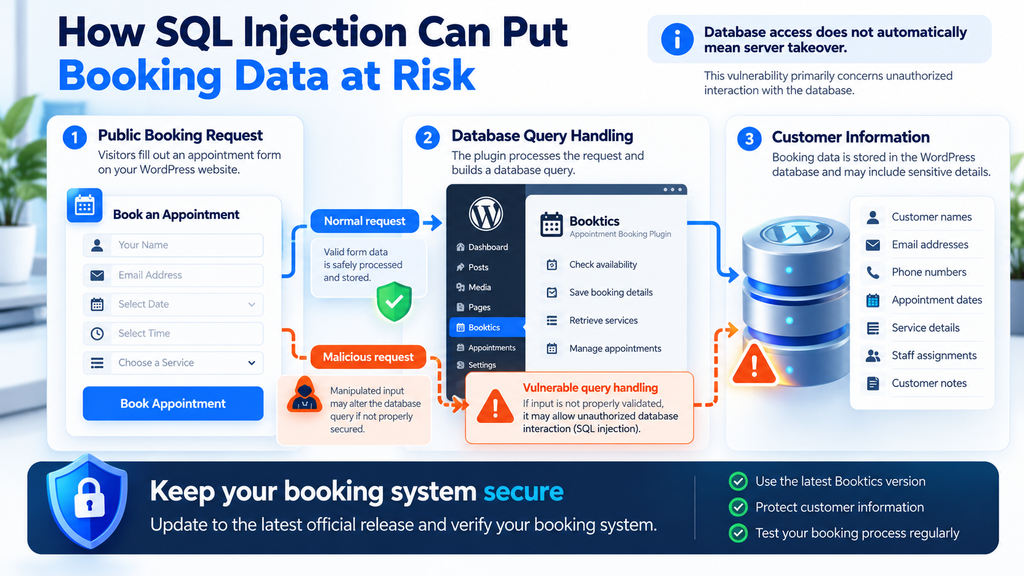
The important distinction is that a critical vulnerability does not automatically mean a complete website compromise. SQL injection primarily concerns unauthorized interaction with a database. Depending on database permissions, application design, and other weaknesses, attackers might obtain information or interfere with stored records. Complete server takeover would require additional capabilities or favorable conditions that are not established by the basic CVE description. This article focuses on the confirmed vulnerability, reasonable risks, and practical defensive steps rather than assuming the worst possible outcome has occurred.
Booktics vulnerability facts at a glance
| Security detail | Confirmed information |
|---|---|
| Vulnerability identifier | CVE-2026-109894 |
| Affected software | Booktics for WordPress |
| Developer | Arraytics |
| Vulnerability category | SQL injection |
| Weakness classification | CWE-89 |
| Severity | Critical |
| CVSS 3.1 score | 9.3 |
| Authentication required | No |
| Vulnerable versions | Up to and including 1.0.29 |
| First patched release | 1.0.30 |
| Latest listed release | 1.0.31 |
| Public CVE publication | October 18, 2026 |
Sources: published CVE details, Rapid7 vulnerability information, and the official Booktics release history.
Which Booktics Versions Are Vulnerable?
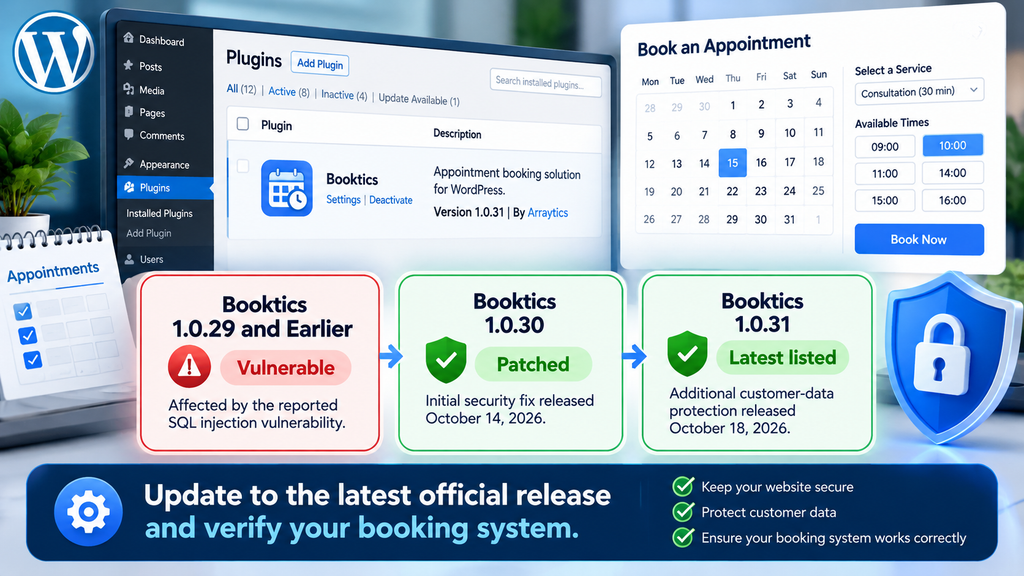
The affected version range is straightforward. Booktics 1.0.29 and earlier are identified as vulnerable to CVE-2026-109894. The developer released version 1.0.30 to address the reported database security problem. On October 18, 2026, version 1.0.31 followed with additional booking-request hardening intended to prevent customer details from being exposed. For this reason, the safest routine update target is the latest official compatible version, not an older release merely because it contains the initial fix.
Not every website owner knows which version of a plugin is installed. Some businesses rely on automatic updates, while others receive plugin maintenance from a web designer or hosting provider. A website can also continue functioning normally while running outdated software. Therefore, you should check the installed version directly rather than assume the plugin is current because appointments still work. This check takes only a few minutes and provides the starting point for every other security decision.
How to check your installed Booktics version
Open your WordPress administrator dashboard using your normal secure login address. In the left navigation menu, select Plugins → Installed Plugins. Search for Booktics in the list and read the version number displayed beneath or near the plugin name. If your installation uses a different language or a customized administration interface, the wording may vary slightly, but the installed plugin list serves the same purpose. Do not confuse the version of WordPress itself with the version of Booktics. These are separate software components, and both require their own maintenance.
For example, suppose your dashboard displays Booktics version 1.0.28. That version falls within the affected range, so updating should become an immediate priority. If it displays 1.0.30, the original SQL injection fix should be present, but you should still review the newer 1.0.31 release. When version 1.0.31 or a later official release is installed, confirm that the plugin actually updated successfully and that booking functions still behave correctly. A version number is useful evidence of patch status, but it cannot establish whether someone previously accessed the database.
Understanding the version comparison
Affected by the reported SQL injection vulnerability
Initial security fix released October 14, 2026
Additional customer-data protection released October 18, 2026
How Unauthenticated SQL Injection Threatens Booking Data
SQL injection may sound complicated, but the basic concept is easier to understand with an everyday example. Think of a receptionist receiving a written request from a customer. Normally, the receptionist reads the message as information and follows the business’s established procedures. Now imagine that the receptionist mistakenly treats part of that message as an instruction that overrides those procedures. In a database application, a similar problem can happen when untrusted information becomes part of a database command instead of remaining ordinary data. That separation is one of the foundations of secure application development.
A booking plugin needs to exchange information with WordPress and its database. It may check appointment availability, retrieve service details, identify reservations, and store booking information. Those operations are legitimate and necessary. The vulnerability arises when an application fails to handle certain externally supplied values safely while constructing SQL queries. An attacker may then influence how the database interprets a request. The published advisory identifies Booktics as affected by this class of weakness, but it does not mean every database table is necessarily accessible or that every possible destructive action is achievable.
What does unauthenticated mean?
An unauthenticated vulnerability does not require the attacker to log into WordPress first. That distinction matters because many website security controls focus heavily on protecting administrator accounts. Strong passwords and two-factor authentication remain essential, but they cannot, by themselves, correct a vulnerable public booking request. A malicious visitor may be able to interact with the affected functionality without holding a subscriber, customer, editor, or administrator account. This increases the importance of timely patching, especially when the booking system is openly accessible to visitors.
Consider a photography studio that allows anyone to request a session. Customers can view available appointments without creating an account, making the website convenient and accessible. That public functionality also needs secure server-side handling. If an underlying request is vulnerable, protecting the administrator login does not remove the exposure. A website firewall may provide additional filtering, but it should not replace the developer’s security update. The central lesson is that public-facing functionality deserves the same attention as the login system, even when it appears to perform only simple tasks.
Which customer details could be affected?
The exact information at risk depends on what the WordPress installation stores, how Booktics is configured, and which database permissions are available. A booking website may contain names, email addresses, telephone numbers, service selections, appointment dates, staff assignments, and customer notes. Other plugins may store additional records in the same WordPress database. These examples describe categories of potentially sensitive information, not a confirmed inventory of data accessible through CVE-2026-109894. An incident investigation must establish which records were actually exposed before a business makes specific claims about the affected customers.
For example, a hair salon may only collect a customer’s first name, telephone number, and appointment time. A consulting business might request a full name, email address, company details, and a short explanation of the appointment. The consequences of exposure differ because the collected information differs. Website owners should therefore understand their own data collection practices rather than assume every booking website stores the same records. Limiting unnecessary customer information is a useful privacy measure even after the vulnerability has been corrected.
Database access versus complete server takeover
Database compromise
May involve unauthorized reading or alteration of accessible database records, depending on the exploit and permissions.
Server takeover
Involves broader control of hosting resources, processes, or files and requires capabilities not established by this CVE alone.
A critical SQL injection vulnerability must be taken seriously without treating every possible secondary outcome as confirmed.
The difference matters when communicating with customers or colleagues. Database compromise could mean unauthorized access to records available to the WordPress database account. Complete server takeover suggests much wider control over the hosting environment. Certain configurations or additional vulnerabilities can allow an initial database compromise to develop into something more serious, but this progression is not automatic. The CVE’s 9.3 rating reflects a severe potential impact on confidentiality and other security properties, not a verified report that every affected installation can be fully controlled remotely.
Why database permissions matter
WordPress connects to its database through a database user account. That account has permissions determining which operations the application can perform. If the account has unnecessarily broad privileges, a security weakness may have a greater impact. Restricting database privileges to what the website actually needs can reduce potential damage. However, changing permissions without understanding WordPress requirements can break updates, plugin installation, or normal booking operations. The correct approach is to review the configuration carefully and involve a qualified administrator when necessary.
A useful example is a business that hosts several websites on one server. Each WordPress installation should ideally use separate database credentials and appropriate database access boundaries. That separation helps reduce the consequences of one application being compromised. It does not eliminate SQL injection, and it cannot guarantee that sensitive information within an affected database remains safe. Nevertheless, isolation, appropriate privileges, and regular backups are valuable layers of defense. The most important immediate protection for this specific vulnerability remains installing the official patched Booktics release.
Updating Booktics to Version 1.0.30
Updating Booktics is the most important immediate action for website owners using an affected version. The official developer changelog confirms that version 1.0.30 corrected the reported weakness involving private database information in booking requests. It also documents improvements to notification permissions and the handling of notification content. However, the subsequent 1.0.31 release adds further protection for customer details. Because that newer version is available as of October 19, 2026, administrators should generally install 1.0.31 or the latest compatible official release instead of deliberately remaining on 1.0.30.
A security update should be treated as a controlled maintenance task, not simply another button to click. Booking plugins can connect to calendars, email notifications, staff schedules, payment integrations, and customer-facing pages. A careless update may interrupt reservations even when the security patch itself works correctly. This does not justify delaying a critical fix indefinitely. Instead, prepare a reliable backup, check compatibility, apply the official update promptly, and test the features customers depend on. For businesses with active bookings, a short maintenance window may be appropriate if it can be arranged without unnecessarily extending exposure.
Step 1: Create a complete website backup
Before changing the plugin, create a backup that includes both WordPress files and the database. The database is especially important because it may contain appointments, customer records, plugin settings, and information about services or staff. A files-only backup will not necessarily preserve these records. Likewise, a database-only backup may omit uploaded images, plugin files, themes, and other resources required for a complete restoration. Use your hosting provider’s backup system or a trusted WordPress backup solution, and confirm that the backup has completed successfully before proceeding.
For example, a small dental practice may have appointments scheduled several weeks ahead. If an unexpected problem occurs during the update, a reliable backup can help restore essential information. However, restoring an older backup can also remove bookings created after that backup was taken. For that reason, consider how to preserve recent reservations if a rollback becomes necessary. Keep backup copies in a protected location, preferably separate from the live hosting account. If you suspect an existing compromise, preserve relevant evidence before making major changes, because restoring an older snapshot can erase information needed for an investigation.
Step 2: Review the official Booktics release
Visit the official Booktics plugin page on WordPress.org and review the latest version, release notes, and compatibility requirements. This helps confirm that you are obtaining the plugin from its legitimate distribution channel. The WordPress.org listing identifies WordPress 6.2 or later and PHP 7.4 or later as minimum requirements for the listed release. These are minimum compatibility requirements, not recommendations to keep outdated WordPress or PHP environments indefinitely. You should also check whether other installed plugins, your theme, or any Booktics Pro components have additional compatibility considerations.
Avoid downloading a security update from an unfamiliar website, an unofficial file-sharing service, or an advertisement claiming to provide a special patched edition. Modified plugin packages can introduce new problems, including unwanted code. If WordPress does not display an update immediately, check the plugin’s official page and the developer’s release history before deciding what to do next. On a managed website, ask the person responsible for maintenance to confirm the update source and installed version. Security work should be based on verifiable releases rather than assumptions or promises from unrelated download pages.
Step 3: Install the update through WordPress
Sign in to WordPress with an account authorized to manage plugins. Navigate to Dashboard → Updates or Plugins → Installed Plugins. Locate Booktics and check whether WordPress offers an update. If an official update is available, review the version and select the update option. Allow the process to finish before leaving the page. On some hosting environments, updating may take longer because of network conditions, file permissions, or other background operations. Avoid repeatedly clicking the update button, as doing so can make it harder to understand whether the original operation completed.
After WordPress reports that the update has finished, return to the installed plugins list and verify the displayed Booktics version. Do not rely solely on a success notification. For example, if you previously used 1.0.29 and WordPress now shows 1.0.31, you have confirmation that the installed version changed to the newer official release. If the update fails, record the error message and check the WordPress Site Health screen or your hosting error logs. Resolve the underlying issue rather than repeatedly attempting an update that cannot complete correctly.
Step 4: Test your booking system with fictional customer information
Once the update is installed, open your booking page in a private browser window. This provides a useful test from the perspective of a visitor who is not signed into WordPress. Select an available service, choose a suitable date, and follow the normal booking process. Use clearly fictional customer information, such as a designated test name and a test email address that you control. If your website processes payments, use an authorized payment sandbox or another safe testing method. Never create a real charge merely to confirm that a plugin update succeeded.
Next, check the WordPress administrator dashboard to see whether the test reservation appears correctly. Verify that the selected service, appointment time, and customer details match what you entered. If email notifications are enabled, confirm that the expected messages arrive and contain appropriate information. Test cancellation or rescheduling functions when your business uses them. Finally, remove the test reservation using the plugin’s normal controls. These checks help confirm that essential features still work, but they do not establish whether the site was compromised before the update.
Step 5: Check calendars, services, and staff availability
A booking system may appear healthy while some less visible features are malfunctioning. For example, the main appointment form might work correctly, but staff availability could display the wrong time slots. Review the services configured in Booktics and compare their duration, availability, and pricing with your business settings. Check staff schedules, special working hours, unavailable dates, and any calendar synchronization that your installation uses. If you operate in multiple time zones, pay particular attention to how appointment times appear to customers and administrators.
Suppose a massage studio offers appointments lasting 30, 60, and 90 minutes. After updating, test each duration and confirm that the calendar presents realistic availability. Check that unavailable appointments cannot be selected and that the correct confirmation reaches the customer. The developer’s 1.0.31 changelog includes several scheduling and time-slot corrections, making these tests especially useful when upgrading to that version. Keep a short record of the tests you completed, including the date, installed version, and any problems discovered. Version History & Updates
Step 6: Verify the plugin update without exposing sensitive information
A simple maintenance record can help administrators demonstrate that they addressed the vulnerability promptly. Record the plugin name, previous version, updated version, update date, and whether basic booking tests passed. You can keep this information in a private maintenance document or your hosting management system. Do not publish administrator screenshots that reveal customer details, internal paths, private URLs, or security configuration information. The goal is to create a useful operational record without exposing additional information that could assist an attacker or compromise customer privacy.
For example, a maintenance entry might state that Booktics was updated from 1.0.29 to 1.0.31, followed by successful tests of the public booking form, staff availability, and notification delivery. That record supports the claim that the update was applied and basic functionality was checked. It does not prove that historical booking information was never accessed. If you have evidence suggesting suspicious activity occurred before the patch, maintain a separate incident record. Updating and investigating are related tasks, but they answer different questions and should not be confused.
Step 7: What to do if the update cannot be installed immediately
If a critical plugin update fails, leaving the affected booking functionality publicly accessible can prolong exposure. First, identify why the update cannot proceed. Common causes include insufficient file permissions, storage limitations, conflicting software, or compatibility problems. Contact your hosting provider or plugin developer if you cannot resolve the issue safely. When immediate patching is impossible, consider temporarily disabling the vulnerable plugin or restricting access to the affected booking functionality. Such measures can interrupt reservations, so communicate clearly with customers and provide a temporary alternative.
A web application firewall may reduce exposure to some suspicious requests, but it cannot guarantee protection from every SQL injection attempt. Similarly, hiding the booking page from navigation does not necessarily prevent direct requests to its underlying functionality. Any temporary restriction should be verified by a qualified administrator. Do not delete customer records, disable logging, or remove the entire website without understanding the consequences. The objective is to reduce the immediate attack surface while preserving business operations and preparing for the official update. Once the patch is installed, remove temporary restrictions carefully and test the booking system again.
Auditing Booking Requests and Server Logs

Installing the patched version prevents the known vulnerability from remaining exposed through the affected code path, but it does not automatically answer whether suspicious requests reached your website earlier. A security review should therefore consider the period when the vulnerable plugin was installed and publicly accessible. Depending on your hosting setup, useful evidence may exist in web server access logs, error logs, application monitoring tools, security plugin records, and database audit logs. These sources can help identify unusual activity, although not every WordPress installation collects the same information.
For example, a business might discover that an unfamiliar source sent an unusually high number of requests to its booking functionality over a short period. That pattern deserves investigation, but it is not proof of a successful SQL injection attack. Automated search engines, monitoring services, legitimate integrations, and poorly configured clients can also generate repeated requests. Conversely, a successful malicious request may not produce an obvious error. The purpose of auditing is to compare several pieces of evidence, identify meaningful anomalies, and decide whether additional investigation is necessary.
Understanding the different types of logs
| Log source | What it may reveal |
|---|---|
| Web server access logs | Request times, paths, response codes, source addresses, and unusual request patterns |
| Web server error logs | Application failures and server errors occurring around suspicious activity |
| WordPress security logs | Login events, administrative changes, and other monitored activities |
| WAF logs | Requests blocked or flagged by security rules |
| Database audit logs | Recorded database operations, if detailed auditing was enabled |
| Hosting activity logs | Account-level changes and relevant hosting events |
| Backup history | Earlier site states useful for comparison and recovery planning |
The most useful log source depends on how the website is hosted. Shared hosting customers may have limited access to server records, while VPS administrators can often review Apache or Nginx logs directly. Managed WordPress providers may offer security dashboards that summarize suspicious traffic. A security plugin can add visibility, but it does not automatically replace server logs or database auditing. Before drawing conclusions, confirm which logs were enabled, how long they are retained, and whether timestamps use the same time zone. Inconsistent timestamps can make unrelated events appear connected.
How to review booking-related traffic in cPanel
If your website uses cPanel, sign in to your hosting account through its official secure address. Look for sections such as Metrics, Raw Access, or Errors, depending on your hosting configuration. Raw access records may provide information about requests reaching the website, while error records can help identify application problems. Download or export relevant logs to a protected location before making changes. If your provider rotates or deletes logs automatically, preserving available evidence early can be important. Avoid placing exported logs inside a publicly accessible WordPress uploads directory.
Start by reviewing the period when Booktics 1.0.29 or an earlier version was installed. Look for unexpected increases in requests involving the booking functionality, repeated errors, or unusual access patterns. Do not assume that every request containing unfamiliar characters is malicious. Legitimate customer information can include punctuation, international characters, and other values that appear unusual in a log. If you find a suspicious pattern, record the relevant timestamps and request metadata, then compare them with firewall events and application behavior. Keep the investigation defensive and avoid testing suspected exploit strings against your live website.
What VPS administrators should examine
VPS administrators may have access to additional information through their hosting control panel, web server configuration, and monitoring tools. Begin by identifying which service handles incoming web requests and where its access and error logs are stored. Then review the relevant website’s records, rather than searching unrelated hosting accounts. If several WordPress sites share the same server, keep their investigations separate unless evidence suggests a broader incident. This makes the review more accurate and reduces unnecessary handling of data belonging to other websites.
A useful approach is to establish a timeline of the installed plugin versions, suspicious request activity, update completion, and any unusual database or application behavior. Compare that timeline with backups, WordPress administrator events, and security alerts. If you use a reverse proxy or content delivery network, remember that the original visitor address may be represented differently in origin server logs. Confirm that logging is configured correctly before relying on source addresses. Avoid changing logging settings or restarting services unnecessarily while collecting evidence, especially when the incident may require professional forensic analysis.
Recognizing warning signs without assuming a breach
Some warning signs are easier to recognize than others. A sudden increase in booking-related errors may indicate malformed requests, software problems, or unusual traffic. Unexpected changes to appointment records may suggest an application issue or unauthorized modification. Newly created administrator accounts, unfamiliar scheduled tasks, or altered plugin files deserve investigation because they could indicate a broader security incident. However, these symptoms are not unique to CVE-2026-109894, and their presence does not prove that this particular vulnerability was exploited.
The absence of visible symptoms is equally important to interpret correctly. A website can continue accepting reservations even if someone has accessed information that should remain private. A successful data-reading attack might not alter appointments or create an obvious WordPress notification. Standard access logs may show that a request occurred without revealing the database information returned by the application. Consequently, a clean-looking dashboard or an ordinary malware scan cannot guarantee that no customer information was exposed. When evidence is incomplete, describe the uncertainty rather than announcing that the website is completely safe.
Responding to a Possible Customer Data Breach
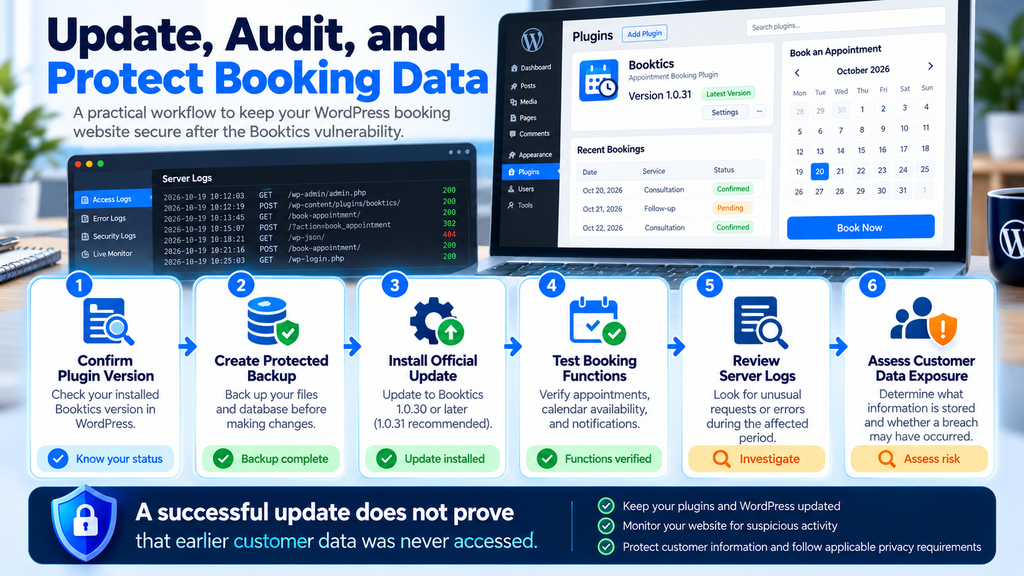
Discovering a critical vulnerability can be unsettling, particularly when your website handles personal information. The first priority is to distinguish a potential exposure from a confirmed incident. A vulnerable plugin creates an opportunity for unauthorized access, but the existence of the vulnerability does not prove that anyone exploited it. Likewise, installing the fix does not establish that no previous exploitation occurred. A responsible response combines prompt remediation, careful evidence collection, an assessment of potentially affected information, and communication based on what is actually known.
A small business does not necessarily need an elaborate security department to respond appropriately. It does, however, need a clear process. Assign someone to coordinate the investigation, preserve available evidence, document important decisions, and communicate with the hosting provider or security specialist. If personal data may have been compromised, involve the person responsible for privacy compliance. Avoid publicly identifying customers, sharing suspicious request details unnecessarily, or making statements that go beyond the available evidence. Clear, measured communication is more useful than speculation.
Step 1: Contain the vulnerability and preserve evidence
Containment means reducing the opportunity for further unauthorized activity. In this case, that normally begins with installing the latest official Booktics update. If the update cannot be applied immediately, consider temporary restrictions on the affected booking functionality with appropriate technical assistance. At the same time, preserve relevant access logs, security alerts, and backups. Record when the vulnerable version was identified, when containment measures were applied, and who performed each action. These details can become important if a later investigation reveals that personal information was accessed.
For example, suppose a hotel website discovers Booktics 1.0.29 on October 19. The administrator should document the finding, protect available logs, install the patched release, and verify normal reservations. If the security dashboard also shows unusual booking requests from an earlier period, those records should be preserved for analysis. Do not immediately delete suspicious entries or overwrite backups simply to make the dashboard appear clean. Evidence preservation and vulnerability remediation can happen in a coordinated manner, allowing the business to reduce current risk without unnecessarily destroying information about past activity.
Step 2: Identify which customer information is stored
Before assessing the consequences of a possible breach, understand what information your website actually collects and stores. Review the Booktics configuration, relevant WordPress database tables, privacy documentation, and connected services. Determine whether the system stores customer names, email addresses, telephone numbers, booking notes, or other personal information. If payment services are involved, establish which information remains with the external payment provider and which information is stored locally. Do not assume that full payment card details are stored in WordPress merely because the booking process includes a payment option.
A practical example is a personal training studio that collects a name, email address, selected training session, and preferred time. Those details may seem routine, but they can still constitute personal data. Another business might collect additional notes that reveal more sensitive circumstances. The potential consequences of exposure depend on the type of information, the number of affected people, and how the information could be misused. Restrict access to this review, avoid unnecessary exports, and keep any working copies encrypted or otherwise appropriately protected.
Step 3: Determine whether unauthorized access occurred
This stage requires careful investigation rather than assumptions. Review the available logs and compare suspicious activity with known customer requests, legitimate integrations, and normal website behavior. Check for unexpected changes to appointments, user accounts, application settings, and database records. Where detailed database auditing exists, it may provide additional evidence. However, many WordPress websites do not have complete historical query logs. If records are missing or insufficient, acknowledge that limitation rather than interpreting it as proof that no unauthorized access occurred.
Consider a business that finds several unusual requests but no evidence of modified reservations. That finding may justify further analysis, yet it does not establish whether data was read. A second business might discover unexpected database changes alongside suspicious traffic, raising more serious concerns. Each case requires an evidence-based assessment. If the potential exposure involves sensitive customer records or substantial uncertainty, consult a qualified incident response professional. Avoid running public exploit tools against the production website to confirm the vulnerability, because such testing can introduce additional risk and complicate the investigation.
Step 4: Review accounts, credentials, and website integrity
If the investigation suggests broader unauthorized activity, review WordPress administrator accounts, user roles, active sessions, and relevant credentials. Remove access that is no longer required and investigate accounts you cannot identify. Change potentially exposed credentials through a controlled process, prioritizing accounts or secrets supported by evidence of compromise. If database credentials may have been exposed, coordinate rotation with your hosting administrator so the WordPress configuration remains consistent. Consider invalidating active sessions when appropriate and verify that legitimate staff can still access essential business functions.
Also examine website files and scheduled tasks for unexpected changes when the evidence warrants a broader investigation. Compare suspicious files with trusted plugin packages or known-good backups. A file integrity scan can identify differences, but legitimate updates and custom development may also change files. Do not delete unfamiliar files without first understanding their purpose and preserving evidence. For a site with multiple custom plugins or hosting-level integrations, an experienced WordPress administrator may be best placed to distinguish authorized changes from suspicious ones.
Step 5: Assess GDPR and customer notification obligations
For businesses operating in the European Union, a confirmed personal data breach may trigger obligations under the General Data Protection Regulation. Under Article 33, a controller generally must notify the competent supervisory authority without undue delay and, where feasible, within 72 hours after becoming aware of a personal data breach, unless the breach is unlikely to result in a risk to individuals’ rights and freedoms. Article 34 may also require communication to affected individuals when the breach is likely to result in a high risk. These requirements depend on the facts of the incident and the organization’s legal role.
The distinction between discovering a vulnerability and becoming aware of a personal data breach is important. Finding an outdated plugin does not automatically start a breach notification process on the assumption that customer data was stolen. Nevertheless, organizations should investigate promptly, document their assessment, and obtain qualified legal or privacy advice when necessary. Even where notification is not required, GDPR Article 33(5) requires controllers to document personal data breaches. Businesses outside the European Union should review their own applicable privacy and breach notification laws.
Step 6: Communicate clearly if customers need to be informed
If your investigation determines that customer notification is required, prepare a message based on verified information. Explain what happened, which categories of information were affected, what the business has done, and what customers can do to protect themselves. Provide a reliable contact method for questions. Avoid technical jargon that creates confusion, but do not minimize the incident or promise that no further consequences are possible. If important details remain under investigation, state that clearly and explain how additional verified information will be communicated.
For example, if evidence confirms that customer contact details were accessed, customers may need to be warned about unexpected messages pretending to come from the business. However, you should not tell customers that passwords or payment information were exposed unless the investigation supports that conclusion. Use established communication channels, verify recipient lists, and avoid placing unnecessary personal information in the notification itself. Before publishing a public statement, coordinate with your privacy adviser or incident response team to ensure that the information is accurate and consistent with applicable legal requirements.
Step 7: Restore confidence through verification and monitoring
After containment and investigation, confirm that the website is operating safely. Check the installed Booktics version, test booking functions, review account access, and confirm that relevant security monitoring remains active. Resolve any suspicious changes identified during the investigation. If a clean restoration is necessary, plan carefully to preserve legitimate reservations created after the chosen backup. Continue reviewing meaningful security events for a reasonable period, using monitoring practices appropriate to the website’s size and risk. The objective is to detect new problems without creating excessive false alarms or retaining personal information unnecessarily.
A business can also use this incident as an opportunity to improve its maintenance process. Assign responsibility for reviewing plugin updates, confirm that backups are recoverable, and maintain an inventory of essential WordPress components. Establish a simple procedure for contacting the hosting provider during an emergency. Review the information collected from customers and remove fields that are no longer necessary. These measures cannot eliminate every vulnerability, but they reduce preventable exposure and make future security incidents easier to manage.
How to Reduce Future WordPress Booking Security Risks
A critical security alert is a reminder that website maintenance should be a regular business activity, not something performed only after an incident. WordPress websites often depend on several components working together, including the core platform, plugins, themes, hosting services, and external integrations. Each component may receive updates at different times. A booking website can therefore become exposed even when its owner has made no visible changes. Maintaining an accurate software inventory helps administrators identify which updates matter and respond more quickly when new vulnerabilities are disclosed.
For example, a business owner might review plugin updates every Monday while also enabling carefully managed automatic security updates where appropriate. Critical vulnerabilities, however, should not wait for a routine weekly review. Security advisories should be checked promptly, and urgent patches should receive priority. The process should include backup verification, update installation, functional testing, and documentation. A consistent routine reduces confusion because everyone involved understands what needs to happen before, during, and after maintenance.
Keep WordPress, plugins, and PHP maintained
Keeping Booktics updated is essential, but it should be part of a broader maintenance plan. WordPress core, other installed plugins, themes, and the PHP runtime also need attention. Unsupported software can introduce additional vulnerabilities or compatibility problems. Remove unused plugins and themes when they are no longer required, after confirming that no essential functionality depends on them. Deactivating a plugin does not necessarily remove its files, and retaining unnecessary software increases the amount of code administrators must monitor.
For example, a booking website might use Booktics alongside an SEO plugin, a contact form, an email delivery plugin, and a caching solution. Each component has its own maintenance requirements. Updating Booktics does not protect the website from a separate vulnerability in another plugin. Review updates from official sources and test changes that affect reservations or payments. If your business relies on a developer, request a brief maintenance report that identifies updated components, unresolved issues, and any important security recommendations.
Use backups as a recovery tool, not a security guarantee
Regular backups are one of the most useful protections against operational disruption. They can help recover from accidental deletion, failed updates, corrupted files, and certain security incidents. However, a backup does not prevent attackers from accessing information. It may also contain vulnerable software or previously compromised data. Consequently, restoring a backup should be part of a carefully considered recovery process rather than an automatic response to every security warning.
A useful backup strategy includes multiple recovery points, protected storage, and occasional restoration tests. For a busy booking website, the frequency should reflect how much reservation information the business can afford to lose. A website receiving dozens of appointments each day may require more frequent database backups than a small site receiving only a few requests per week. Consider whether backups include customer information and protect them accordingly. Restrict access, define appropriate retention periods, and ensure that copies are not publicly accessible.
Apply additional protection without relying on one security plugin
A reputable web application firewall, strong authentication, limited administrator access, and appropriate database permissions can reduce several types of security risk. These controls work best when they complement secure application code and timely updates. A firewall might detect some suspicious requests, but it cannot guarantee that every application vulnerability will be blocked. Similarly, two-factor authentication helps protect accounts but does not correct unauthenticated SQL injection in public booking functionality.
Consider a WordPress website where administrators use unique passwords and multi-factor authentication, while the booking form remains accessible to visitors. The account security measures are valuable, but the public booking system still requires its own protections. This is why layered security matters. Website owners should maintain software, limit unnecessary privileges, protect administrative access, monitor relevant activity, and periodically review the information stored about customers. Each measure addresses a different part of the overall risk.
Create a simple security maintenance schedule
| Frequency | Recommended activity |
|---|---|
| Daily | Review urgent security alerts and backup failures |
| Weekly | Check plugin updates and test essential booking features |
| Monthly | Review administrator accounts, user roles, and unnecessary plugins |
| Monthly | Verify backup health and review relevant security events |
| Quarterly | Test a backup restoration in a safe environment |
| After critical updates | Verify installed versions, booking functionality, and notifications |
| After suspected incidents | Preserve evidence, investigate, contain, and assess notification duties |
This schedule is an example rather than a universal requirement. A large booking platform may need more frequent monitoring and dedicated security personnel. A small business may use managed WordPress hosting and an external maintenance provider. What matters is assigning responsibility and making the process repeatable. Even a simple maintenance record can prevent forgotten updates and help the business respond more confidently to a future security advisory.
Frequently Asked Questions
1. What is the Booktics vulnerability CVE-2026-109894?
CVE-2026-109894 is a critical SQL injection vulnerability affecting the Booktics appointment booking plugin for WordPress. It concerns unsafe handling of certain externally supplied information in database queries. The vulnerability has a CVSS 3.1 severity score of 9.3 out of 10 and may allow unauthorized database access. Because authentication is not required, website owners should treat affected public booking installations as a high-priority security concern. The vulnerability does not automatically establish that an attacker has accessed customer records or taken over the server.
2. Which Booktics versions are affected?
Booktics version 1.0.29 and earlier are affected by the reported SQL injection vulnerability. Version 1.0.30 introduced the initial security fix on October 14, 2026. The developer subsequently released version 1.0.31 on October 18 with additional security improvements involving customer booking information. Website owners should check their installed version under WordPress Plugins and install the latest official compatible release. A successfully installed update addresses the known vulnerable code, but historical activity should be reviewed separately when there are reasons for concern.
3. Is Booktics 1.0.30 safe to use?
Version 1.0.30 contains the developer’s fix for the SQL injection vulnerability identified as CVE-2026-109894. However, no software version should be described as completely free from security risks. The developer has also released version 1.0.31, which includes additional protection for booking requests and customer details. Therefore, updating to the newest compatible official version is preferable. After installation, verify the displayed version and test the booking form, calendar availability, and notifications. These checks confirm basic functionality, not the absence of every possible vulnerability.
4. Can attackers steal customer information through this vulnerability?
The vulnerability may permit unauthorized access to information stored in the WordPress database, depending on the application’s configuration and available database privileges. Customer information could be at risk if it is stored in records accessible through the affected functionality. However, the public vulnerability description does not establish that every Booktics website has experienced data theft. Nor does it identify an identical set of exposed fields across all installations. Administrators should review their data collection practices and investigate suspicious activity before determining whether customer information was actually compromised.
5. Does this SQL injection vulnerability allow complete server takeover?
Complete server takeover is not an automatic consequence of SQL injection. The reported weakness concerns unauthorized interaction with database queries. Its impact depends on the database permissions, application environment, and any additional weaknesses available to an attacker. Some SQL injection vulnerabilities can contribute to more serious compromises under particular conditions, but those conditions should not be assumed for every Booktics installation. Website owners should address the critical database risk promptly while avoiding unsupported claims that attackers can necessarily control the entire hosting server.
6. Can a WordPress security plugin block the Booktics vulnerability?
A security plugin or web application firewall may help detect or block some suspicious requests. However, these tools should be considered additional protective layers rather than replacements for the official Booktics update. A firewall may not recognize every malicious request, particularly when attacks exploit application-specific behavior. Strong administrator passwords and two-factor authentication are also important, but they cannot independently correct an unauthenticated SQL injection flaw. The primary recommendation remains installing the latest patched release and verifying that the affected plugin is no longer running a vulnerable version.
7. Should I disable Booktics until I can update it?
If you are running an affected version and cannot install the security update promptly, temporarily disabling the plugin or restricting access to the affected booking functionality may be appropriate. This decision should account for business operations, existing appointments, and the technical controls available. Simply hiding the booking page is not necessarily sufficient because underlying requests may remain accessible. If you are uncertain, contact your hosting provider or WordPress administrator. Once the official update is installed, test all essential features before restoring normal booking availability.
8. How can I tell whether my website was attacked?
Begin by reviewing available server access logs, error logs, security alerts, and relevant booking records. Look for unusual request patterns, unexpected errors, unexplained database changes, or suspicious account activity. These indicators can justify further investigation, but none automatically proves that CVE-2026-109894 was exploited. Likewise, a clean malware scan does not prove that no customer information was accessed. If evidence suggests a possible compromise, preserve logs and backups, document the timeline, and seek qualified incident response assistance when necessary.
9. Do I need to notify customers about the vulnerability?
Finding a vulnerable plugin does not automatically mean customers must be notified. Notification obligations generally depend on whether a personal data breach occurred, what information was affected, and the resulting risk to individuals. Under the GDPR, qualifying breaches may require notification to a supervisory authority and, in certain circumstances, affected individuals. Businesses should investigate promptly and document their assessment. If personal information may have been compromised, consult an appropriate privacy professional or legal adviser to determine the applicable requirements and deadlines.
10. Will updating Booktics delete existing appointments?
A normal plugin update is intended to preserve existing settings and booking information, but administrators should not assume that every update will complete without problems. Create a complete backup before proceeding, especially when the website contains important customer reservations. After installing the update, check existing appointments, staff schedules, service availability, and notification delivery. If unexpected changes appear, avoid immediately restoring an older backup without considering newer reservations that might be lost. Contact the developer or a qualified WordPress professional if you need assistance recovering information safely.
Protect Your Booking Website Before Trust Is Lost
The Booktics vulnerability demonstrates why even a familiar appointment calendar deserves careful security maintenance. A booking plugin may appear to perform a simple task, yet it operates within a system that handles customer information and business records. CVE-2026-109894 is particularly serious because it concerns unauthenticated SQL injection and carries a critical severity rating. The first fixed version is Booktics 1.0.30, while the newer 1.0.31 release provides additional customer-data protection. Updating promptly is the most practical immediate defense.
The second lesson is that patching and investigation serve different purposes. Installing the latest release addresses the known vulnerable functionality, but it cannot establish whether unauthorized activity occurred before the update. Website owners should review available evidence when warranted, protect backups, verify booking functionality, and assess any potential exposure of personal information. Equally important, they should avoid confusing possible database access with confirmed server takeover. Accurate security communication helps businesses make informed decisions without creating unnecessary alarm.
Ultimately, protecting a booking website is about protecting the relationship between a business and its customers. People expect their appointments to remain accurate and their personal information to be handled responsibly. Regular updates, sensible access controls, reliable backups, and clear incident procedures help support that expectation. If your WordPress website uses Booktics, check the installed version today, apply the latest official security update, and make sure your booking system continues working as intended.
⚠️ Disclaimer and Source Hygiene
This article provides general educational information about CVE-2026-109894 and WordPress booking website security. It is not a substitute for professional cybersecurity, legal, privacy, or incident response advice. Vulnerability information, software versions, and recommended mitigation steps may change as developers publish additional updates or researchers provide new findings. Website owners should consult official developer announcements and authoritative vulnerability databases before making significant security decisions.
The article distinguishes confirmed vulnerability information from possible technical consequences and illustrative examples. References to customer information, suspicious traffic, database access, and incident response scenarios do not constitute evidence that any particular Booktics installation has been compromised. The version information reflects the publicly available release history reviewed on October 19, 2026. For suspected personal data breaches, consult a qualified professional familiar with the applicable legal and regulatory requirements.
Sources and References
The following sources provide the technical and release information used to prepare this article. Official software documentation and recognized vulnerability databases should be prioritized when checking for new information.
1. WordPress.org – Booktics Plugin Directory Official Booktics plugin page. Contains plugin release information, installation requirements, and the security fixes documented for version 1.0.30. WordPress.org
2. Arraytics – Official Booktics Changelog Booktics version history and updates. Documents the October 14 security release and the additional fixes included in version 1.0.31 on October 18, 2026. Version History & Updates
3. OpenCVE – CVE-2026-109894 Booktics SQL injection vulnerability details. Provides the affected version range, vulnerability classification, severity score, and published advisory information. OpenCVE
4. Rapid7 – Vulnerability Database Rapid7 CVE-2026-109894. Independently records the affected software and CVSS 3.1 score of 9.3. Rapid7
5. Patchstack – WordPress Vulnerability Database Booktics vulnerability advisory. Specialist WordPress vulnerability reference associated with the published CVE.
6. OWASP – SQL Injection Prevention Cheat Sheet SQL injection prevention guidance. Technical reference for secure database query handling, parameterized queries, and defense-in-depth.
7. European Union – General Data Protection Regulation GDPR official legal text. Primary legal source for personal data breach documentation and notification obligations, including Articles 33 and 34.
Secondary Sources and Testimonials
Additional technical background
The Aqua Security vulnerability database provides additional background on the SQL injection weakness and general defensive practices. Its guidance discusses safer query construction and limiting database privileges. These recommendations are useful for understanding the wider security principles, but they should not be confused with evidence of specific attacks against individual Booktics installations. Aqua Security
Customer experiences and testimonials
No independently verified customer testimonials or confirmed incident case studies were established for inclusion in this article. The salon, studio, hotel, and other business examples are fictional educational scenarios. They illustrate how a booking vulnerability might affect different organizations without implying that those businesses suffered a real breach. This distinction helps keep the article accurate, responsible, and useful to readers.
Editorial review date: October 19, 2026. Security guidance should be rechecked when new Booktics releases or vulnerability advisories become available.
Sign in with a Subscriber account to vote.