
Table of Contents
A critical LatePoint vulnerability can let attackers bypass OTP attempt limits and access customer accounts. Learn how the race condition works, which information may be exposed, why this does not automatically mean WordPress administrator access, and how to update, investigate, and strengthen your booking website.
What Is CVE-2026-110653
A booking website holds information people expect to remain private. Customers may use it to arrange appointments, review previous visits, or manage their contact details. When its login system has a weakness, those everyday conveniences become a security concern. The LatePoint vulnerability tracked as CVE-2026-110653 affects customer authentication. Wordfence describes a race condition in OTP verification affecting versions through 5.7.4, rates it 9.1, Critical, and identifies 5.7.5 as the patched release. Its advisory credits researcher Ekene Umegakwe. Website owners should update promptly while checking whether customer accounts show signs of misuse. wordfence.com
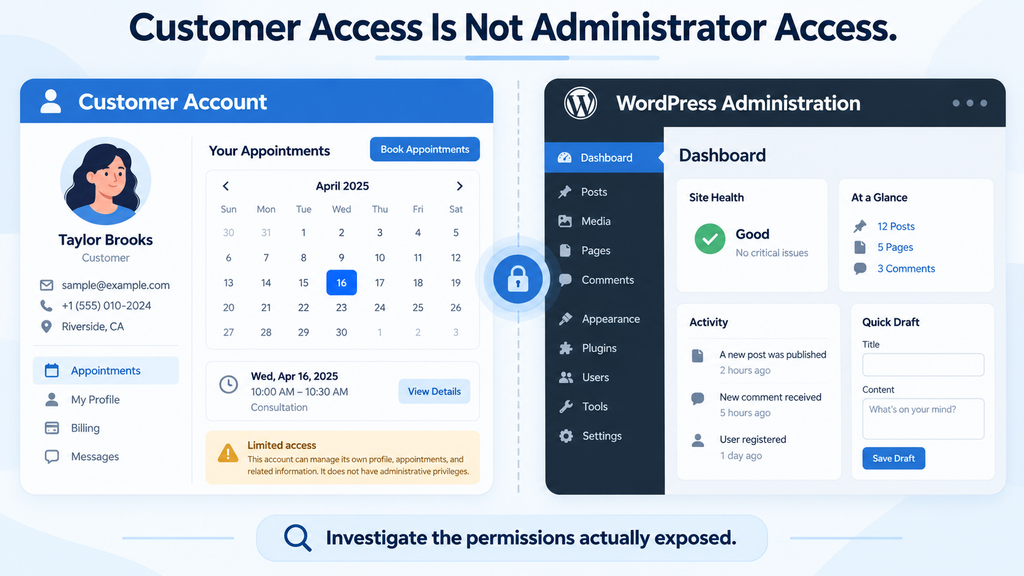
The most important distinction concerns whose account an attacker could access. The documented outcome is authentication as a targeted LatePoint customer. That is a serious privacy and business risk, but it does not, by itself, establish WordPress administrator access. A careful response therefore starts with customer sessions, customer information, and appointment activity. Broader checks become appropriate if evidence points beyond that boundary. Describing every customer login vulnerability as complete website takeover creates confusion. Equally, dismissing customer access because it is not administrator access overlooks the people whose information and bookings depend on the service.
Understanding the Difference Between Customer and Administrator Access
Think about a hotel. A guest key should open that guest’s room and perhaps a shared entrance. It should not open the manager’s office or the building’s maintenance systems. Customer authentication and administrator authentication should have a similarly clear separation. If someone obtains customer-level access, the immediate question is what that customer can view or change. You should not assume the person can install plugins, create administrators, edit server files, or access every other customer. Those outcomes require additional permissions, another weakness, or a configuration that connects access in an unsafe way.
For your own website, inspect that separation instead of relying on account labels. Create a dedicated test customer with fictional details and examine the available screens. Check whether the account can edit contact information, manage reservations, or open linked services. If your configuration connects booking customers with WordPress users, review the assigned role and any custom capabilities. A customer should receive only the permissions required for the service. This review does not prove exploitation occurred. It tells you what customer impersonation could mean in your particular environment and helps you prioritize the right records during an investigation.
Why a Customer Account Vulnerability Deserves Prompt Attention
Imagine a small repair business whose customers manage appointments online. An unauthorized change could move a booking to an inconvenient time or cause someone to miss a service visit. At another business, appointment descriptions might reveal personal interests or sensitive circumstances. These are illustrative consequences, not reported incidents involving this CVE. They show why customer access matters even when the public website remains unchanged. Security problems do not always announce themselves through a defaced homepage. Sometimes the visible symptom is a confused customer asking why their appointment disappeared or why their profile contains an unfamiliar telephone number.
A practical response separates three questions. First, does the website run an affected release? Second, can the relevant customer authentication function be reached? Third, is there evidence that someone used it successfully without permission? Updating addresses the software weakness. Reviewing exposure helps explain the period of risk. Investigating activity determines whether further recovery is necessary. These tasks support one another, but they are not interchangeable. An update notification does not prove a breach, and a successful update does not explain what happened before installation. Keeping these questions separate leads to clearer decisions and more accurate communication.
How the OTP Race Condition Bypasses the Attempt Limit
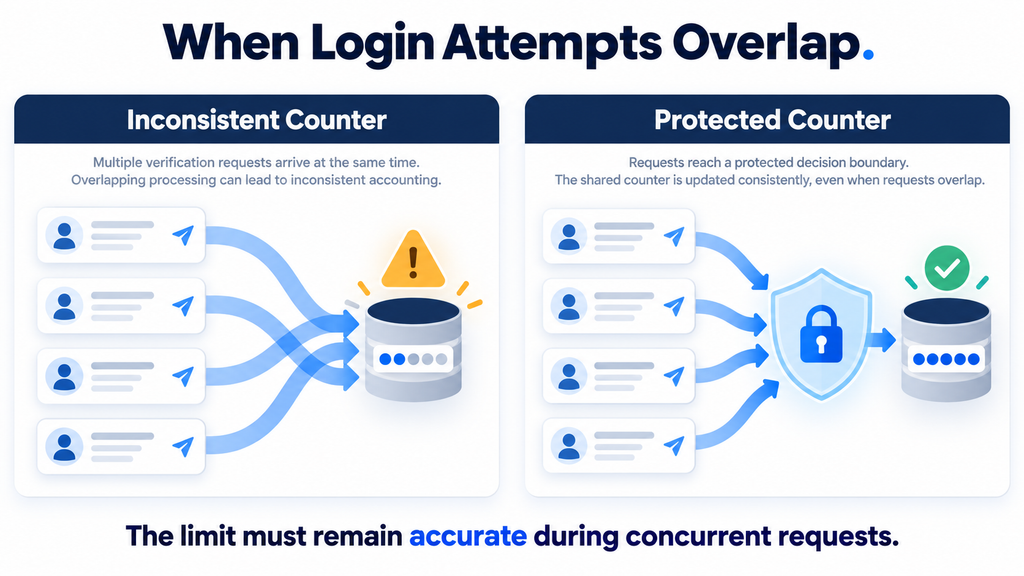
An OTP is a one-time passcode used to verify a login. Wordfence identifies the vulnerable operation as verifyOTP, reached through auth__verify_otp. Concurrent requests can interfere with its attempt counter because the counter update is not atomic. This undermines the intended ten-attempt lockout and enables guessing against the six-digit code. The advisory also explains that the verification nonce is obtainable through unauthenticated OTP request or resend flows, so its presence does not prevent the attack. These details describe the reported defect; the explanations below illustrate the general concurrency problem without providing an exploitation procedure. wordfence.com
The easiest way to understand concurrency is to picture two employees updating the same paper record. Both read that one parcel has arrived. Each receives another parcel and writes down a total of two. Three parcels now exist, but the record says two because the employees worked from the same earlier value. A security counter can suffer a similar lost update when several requests read and modify shared information at nearly the same time. The problem is not simply that requests arrive quickly. It is that the system fails to preserve a correct decision while those requests overlap.
Why Separate Requests Need a Shared, Reliable Decision
A website typically handles many visitors at once. Different server workers may process requests independently, even when those requests concern the same account. That arrangement is normal and necessary for performance. However, security decisions involving shared state must remain consistent across those workers. An attempt counter needs more than an instruction to add one eventually. The application must reliably decide whether an attempt is allowed, reserve or consume that attempt, and prevent other requests from acting on an outdated view. Otherwise, a limit that looks correct during ordinary use may fail under overlap.
For a website owner, the useful question is straightforward: does the protection still hold when requests arrive together? A login form may reject repeated mistakes perfectly when a person types them one at a time. That test checks ordinary behavior, but it does not establish concurrency safety. If you commission technical verification, ask for a controlled test in an isolated environment using synthetic accounts. The result should describe whether the security boundary remains intact during overlapping requests. Avoid running improvised traffic generators against a production booking system, where testing could interrupt real customers or create confusing incident records.
What an Atomic Operation Means in Plain English
An atomic operation treats a critical change as one indivisible step from the perspective of competing requests. Consider a ticket counter with one seat remaining. A reliable reservation system must ensure that only one buyer receives that seat, even if several people click purchase together. The same principle applies to a limited number of authentication attempts. Every accepted verification attempt must consume the correct allowance, and the decision must remain accurate across simultaneous processing. The specific implementation belongs to the software developer, who must also account for database behavior, transaction boundaries, and failure handling.
This is why increasing server speed does not repair the underlying logic. Faster processing may change timing, but it does not establish correctness. Moving to a larger VPS, adding PHP workers, or installing an object cache should not be presented as a security patch. Those changes may improve capacity while leaving the same unsafe decision in place. Likewise, reducing the number of workers is not a dependable long-term solution. A supported application update addresses the software defect. Infrastructure controls can reduce abuse and provide useful evidence, but they must not become a reason to retain vulnerable application code.
Why a Nonce Is Different From Proof of Identity
WordPress documentation explicitly warns that nonces must not serve as authentication, authorization, or access-control mechanisms. They help protect requests against certain forms of misuse, including cross-site request forgery, but their presence does not establish who owns an account. This distinction matters whenever someone reviews a form and assumes that a hidden token makes it secure. A request can contain a valid token while still failing to prove identity. The application must independently validate the credentials or authentication challenge and enforce all related restrictions correctly. Developer.WordPress.org
A helpful comparison is a numbered form available at a reception desk. Holding the form shows that you obtained the paperwork; it does not prove you are the customer named on it. In a public login flow, some information must be available before authentication so legitimate visitors can begin signing in. That public availability is not automatically a defect. The important issue is what the application trusts afterward. Security reviews should ask what each token proves, where it comes from, and whether another independent check protects the requested action. Similar-looking tokens can serve very different purposes.
What an Attacker Needs to Exploit LatePoint
According to Wordfence, the attacker does not need an existing authenticated account but does need the targeted customer’s registered email address or phone number. The reported result is access to that customer’s account, bookings, and personal data. Knowing a contact detail alone is not equivalent to immediate login: the attack still depends on the vulnerable authentication behavior and successful code guessing. The advisory does not establish automatic administrator access, server execution, or a universal time required for successful exploitation. Those boundaries should remain clear whenever the issue is described. wordfence.com
Contact information should never be treated as a secret security barrier. Customers share email addresses when requesting quotes, signing up for newsletters, or contacting a business. Telephone numbers may appear on public profiles or in previous correspondence. A sound authentication system must remain secure even when someone knows these identifiers. For website owners, this means the response should focus on repairing authentication and controlling abuse. Asking every customer to replace their email address would create disruption without correcting the defect that made an ordinary identifier useful during an attack.
Check Whether the Relevant Function Is Actually Reachable
Start by reviewing how customers sign in to your booking service. Use a private browser window and inspect the normal customer journey without entering anyone else’s details. Identify whether the website offers email codes, telephone-based verification, passwords, or a combination of methods. Then ask your developer to confirm which server-side authentication routes remain available. Removing a button from a page does not necessarily disable the operation behind it. A browser interface controls what visitors see, while the server determines which requests it accepts. Both need to match your intended security configuration.
If you temporarily restrict customer login, verify that the restriction applies to the actual server operation. A maintenance notice on the homepage may leave background requests reachable. Similarly, hiding a customer dashboard link does not necessarily prevent direct access to its authentication handler. Your hosting provider or developer should validate the restriction using a test account and the real request path. Record what was disabled, when it happened, and how customers can obtain assistance. This creates a useful operational record and reduces the chance that someone later restores the vulnerable function without understanding the temporary protection.
Separate Exposure From Evidence of Exploitation
An affected version indicates that the website needs remediation. It does not establish that a customer account was accessed. Conversely, the absence of complaints does not establish that nothing happened. Customers may overlook an unfamiliar session, and some unauthorized access may leave no visible profile change. A useful investigation therefore combines version history, authentication records, booking changes, and customer reports. Each source answers a different question. Software inventory establishes the exposure period, while account activity helps assess whether that exposure resulted in an incident.
Avoid assuming that every burst of requests is malicious. A broken browser script, an impatient customer, or an unreliable connection can produce retries. Context matters: repeated failures concentrated on one identity, overlapping verification events, and subsequent account changes deserve closer attention than a single unusual request. Even then, describe what the evidence shows rather than jumping to a conclusion. For example, “repeated verification failures followed by a customer session” is an observation. Calling it confirmed unauthorized access requires additional evidence, such as customer verification or a clear mismatch with legitimate activity.
Which Customer Data and Bookings Are Exposed
The most useful way to assess impact is to inspect what an ordinary customer can access on your installation. LatePoint’s official listing describes customer dashboards and appointment management, with available features varying by configuration and edition. Your assessment should therefore follow actual permissions and visible information rather than assuming every installation exposes identical fields. A basic booking site may show contact details and appointment times. A customized site may include additional customer-facing information. Inventory the screens and actions available to a test customer, then document which of those would matter if someone impersonated that account. WordPress.org
Use fictional examples during this review. A sample customer might have a name, a test email address, one upcoming appointment, and an optional note created specifically for testing. Check whether that customer can view previous bookings, edit profile details, cancel a reservation, or download a document. Also examine any links that lead to external services. These checks identify possible consequences without exposing real customer information during testing. Keep a distinction between data stored somewhere in the business system and data reachable through the customer account. Storage alone does not establish access through this vulnerability.
Appointment Details Can Reveal More Than Expected
An appointment record may appear harmless because it contains only a date, service, and location. In context, those details can still be personal. A service name might reveal the nature of a consultation. A recurring schedule could show when someone is away from home. A meeting link may create an additional access concern if possession of the link is sufficient to join. These are general reasons to review customer-visible information carefully; they are not claims that every LatePoint installation exposes these details or that this CVE has caused those specific outcomes.
Review custom fields with particular care. Businesses sometimes collect information because a field is easy to add, then forget why it was needed. Ask whether each field supports a real operational purpose, whether customers can view it later, and who else has access. For example, a repair service may need a device model but have no reason to retain unrelated identification documents. Reducing unnecessary information limits the consequences of many kinds of account compromise. Make changes through supported settings and documented retention procedures, preserving anything the business legitimately needs.
Booking Changes Can Create Operational Problems
Unauthorized account access may matter even when no sensitive document is visible. If customer permissions allow changes, a reservation could be moved or cancelled. Staff might then act on information that appears legitimate because it came through the normal account interface. Consider an illustrative case in which a customer arrives for an appointment that the system now marks as cancelled. The business must determine whether the customer cancelled it, a staff member made an error, or an unauthorized session performed the action. Accurate event history makes that distinction much easier.
When reviewing suspicious booking changes, compare the event with notification records and customer communication. Check whether a cancellation email was sent, whether the customer recognized it, and whether staff made related manual changes. Do not reverse every unusual booking automatically. Some changes may be genuine, and bulk reversals could create duplicate appointments or inaccurate availability. Confirm disputed actions individually where possible. Preserve the original event record before correcting the booking, and record the reason for the correction so a later review can distinguish attacker activity from your recovery work.
Payment Information and Administrative Permissions Need Separate Evidence
Do not equate access to a booking account with access to complete card numbers or a payment provider’s dashboard. The official plugin listing states that card data is handled by the chosen payment processor. Nevertheless, customer-facing payment status, invoices, references, or other transaction details may require review if your configuration makes them available. The right question is what the compromised customer session could actually retrieve or change. Payment administration and customer booking access may involve different permissions, different systems, and different evidence. WordPress.org
Apply the same discipline to WordPress administration. If your investigation discovers a new administrator, unexpected plugin installation, or modified PHP file, investigate those findings seriously. However, do not automatically attribute them to this OTP issue. They may indicate another vulnerability, stolen credentials, an unsafe integration, or unrelated activity. Connecting events requires evidence. A precise incident report can say that customer authentication was exposed while separately documenting any broader findings. This approach avoids both exaggeration and false reassurance, giving the business a clearer basis for recovery decisions.
Updating LatePoint to Version 5.7.5

Patchstack identifies 5.7.5 as the patched version and recommends updating to that release or later. The official WordPress.org changelog dates version 5.7.5 to October 16, 2026, and mentions security corrections. At publication, the practical recommendation is to install a current supported patched release from an official distribution channel. If you read this article later, check current release information rather than assuming that the first fixed version remains the best available version. Updating promptly reduces exposure while you continue checking customer activity and the effectiveness of surrounding controls. Patchstack
Before making changes, identify who owns the update and who will verify the booking journey afterward. On a small website, that may be one person. On a business-critical installation, involve the administrator, hosting provider, and someone who understands appointment operations. Give each person a concrete task: preserve a backup, install the release, test customer login, or review recent reservations. Clear responsibility prevents the common situation where everyone assumes someone else checked the important part. Keep the preparation proportionate, but do not leave an affected public authentication function exposed while waiting for an ideal maintenance window.
Step 1: Record the Installed Version and Protect Your Recovery Options
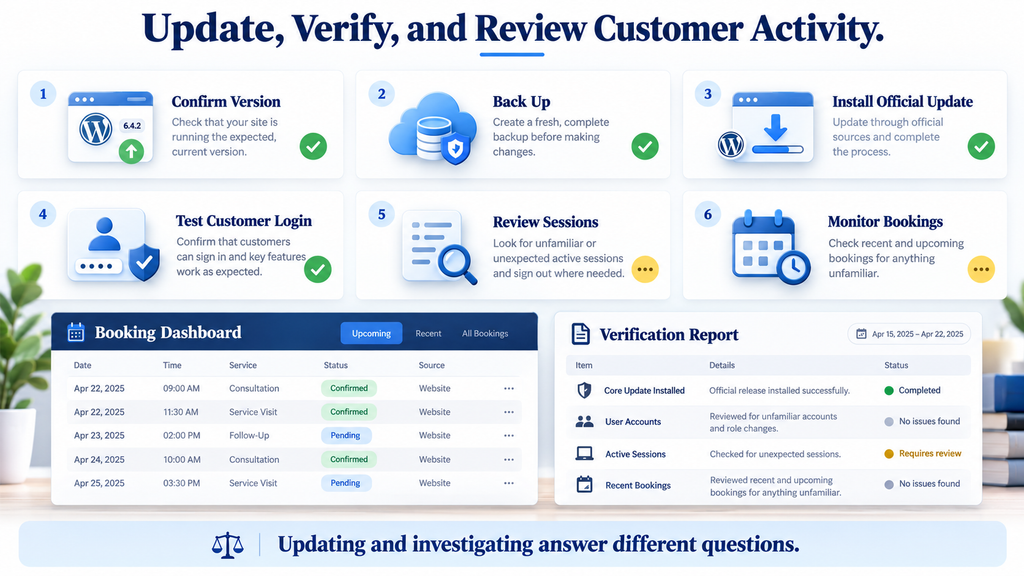
Open WordPress Dashboard → Plugins → Installed Plugins and locate LatePoint. Record the displayed version and whether an update is available. Note the site name and time of inspection, especially if you manage multiple installations. A developer may also verify the installed package directly if custom deployment tools or multiple environments are involved. This simple record establishes the starting point. It also helps distinguish the production website from staging, which can look almost identical in a browser while running different plugin versions.
Create a fresh backup of the database and relevant website files before updating. Confirm that the backup process completed and that someone knows how to restore it. For a booking business, database timing matters because new appointments may arrive after the backup. Restoring an older database can remove legitimate reservations created in the meantime. Your recovery plan should therefore explain how recent bookings would be preserved or reconciled. A backup is a safety net, not an invitation to overwrite current business records whenever a minor compatibility issue appears.
Step 2: Test Efficiently Without Leaving Production Exposed
If a staging environment already exists, use it for a focused compatibility check. Restrict access and prevent the copy from sending real customer messages or processing live payments. Test the functions the business actually uses: customer sign-in, appointment selection, confirmation, and permitted booking changes. A staging copy containing real data needs careful handling; a synthetic dataset is preferable when it can exercise the relevant workflow. The goal is to identify obvious breakage quickly, not to recreate every possible business scenario before installing an urgent security update.
When staging is unavailable, agree on a short production maintenance plan with your provider. If the update cannot proceed promptly, consider a supported temporary restriction on the affected authentication function. Make sure customers have a practical alternative, such as a contact form or telephone booking process. Explain any interruption in ordinary language without publishing unnecessary technical detail. For example, a maintenance notice can tell visitors that online account access is temporarily unavailable and provide a way to manage existing appointments. Keep the interruption focused and restore service after verification.
Step 3: Install the Official Update and Confirm Completion
Use the plugin’s normal supported update mechanism. In the WordPress plugin list, apply the available LatePoint update and wait for completion before navigating away. If the installation uses a vendor-managed package or deployment process, follow that official route instead. Do not obtain a modified ZIP from an unfamiliar download site simply because it claims to contain a faster fix. When an update fails, record the error and ask your provider to resolve the cause. Repeatedly clicking the update button without understanding the failure can complicate an otherwise straightforward maintenance task.
After installation, revisit the plugin list and confirm the displayed version. Check for update errors and any required follow-up instructions from the vendor. Then verify the public booking interface from a fresh browser session. If outdated frontend assets cause display problems, clear the relevant cache through its normal controls. Avoid indiscriminate cache changes that could expose private responses or disrupt unrelated services. Customer-specific pages and authentication responses require appropriate cache handling; clearing a cache is a functional troubleshooting step, not proof that a security correction is active.
Step 4: Verify Normal Customer Behavior
Create or use a synthetic customer account and complete the supported login flow. Confirm that a valid code works and that an invalid code receives a sensible rejection. Check expiry and resend behavior where practical, following the product’s documented workflow. Next, open the customer dashboard and verify that the account sees only its own information. If booking changes are allowed, perform a harmless test reservation or use a designated test service. Delete or cancel test records through normal business procedures so they do not confuse staff or affect real availability.
A functional test answers whether normal customers can still use the website. It does not independently prove that a race condition has been eliminated. If your organization requires technical assurance, ask a qualified developer for controlled concurrency verification outside production. Request a written result covering the authentication boundary, attempt accounting, and any relevant distributed components. Keep that work separate from routine customer testing. Website owners should not need to build an attack tool to apply an official update or confirm that the everyday booking journey still functions.
Step 5: Address Existing Sessions When Evidence Warrants It
An update should not be assumed to terminate sessions established before installation. If account misuse is suspected, ask the vendor or developer how to revoke the relevant LatePoint customer sessions. Confirm whether those sessions are separate from WordPress sessions and whether the available action affects one customer or everyone. Avoid deleting unfamiliar database rows based on their names. An incorrect cleanup can damage bookings, remove useful evidence, or leave the actual session mechanism untouched. Use a supported recovery method and test that the affected session truly loses access.
Record the update time, installed version, functional test results, and any session-revocation action. Review disputed customer changes separately from the software update. For example, restoring a customer’s telephone number does not necessarily revoke an unauthorized session, and revoking a session does not restore a cancelled booking. Each recovery action has a specific purpose. A short written record helps staff understand what has been completed and what remains unresolved. It also makes the next review easier because investigators can distinguish pre-update events from activity generated during testing and recovery.
Detecting and Blocking OTP Brute-Force Activity
Monitoring should focus on authentication outcomes and related account activity, not simply the total number of website visits. A booking site can receive substantial legitimate traffic while a smaller stream of suspicious requests targets one customer. OWASP recommends recording authentication successes and failures and protecting logs from inappropriate exposure. Useful records should support investigation without storing secrets such as OTP values, session tokens, or passwords. For this website review, prioritize reliable timestamps, the relevant operation, a suitable account reference, the outcome, and a request identifier where available. OWASP Cheat Sheet Series
Before creating alerts, find out what your current systems actually record. A web-server access log may show the request path and response status but omit the application-level action or login result. If several operations share one endpoint, the path alone may not distinguish OTP verification from unrelated activity. Similarly, an HTTP success status does not necessarily mean authentication succeeded; the application may return a failure message within an otherwise successful HTTP response. Ask your developer to identify trustworthy outcome signals. Good detection begins with understanding the records, not with writing a rule against an assumed format.
Recognize Sequences That Deserve Investigation
Look for patterns that connect events. A concentration of failed verifications followed by a new customer session may deserve review, particularly if unexpected account changes follow. Repeated requests for new codes can also matter when they occur alongside unusual verification behavior. However, none of these observations should be treated as a complete verdict in isolation. Compare them with expected customer behavior, support conversations, and the site’s own retry logic. A poorly functioning form can generate noise, while an unauthorized session may appear ordinary after authentication succeeds.
For example, imagine a fictional customer who reports an unexpected cancellation. Investigators find unusual verification failures shortly before a session begins, followed by the cancellation event. That sequence provides a stronger basis for investigation than a generic traffic spike. The next step is to verify whether the customer recognizes the login and whether staff made any related change. Preserve the relevant records before altering the account. This example illustrates an investigation method; it is not evidence of a known attack campaign against LatePoint or a claim about the frequency of exploitation.
Apply Rate Limits Across More Than One Dimension
OWASP’s authentication guidance supports login throttling and emphasizes account-based controls rather than depending solely on source IP addresses. IP-only restrictions have obvious limitations: many legitimate users can share one address, and abusive requests can originate from several addresses. Account-level restrictions also need care because an attacker could deliberately exhaust a victim’s allowance. A balanced design combines multiple signals and provides a safe recovery path. These are general authentication principles, not a claim that any particular firewall product automatically implements the correct protection for this vulnerability. OWASP Cheat Sheet Series
For your deployment, ask the provider to distinguish code issuance, code resend, and code verification. These operations create different risks and should not be treated as an undifferentiated stream of requests. Limit excessive activity per source while also considering the targeted account and authentication challenge. Add a broader service safeguard to protect capacity during abnormal traffic. Choose thresholds from the actual customer journey and observed behavior rather than copying arbitrary values from another website. Test shared-office connections and mobile use so ordinary customers do not lose access because the rule mistakes normal traffic for abuse.
Treat Request Rate and Concurrent Processing Separately
A rate limit controls how many requests enter during a period. A concurrency limit controls how many are processed at the same time. These are related but different protections. A configuration that allows a small burst may still admit overlapping requests, while a strict concurrency setting can create queues or delays. For authentication, the application must preserve its security rules regardless of those infrastructure choices. External controls can reduce pressure and suspicious traffic, but they should support the patched application rather than substitute for correct attempt accounting.
Ask technical staff whether the protective state is shared across every relevant worker or server. A counter held independently in each process may not enforce a meaningful site-wide policy. Similarly, a temporary restriction applied to one hostname may leave another route available. Have the provider identify the real authentication request from a controlled browser session and confirm where enforcement occurs. Avoid a blanket block on a shared WordPress AJAX endpoint because unrelated forms and booking features may depend on it. A precise rule should match the intended operation while preserving legitimate functionality.
Verify Firewall Coverage Instead of Assuming It
A firewall can only help when the relevant requests pass through it and its rules understand enough of the request to act. Ask whether the provider can identify the authentication operation inside the actual request format. Confirm whether body inspection is available, whether trusted proxy information is configured correctly, and whether the origin server can be reached through an unprotected path. These questions turn “we have a firewall” into a testable statement about coverage. They also reveal when the provider needs an application-level control instead of a simple URL-based rule.
Patchstack’s entry notes that it cannot assign a mitigation rule to this issue. That statement concerns its handling of this vulnerability and should not be expanded into a claim that every defensive control is useless. It does reinforce an important practical point: do not assume a named security service has supplied a dedicated virtual patch. Obtain specific confirmation from your provider, install the supported software update, and treat temporary restrictions as temporary. A generic “protected” badge does not explain whether the relevant authentication behavior is covered. Patchstack
Make Logs Useful Without Turning Them Into a New Exposure
Keep operational records focused on the event you need to understand. A stable internal account reference may be more appropriate than repeatedly recording a full email address or telephone number. Avoid enabling unrestricted request-body logging just to make troubleshooting easier, because it can capture secrets and personal information. Restrict access to investigation material, document the timezone, and preserve relevant records before routine rotation removes them. These are practical logging recommendations. The exact retention period and access policy should reflect the business’s needs and applicable requirements.
Synchronize timestamps across the systems you compare. A firewall may record UTC while the application displays local time, making related events appear separated when they occurred together. Record the offset rather than silently adjusting evidence. Also distinguish events that were observed from events that were blocked or completed. A blocked request demonstrates that a control acted on that request; it does not establish that every earlier request was blocked. Clear event labels help prevent confident but unsupported conclusions during stressful incident response.
Recover Customer Access With a Measured Response
If evidence supports unauthorized customer access, first contain the exposed route and preserve relevant records. Then revoke affected sessions through a supported method, verify account details, and review disputed bookings. Work with the customer to establish which changes were legitimate. If contact details changed, use a previously verified channel where practical instead of relying only on the newly stored information. Document corrections carefully so staff can distinguish the original suspicious action from the repair. A focused recovery process protects the customer without unnecessarily disrupting every account on the website.
Communication should match the evidence. Explain what was observed, what information may have been accessible, and what corrective action the business completed. Avoid claiming that all customer data was stolen when you have only detected attempts. Equally, do not promise that nothing was accessed simply because logs are incomplete. If the situation may require formal notifications or specialist incident handling, consult the appropriate privacy or security professional. The operational goal is to restore trustworthy access while giving customers accurate information they can use.
Frequently Asked Questions
Does This LatePoint Vulnerability Automatically Give WordPress Administrator Access?
The documented issue concerns customer authentication. Administrator access should not be assumed from that finding alone. Review the actual role mappings and integrations on your website, particularly where customer identities connect to WordPress users. If administrative changes appear during an investigation, examine them as additional evidence and determine their cause. Keeping these access boundaries clear helps you investigate the right systems without understating the importance of customer privacy.
Is a Website Compromised Simply Because It Runs an Affected Version?
An affected version means the website requires remediation; it does not prove unauthorized access occurred. Establish the exposure period, update, and review relevant activity. Keep your conclusion proportionate to the evidence. “Vulnerable installation,” “suspicious authentication activity,” and “confirmed customer account access” describe different situations. Using those terms accurately helps technical staff and business owners understand what has actually been established.
Should Customers Change Their Passwords?
A password change does not repair defective OTP verification. Apply the software correction first and investigate any suspected account misuse. If a customer account has a password and there is evidence that it was exposed or changed without permission, reset it through the supported process. Also address active sessions separately. Do not assume that changing one credential automatically invalidates every session or authentication method connected to the account.
Will Administrator Two-Factor Authentication Protect Customer OTP Login?
Administrator two-factor authentication protects the administrative flow where it is enforced. It should remain enabled, but it does not automatically extend to a separate customer authentication system. Review each login path independently. A website can have strong administrator protection while a customer-facing function still needs remediation. Security controls should be evaluated according to the operation they actually protect.
Can I Hide the Login Form Until the Update Is Installed?
Hiding the form changes the interface but may leave the underlying server operation available. If temporary restriction is necessary, ask your developer to disable or block the relevant authentication function through a supported method. Verify the result directly using a test account. Provide a clear alternative for customers who need to manage appointments while account access is unavailable.
Is CAPTCHA Enough to Solve the Problem?
CAPTCHA can add friction to some automated activity, but it does not correct an unsafe shared counter. Its value also depends on whether the server enforces it on every relevant operation. Treat it as a possible additional control, subject to usability and accessibility testing. The supported application update remains the central remediation, with carefully configured abuse controls providing additional protection.
Does a Successful Update Prove That Previous Customer Sessions Are Safe?
No. Updating confirms a software change, while session review addresses existing access. If misuse is suspected, determine how the application stores and revokes customer sessions. Use the supported revocation method and verify its effect. Also inspect account and booking changes separately, because ending an unauthorized session does not automatically undo actions that happened before revocation.
Should I Disable the Entire Booking Plugin?
The appropriate interruption depends on whether you can update promptly and restrict the affected function reliably. Disabling the whole plugin may stop online bookings and disrupt other operations. Prefer a supported, focused restriction when it adequately contains the risk. If reliable containment is unavailable, broader temporary shutdown may be necessary. Plan an alternative booking method and involve your provider in the decision.
Can a Clean Malware Scan Rule Out Customer Account Misuse?
A malware scan examines particular indicators, often focusing on files or known malicious patterns. Customer account misuse may occur without adding a malicious file. Investigate authentication events, sessions, profile changes, and booking history as well. A clean scan is useful evidence within its scope, but it does not answer every question about unauthorized activity.
How Can I Tell Whether the New Protections Are Working?
Verify several outcomes: the patched release is installed, normal customers can sign in, suspicious traffic controls act on the intended operation, and monitoring records useful results. If concurrency assurance is required, commission controlled testing outside production. Document what each check establishes. No single dashboard message or successful login test should be treated as proof that every security question has been answered.
Keep Customer Trust at the Center of the Response
A good response protects both the website and the people who rely on it. Install the supported update, verify ordinary booking functions, and examine customer activity where the evidence warrants it. Keep customer account exposure distinct from administrator compromise, while recognizing that private appointments and contact details deserve serious protection. The value of an accurate explanation is practical: it directs attention toward the accounts, records, and business processes that may actually need help.
Build on the update by reviewing how authentication attempts are counted, how suspicious activity is limited, and how customer sessions can be revoked. Ask clear questions of your provider and keep a short record of the answers. You do not need to become a database engineer to manage this responsibly. You need a patched application, tested business functions, reliable evidence, and a recovery process that matches what happened. Those habits support customer trust long after the immediate security notice leaves the headlines.
⚠️ Disclaimer and Source Hygiene
This article provides general educational guidance based on the sources checked on October 18, 2026. It does not certify a particular website as secure or establish that an incident occurred. Consult a qualified WordPress developer, hosting provider, or security professional for deployment-specific investigation and recovery. Examples involving businesses and customers are illustrative. Release information and security assessments can change, so check the current advisory before making maintenance decisions.
Sources and References
- Wordfence Intelligence – CVE-2026-110653 advisory: Technical disclosure, affected versions, impact, researcher credit, and remediation.
- LatePoint on WordPress.org: Official plugin information and release changelog.
- Patchstack – LatePoint authentication vulnerability: Patched-version confirmation and mitigation-rule note.
- WordPress Developer Handbook – Nonces: Explanation of nonce purpose and access-control limitations.
- OWASP Authentication Cheat Sheet: General guidance on authentication defenses and throttling.
- OWASP Logging Cheat Sheet: General guidance on security events and sensitive information in logs.
Secondary Sources and Testimonials
No customer testimonials, victim counts, or claims of widespread exploitation are used in this article. The business scenarios illustrate possible consequences and investigation methods. They should not be interpreted as reports of confirmed incidents.
Sign in with a Subscriber account to vote.